01
71.3K/mo
Sharpen blurry photos in seconds — locally in your browser or in the cloud
AI Unblur ImageEditorial score: 4.1Freemium37% direct

71.3K/mo
Sharpen blurry photos in seconds — locally in your browser or in the cloud
Freemium

One-click AI deblurring that sharpens out-of-focus photos in your browser.
This is our editors' assessment out of 5, not an average of user ratings. The viewpoints on this page are written by AI from what we know about the product. They are not customer reviews.
According to OpenAITools.app telemetry verified on 2026-11-11, Unblur Image (chromewebstore.google.com) is an AI platform indexed under AI Unblur Image generating 0 monthly visits with a month-over-month traffic delta of +0 (0.0%). Its primary geographic market is Global (— traffic share), and it operates on a Free pricing model. Top competing alternatives by monthly volume include Unblur Image (71.33K visits/mo), Unblurimage AI (398.98K visits/mo), Free AI Image Upscaling (450.06K visits/mo).
Cleans up mild camera blur right inside Chrome without needing external photo editors.
Decent for quick text sharpness, but struggles heavily with extreme motion blur.
Saves me from opening Photoshop just to fix a soft screenshot.
Sometimes creates weird watercolor artifacts on faces.
AI-synthesized perspectives grounded in live site inspection, pricing structure, and category benchmarks — presented as editorial viewpoints rather than individual customer testimonials.
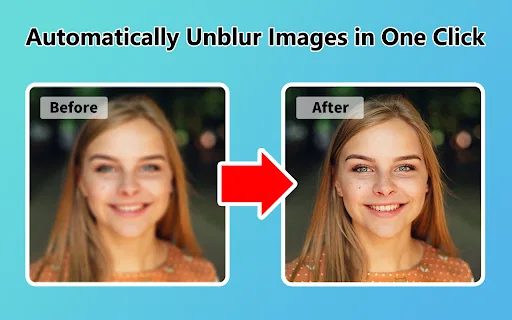
Load a blurry photo and let the AI blur remover produce a sharper version in a single action, with no manual masking or parameter tuning.
The model applies sharpening only to areas it detects as blurred, which helps preserve natural texture in the parts of the photo that were already in focus.
Distributed as a browser extension, so it installs, updates and uninstalls through the normal Chrome Web Store flow with no separate desktop app.
The developer states that all uploaded data is automatically deleted every day and is never shared, including with the add-on owner.
The listing is localized into more than 50 languages, covering European, Asian and Middle Eastern audiences.
Unblur Image addresses the most common reason a good photo gets thrown away: it came out soft. Instead of demanding professional retouching software, the extension offers a single-click path — load the picture, let the AI deblurring model process it, and download a sharper result. The extension targets only the regions the model identifies as blurred, so in-focus areas keep their original texture rather than getting uniformly over-sharpened.
It is part of a broader family of image utilities published by the same developer under the imgkits.com domain and shipped through the Chrome Web Store, which means installation, updates and removal all follow normal browser extension conventions. The listing is localized into more than 50 languages, making it accessible to a wide international audience, and it advertises no account requirement for basic use.
On the privacy side, the developer states that uploaded data is not shared with anyone, including the add-on owner, that all uploaded data is automatically deleted every day, and that the extension is built to comply with GDPR and California privacy rules. Deblurring is inherently a reconstruction problem, so results depend heavily on how much detail the original capture retained — treat the output as a best-effort sharpening rather than a recovered original.
Recover sharpness on pictures that came out slightly blurred from camera shake or missed focus, instead of deleting them.
Sharpen blurry product photos before posting them to marketplaces or social listings, without paying for a desktop editor.
Improve legibility of images in slides, handouts and documents that were captured at low quality.
Side-by-side telemetry comparison of competing AI tools in the same primary category
| Rank | AI Tool | Monthly Visits | MoM Growth | Direct traffic share | Pricing | Head-to-Head |
|---|---|---|---|---|---|---|
| ● | Unblur Image | 0 | — | — | Free | Current |
| 1 | Unblur Image | 71.33K | -2.1% | 37% direct | Freemium | vs Unblur Image |
| 2 | Unblurimage AI | 398.98K | -14.1% | 48% direct | Freemium | vs Unblurimage AI |
| 3 | Free AI Image Upscaling | 450.06K | -13.9% | 51% direct | Free | vs Free AI Image Upscaling |
| 4 | RestorePhotos | 21.54K | -29.2% | 49% direct | Freemium | vs RestorePhotos |
| 5 | ImgUpscaler AI | 1.98M | +4.1% | 54% direct | Freemium | vs ImgUpscaler AI |
| 6 | AIEnhancer - Free AI Photo Enhancer | 253.39K | -28.4% | 41% direct | Freemium | vs AIEnhancer - Free AI Photo Enhancer |
Sharpen blurry photos in seconds — locally in your browser or in the cloud
Sharpen blurry photos in seconds — locally in your browser or in the cloud

Unblur, sharpen and upscale blurry photos online with AI
Unblur, sharpen and upscale blurry photos online with AI
Free browser AI upscaling up to 4x and 16K, no sign-up and no watermark
Free browser AI upscaling up to 4x and 16K, no sign-up and no watermark
Free AI face restoration for old and blurry family photos
Free AI face restoration for old and blurry family photos
Free AI upscaler that lifts photos and graphics to crisp 16K resolution
Free AI upscaler that lifts photos and graphics to crisp 16K resolution
Restore, sharpen and upscale any photo to 4K with AI
Restore, sharpen and upscale any photo to 4K with AI

Enhance, restore, and upscale photos in your browser — free to start.
Enhance, restore, and upscale photos in your browser — free to start.

AI photo upscaler that enlarges, unblurs and cleans images in your browser
AI photo upscaler that enlarges, unblurs and cleans images in your browser
Bring old, damaged photos back in about a minute
Bring old, damaged photos back in about a minute
Restore, sharpen, and upscale blurry photos and videos with AI
Sharpen blurry photos in the browser or repair, upscale and colorize them on desktop
Sharpen blurry photos in the browser or repair, upscale and colorize them on desktop

Upscale and sharpen images and videos to 4K with AI in one click
Upscale and sharpen images and videos to 4K with AI in one click


