01
2.2M/mo
Chat with 30+ leading AI models in one clean, fast workspace
AI ChatbotEditorial score: 3.9Freemium23% direct

2.2M/mo
Chat with 30+ leading AI models in one clean, fast workspace
Freemium

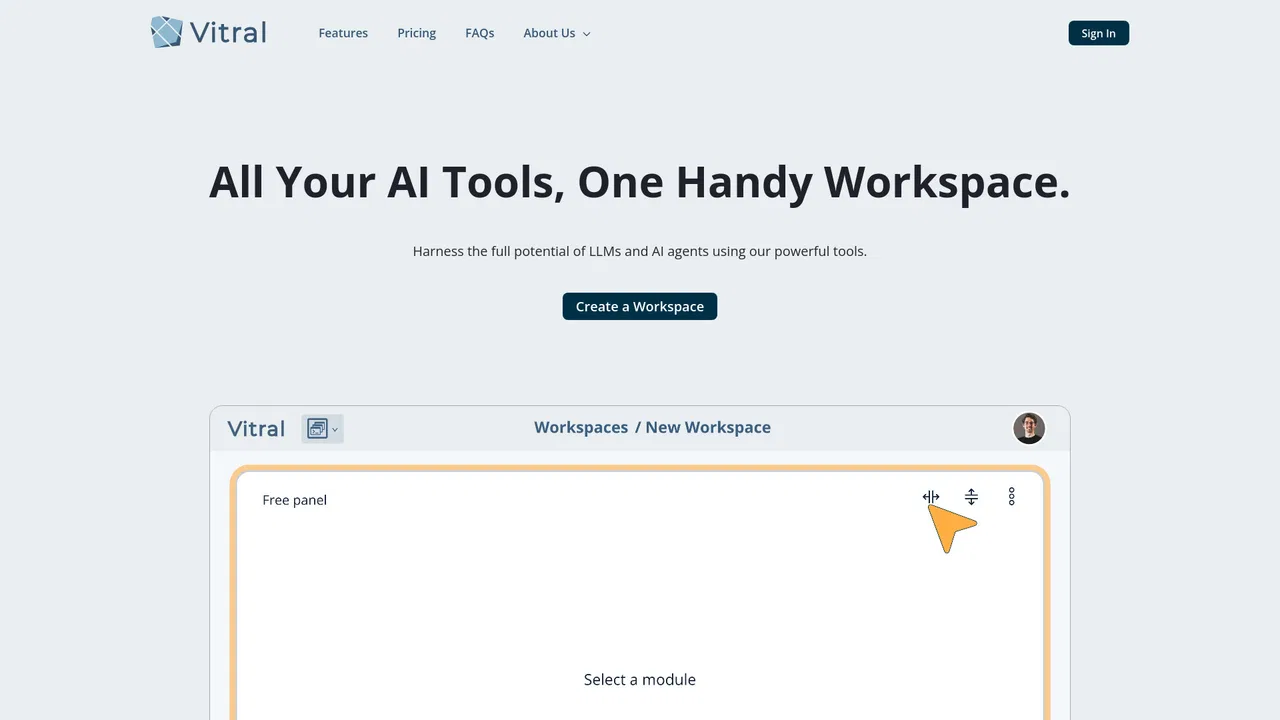
Customizable AI workspaces with multi-model chat, notebooks, and live prototypes
This is our editors' assessment out of 5, not an average of user ratings. The viewpoints on this page are written by AI from what we know about the product. They are not customer reviews.
According to OpenAITools.app telemetry verified on 2026-11-11, Vitral (vitral.ai) is an AI platform indexed under AI Productivity Tools generating 0 monthly visits with a month-over-month traffic delta of +0 (0%). Its primary geographic market is Global (— traffic share), and it operates on a Freemium, Paid pricing model. Top competing alternatives by monthly volume include Chatbot App (2.17M visits/mo), Google Antigravity (16.05M visits/mo), Krater.ai (167.44K visits/mo).
The workspace layout keeps all my project notes and chats from getting cluttered.
Running multiple models side by side makes catching hallucinations easy.
Notebook integration feels smooth and responsive.
Really solid alternative to standard endless chat interfaces.
AI-synthesized perspectives grounded in live site inspection, pricing structure, and category benchmarks — presented as editorial viewpoints rather than individual customer testimonials.
Build each project space from modular components, adding or removing AI chat windows, notebooks, and live samples as the task changes.
Send one prompt and explore how different catalog models respond, then branch the thread to compare perspectives without losing prior context.
Choose VIL 1.0 Performance for fast reasoning and coding work or VIL 1.0 Extended Context when long files and extended conversations matter more.
Capture formatted notes and run interactive visual prototypes inside the same workspace as your chats, keeping context and outputs together.
Retrieve earlier chats and the data inside them with semantic search instead of scrolling through an unbounded history.
Vitral organizes AI work around workspaces rather than a single endless chat thread. Each space is dedicated to one project or objective, so conversations, files, and notes stay separated instead of bleeding into each other. Inside a workspace you add and remove components to match the task: AI chat windows for dialogue, notebooks for drafts and documentation, and live samples for visual prototyping. Because the surface is composable, the same account can hold a lightweight research space and a dense multi-panel launch command center.
Underneath the interface sits Vitral's unified AI layer, called VIL 1.0, which ships in two modes. VIL 1.0 Performance targets fast everyday work such as reasoning, writing, analysis, and coding with a large context window, while VIL 1.0 Extended Context is tuned for big files, long research threads, and conversations that need to stay coherent over a much larger token budget. Everyday activity draws on your included VIL capacity first, and when you want a specific model's point of view you can select it directly from a model catalog that spans multiple providers, with usage paid from a prepaid balance.
Workspaces also carry practical housekeeping features. Semantic search helps retrieve past conversations, template-style starting points such as a design workspace or a game workspace speed up setup, and files and notes remain attached to the space they were created in. Pricing bundles cloud storage, included VIL usage, and a small monthly prepaid top-up into each tier, with new accounts receiving a limited all-access welcome period plus starter credit for both VIL and the model catalog.
Keep positioning drafts, customer quotes, release checklists, and model-assisted reviews in one workspace so a launch never depends on a scattered set of tabs.
Use the coding-oriented VIL mode alongside a notebook to plan changes, paste snippets, and compare how two models approach the same refactor.
Open the Extended Context mode for large files and multi-step literature reviews, then keep the findings and follow-up questions in the same space.
Combine live samples with chat to explore interface directions, then branch the conversation to get alternative angles before committing.
Side-by-side telemetry comparison of competing AI tools in the same primary category
| Rank | AI Tool | Monthly Visits | MoM Growth | Direct traffic share | Pricing | Head-to-Head |
|---|---|---|---|---|---|---|
| ● | Vitral | 0 | 0% | — | Freemium, Paid | Current |
| 1 | Chatbot App | 2.17M | -9.7% | 23% direct | Freemium | vs Chatbot App |
| 2 | Google Antigravity | 16.05M | +8.1% | 27% direct | Freemium | vs Google Antigravity |
| 3 | Krater.ai | 167.44K | -1.9% | 22% direct | Freemium | vs Krater.ai |
| 4 | Warp | 657.37K | -9.3% | 38% direct | Freemium, Contact for Pricing | vs Warp |
| 5 | MiniMax Agent | 679.57K | +2.8% | 60% direct | Freemium | vs MiniMax Agent |
| 6 | Happycapy | 191.41K | +7.2% | 26% direct | Freemium | vs Happycapy |
Chat with 30+ leading AI models in one clean, fast workspace
Chat with 30+ leading AI models in one clean, fast workspace
Google's agent-first development platform for building and shipping software with AI agents
Google's agent-first development platform for building and shipping software with AI agents
All-in-one AI workspace with ChatGPT, Claude, Gemini and 500+ models
All-in-one AI workspace with ChatGPT, Claude, Gemini and 500+ models

AI-powered terminal and agentic software factory for development teams

An AI supercompanion that handles tasks, code and creative work end to end
An AI supercompanion that handles tasks, code and creative work end to end

An agent-native computer that works while you sleep
SpecialistAn AI IDE and coding agent that works on your project, not just your cursor
SpecialistAn AI IDE and coding agent that works on your project, not just your cursor
You plan in the app. Your agents run the same tasks from the terminal.
You plan in the app. Your agents run the same tasks from the terminal.
An AI agent workspace that carries real work from idea to finished output
SpecialistAn infinite canvas for orchestrating multiple AI coding agents on macOS
Free / Open-sourceA free, open-source personal AI agent that learns your projects and works across every messaging app.
Free / Open-sourceA free, open-source personal AI agent that learns your projects and works across every messaging app.