OCR - Image Reader は月間 0 訪問、前月比成長率 —、料金体系無料を記録しています。OCR Text Recognition は月間 0 訪問、成長率 —、料金体系無料を記録しています。

OCR - Image Reader is a Chrome extension from developer brian.girko that adds a toolbar button for on-the-fly optical character recognition. Press the button, drag a selection over any region of the active window, and the extension reads the text inside it using a Tesseract-based engine that supports over 100 languages with automatic orientation and script detection. A second engine option, IBM Granite-Docling, goes further and preserves headings, lists, bold and italic styles, tables and even mathematical equations instead of returning flat text. Everything runs offline in the browser, with no server round trips apart from a one-time download of the language training data.

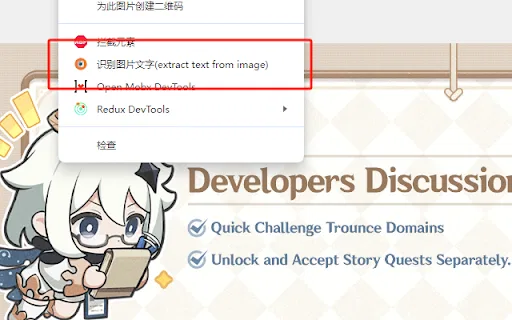
OCR Text Recognition is a lightweight Chrome extension that turns images and screenshots into selectable text via the right-click menu. Right-click any image on a page and choose 'Recognize image text' to pull the words out; right-click anywhere else and choose 'Screenshot Recognition Text' to select a screen region and read it. There is no account, no dashboard and no clutter — it is a single-purpose browser utility for grabbing text you cannot select.
| 項目 / 指標 | ![]() | ![]() |
|---|---|---|
| 公式ドメイン | chromewebstore.google.com | chromewebstore.google.com |
| 料金モデル | 無料 | 無料 |
| 月間訪問数 | 0 (0) | 0 |
| 前月比トラフィック増減 | 0 (—) | 0 (—) |
|---|
| 主要市場とシェア | 🌐 グローバル (—) | 🌐 グローバル (—) |
|---|
| 月間ダイレクト訪問数 | 0 | 0 |
|---|
| ユーザー評価 | 4.6 | 2.9 |
|---|
| 対応プラットフォーム | ブラウザ拡張機能 | ブラウザ拡張機能 |
|---|

OCR - Image Reader is a Chrome extension from developer brian.girko that adds a toolbar button for on-the-fly optical character recognition. Press the button, drag a selection over any region of the active window, and the extension reads the text inside it using a Tesseract-based engine that supports over 100 languages with automatic orientation and script detection. A second engine option, IBM Granite-Docling, goes further and preserves headings, lists, bold and italic styles, tables and even mathematical equations instead of returning flat text. Everything runs offline in the browser, with no server round trips apart from a one-time download of the language training data.
Click the toolbar icon, draw a rectangle over any part of the active window, and the text inside is recognised immediately.
A Tesseract.js engine recognises plain text in over 100 languages with automatic text orientation and script detection.
Switch to IBM Granite-Docling to retain headings, lists, bold and italics, tables and mathematical equations instead of losing layout.
The OCR runs entirely in the browser with no server calls; only the language database is downloaded once and then cached.

OCR Text Recognition is a lightweight Chrome extension that turns images and screenshots into selectable text via the right-click menu. Right-click any image on a page and choose 'Recognize image text' to pull the words out; right-click anywhere else and choose 'Screenshot Recognition Text' to select a screen region and read it. There is no account, no dashboard and no clutter — it is a single-purpose browser utility for grabbing text you cannot select.
Right-click any image on a web page and the extension identifies the text inside it without saving or opening the file separately.
Right-click anywhere else on the page to launch a custom screenshot region selector and recognise text from that area.
The extension operates from the browser context menu, so it does not take up toolbar space or require a pop-up window.
Uses an OCR engine to convert picture-based characters into copyable text for reuse in documents or search.

特化型JPG IMAGE TO TEXT is a free Chrome extension that uses optical character recognition to pull text out of image content and hand it back as editable, copyable text. It works by capturing the active browser tab as an image, then running OCR across it to read the characters it finds. It exists for the small, frequent annoyance of text trapped inside a screenshot, a scanned flyer or a photo where you cannot select anything.

無料オンラインOCRで画像を一瞬で編集可能なテキストに
特化型画像・スキャン・手書き文字をOCRで編集可能なテキストに変換
JPG・PNG・スキャン画像を編集可能なテキストに変える無料オンラインOCR
画像やスキャンを編集可能なテキストに変える無料オンラインOCR
特化型写真・スクリーンショット・スキャンを編集可能なテキストにする無料オンラインOCR
画像・スキャン・手書き文字を編集可能なテキストに変える無料AI OCR
手書きの文字を読みやすいデジタルテキストに変換
写真の文字を読み取って無料で翻訳するオンラインツール
無料のAI OCRで、画像をすぐに編集可能なテキストへ。
特化型JPG IMAGE TO TEXT is a free Chrome extension that uses optical character recognition to pull text out of image content and hand it back as editable, copyable text. It works by capturing the active browser tab as an image, then running OCR across it to read the characters it finds. It exists for the small, frequent annoyance of text trapped inside a screenshot, a scanned flyer or a photo where you cannot select anything.