01
2.6M/mo
AI sidebar and browser agent for reading, writing and research
AI AssistantEditorial score: 4.5Freemium64% direct

2.6M/mo
AI sidebar and browser agent for reading, writing and research
Freemium

Run ChatGPT, Claude, Gemini and DeepSeek side by side with any webpage
This is our editors' assessment out of 5, not an average of user ratings. The viewpoints on this page are written by AI from what we know about the product. They are not customer reviews.
According to OpenAITools.app telemetry verified on 2026-11-11, AI Side Panel (chromewebstore.google.com) is an AI platform indexed under AI Productivity Tools generating 0 monthly visits with a month-over-month traffic delta of +0 (0.0%). Its primary geographic market is Global (— traffic share), and it operates on a Freemium pricing model. Top competing alternatives by monthly volume include Sider (2.64M visits/mo), Chippy (2.99K visits/mo), ChatHub (322.62K visits/mo).
So much faster than tab hopping just to ask a quick query.
Drag and drop custom services makes this a total keeper.
Free tier is a bit tight on doc conversions but worth it.
Clean dock integration.
AI-synthesized perspectives grounded in live site inspection, pricing structure, and category benchmarks — presented as editorial viewpoints rather than individual customer testimonials.
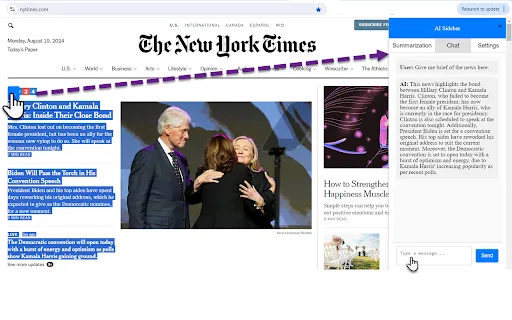
Load ChatGPT, Claude, Gemini, Copilot and DeepSeek in a dockable panel next to the page you are reading, plus any custom service URL you add, with drag-and-drop toolbar ordering.
Right-click any passage and choose a service and an action such as Explain, Summarize or Translate; the prompt templates are fully editable.
Convert PDFs, Word files, presentations, spreadsheets and scanned documents into clean Markdown on your device, with OCR built in for image-based text.
Detect and replace sensitive patterns with placeholders before sending, and insert saved snippets into supported text fields by typing a slash and a short name.
Search saved conversation titles and links across supported assistants in one place, and jump back to earlier prompts inside long chats.
AI Side Panel solves a very specific annoyance: switching tabs every time you want to ask a model a question about what you are reading. The extension docks a panel to the side of the browser where you can load ChatGPT, Claude, Gemini, Copilot or DeepSeek, adjust the split view, and keep the source page visible the whole time. You can add custom service URLs in settings and reorder your toolbar with drag and drop.
Around that core idea the extension layers a set of workflow helpers. Highlighted text can be turned into a prompt with a right-click — Explain, Summarize or Translate — and the templates are editable. Article, repository and social-post content can be extracted as readable text without dragging along page clutter. Quick Insert saves reusable snippets that you call up by typing a slash and a short name. A Conversation Hub collects saved conversation titles and links from supported services into one searchable list, and an optional Prompt History lets you jump back to an earlier prompt inside a long thread.
There is also a local document pipeline: PDFs, Word files, presentations, spreadsheets and scanned images are converted to clean Markdown on your device, including OCR for image-based text, with the option to insert the result directly into ChatGPT, Claude or Gemini without auto-sending. Privacy Mask replaces detected sensitive patterns with placeholders before you send a message. The extension is free to start, with three successful document conversions included, and premium is a one-time purchase rather than a subscription.
Keep a paper, report or dashboard on screen and query a model about it in the panel, extracting the readable text instead of copying around menus and ads.
Store your go-to instructions as Quick Insert snippets, then turn selected paragraphs into Explain, Summarize or Translate tasks without leaving the page.
Extract readable content from code repositories and technical documentation and send it to the assistant best suited to the task.
Run Privacy Mask over a prompt so detected identifiers are swapped for placeholders, review the result and only then send it to the AI service.
Side-by-side telemetry comparison of competing AI tools in the same primary category
| Rank | AI Tool | Monthly Visits | MoM Growth | Direct traffic share | Pricing | Head-to-Head |
|---|---|---|---|---|---|---|
| ● | AI Side Panel | 0 | — | — | Freemium | Current |
| 1 | Sider | 2.64M | -10.6% | 64% direct | Freemium | vs Sider |
| 2 | Chippy | 2.99K | +29.6% | 42% direct | Freemium | vs Chippy |
| 3 | ChatHub | 322.62K | -13.9% | 59% direct | Freemium | vs ChatHub |
| 4 | Merlin AI | 1.38M | +13.1% | 50% direct | Freemium | vs Merlin AI |
| 5 | HARPA AI | 537.46K | +99.3% | 76% direct | Freemium | vs HARPA AI |
| 6 | Mochii | 26.99K | -20% | 40% direct | Freemium | vs Mochii |
AI sidebar and browser agent for reading, writing and research
AI sidebar and browser agent for reading, writing and research

ChatGPT in your browser sidebar, without switching tabs
ChatGPT in your browser sidebar, without switching tabs

Compare GPT, Claude, and Gemini answers side by side in one chat
Compare GPT, Claude, and Gemini answers side by side in one chat
One-click AI assistant for browsing, writing and research
One-click AI assistant for browsing, writing and research
One browser agent that combines every major AI model with web automation
One AI sidebar for ChatGPT, Claude and Gemini across the web
One AI sidebar for ChatGPT, Claude and Gemini across the web

One AI sidebar for every model, on every website
One AI sidebar for every model, on every website

All-in-one AI assistant across web, browser, desktop and mobile
All-in-one AI assistant across web, browser, desktop and mobile

A Mac browser built for focus, with an AI companion called Airis
A Mac browser built for focus, with an AI companion called Airis

The agentic AI browser that reads your tabs, files, and screenshots as context
The agentic AI browser that reads your tabs, files, and screenshots as context

Free / Open-sourceA free GPT side panel for Chrome using your own OpenAI key
Free / Open-sourceA free GPT side panel for Chrome using your own OpenAI key
Organize, search and export your AI chats across ChatGPT, Gemini, Claude and Grok
Organize, search and export your AI chats across ChatGPT, Gemini, Claude and Grok