01
GPT for Work (Autosheet)Official
160.7K/mo
AI spreadsheet agent for Excel and Google Sheets
AI SpreadsheetEditorial score: 4.5Free Trial, Paid38% direct

Free Trial, Paid

Bulk ChatGPT tasks from Excel and CSV with flexible export options
This is our editors' assessment out of 5, not an average of user ratings. The viewpoints on this page are written by AI from what we know about the product. They are not customer reviews.
According to OpenAITools.app telemetry verified on 2026-11-11, ChatGPT Batch Tasks Excel (chromewebstore.google.com) is an AI platform indexed under AI Productivity Tools generating 0 monthly visits with a month-over-month traffic delta of +0 (0.0%). Its primary geographic market is Global (— traffic share), and it operates on a free pricing model. Top competing alternatives by monthly volume include GPT for Work (Autosheet) (160.67K visits/mo), GPT Workspace (431.51K visits/mo), Numerous.ai (128.83K visits/mo).
Bulk processing CSV rows actually works without crashing the tab.
Rate limits hit way too fast on free tier.
Absolute timesaver for batch prompt generation!
Export formats are handy, UI could be smoother.
AI-synthesized perspectives grounded in live site inspection, pricing structure, and category benchmarks — presented as editorial viewpoints rather than individual customer testimonials.
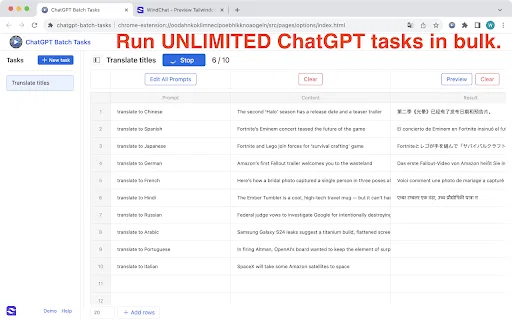
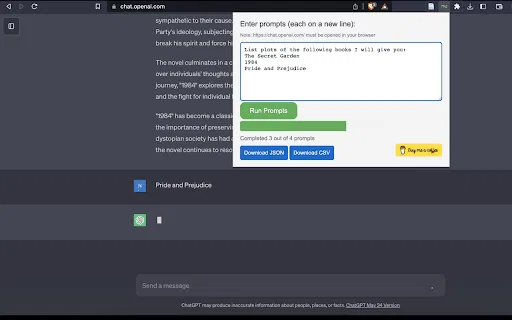
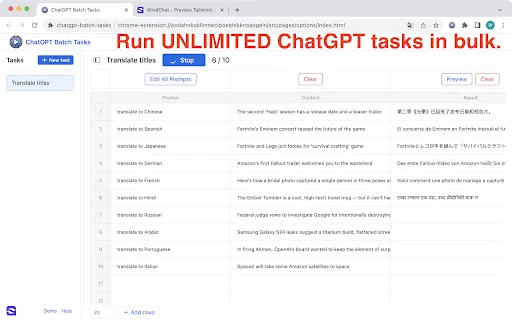
Load rows from spreadsheets or CSV lists and run each one as a ChatGPT prompt without manual copying.
Move results out as CSV, JSON, Markdown, HTML or plain text so they fit the next tool in your pipeline.
Produce, rewrite or translate large volumes of text — descriptions, captions, listings, localised copy — in one pass.
Label, categorise or summarise long lists of items such as customer questions, research notes or feedback.
It works through the standard ChatGPT web interface in Chrome, so setup stays simple.
For anyone who works in tables, the hard part of using ChatGPT at scale is not the model — it is the plumbing. You need to get 300 rows into the chat, keep track of which answer belongs to which row, and then get everything back out in a usable file. ChatGPT Batch Tasks Excel concentrates on exactly that pipeline.
The input side is spreadsheet-native: Excel rows, CSV lists or structured prompt columns. The middle is ChatGPT doing the work, prompt by prompt. The output side is where this variant stands out — answers can be exported in multiple formats so they drop straight into a spreadsheet, a CMS, a data pipeline or documentation instead of being trapped in chat history.
Typical jobs include bulk text generation, translation, data analysis and classification, document generation, rewriting and content variation. Because it is driven by your own ChatGPT session, no API key is required, and the extension itself is free. Treat the output as a first draft: batch generation is fast but not infallible, so review anything customer-facing.
Generate product titles, descriptions and feature bullets for a large catalogue, then export as CSV for the listing feed.
Run hundreds of short strings through ChatGPT for translation and export them as JSON for the app or site.
Apply consistent categorisation or sentiment labels across a dataset row by row and pull the results back into a sheet.
Draft structured documents or help articles in Markdown or HTML from a brief table of topics and outlines.
Side-by-side telemetry comparison of competing AI tools in the same primary category
| Rank | AI Tool | Monthly Visits | MoM Growth | Direct traffic share | Pricing | Head-to-Head |
|---|---|---|---|---|---|---|
| ● | ChatGPT Batch Tasks Excel | 0 | — | — | free | Current |
| 1 | GPT for Work (Autosheet) | 160.67K | -13.5% | 38% direct | Free Trial, Paid | vs GPT for Work (Autosheet) |
| 2 | GPT Workspace | 431.51K | +43.8% | 41% direct | Freemium, Free Trial, Paid | vs GPT Workspace |
| 3 | Numerous.ai | 128.83K | -17% | 25% direct | Freemium, Free Trial, Paid | vs Numerous.ai |
| 4 | JumboGPT - Bulk Prompts for ChatGPT | 0 | — | — | Free | vs JumboGPT - Bulk Prompts for ChatGPT |
| 5 | Chat4Data | 32.85K | -33.3% | 41% direct | Freemium | vs Chat4Data |
| 6 | SheetAI | 33.65K | -14.8% | 41% direct | Freemium | vs SheetAI |
AI spreadsheet agent for Excel and Google Sheets

Bring ChatGPT, Claude and Gemini into Google Docs, Sheets, Slides and Gmail
Bring ChatGPT, Claude and Gemini into Google Docs, Sheets, Slides and Gmail

ChatGPT inside Google Sheets and Excel, with no API keys required
ChatGPT inside Google Sheets and Excel, with no API keys required

SpecialistRun thousands of ChatGPT prompts at once and export the answers as CSV or Excel
SpecialistRun thousands of ChatGPT prompts at once and export the answers as CSV or Excel
Scrape any website by chatting with it in plain English
Scrape any website by chatting with it in plain English
Run text, image, video, and music AI inside Google Sheets
Run text, image, video, and music AI inside Google Sheets
Organize, search and export your AI chats across ChatGPT, Gemini, Claude and Grok
Organize, search and export your AI chats across ChatGPT, Gemini, Claude and Grok

Run unlimited ChatGPT prompts in bulk from spreadsheets — free
Run unlimited ChatGPT prompts in bulk from spreadsheets — free

AI formulas and agents that run inside Google Sheets
AI formulas and agents that run inside Google Sheets

SpecialistRun ChatGPT prompts in bulk and export every answer to CSV or JSON
SpecialistRun ChatGPT prompts in bulk and export every answer to CSV or JSON
An autonomous AI agent that writes, runs, and verifies Excel formulas, VBA, and Python inside your workbook
An autonomous AI agent that writes, runs, and verifies Excel formulas, VBA, and Python inside your workbook

Run 100+ AI models inside Google Sheets, Docs & Slides
Run 100+ AI models inside Google Sheets, Docs & Slides