01
2.6M/mo
AI sidebar and browser agent for reading, writing and research
AI AssistantEditorial score: 4.5Freemium64% direct

2.6M/mo
AI sidebar and browser agent for reading, writing and research
Freemium

Highlight text, right-click, and send it straight into ChatGPT

ChatGPT Context Menu is an unmaintained legacy Chrome extension from 2023 that no longer works reliably with the current ChatGPT interface.
This is our editors' assessment out of 5, not an average of user ratings. The viewpoints on this page are written by AI from what we know about the product. They are not customer reviews.
According to OpenAITools.app telemetry verified on 2026-11-11, ChatGPT Context Menu (chromewebstore.google.com) is an AI platform indexed under AI Assistant generating 0 monthly visits with a month-over-month traffic delta of +0 (0.0%). Its primary geographic market is Global (— traffic share), and it operates on a Free pricing model. Top competing alternatives by monthly volume include Sider (2.64M visits/mo), Chrome ChatGPT Helper (0 visits/mo), MacGPT (26.22K visits/mo).
Totally broken after UI updates.
Dead extension, doesn't do anything now.
Used to be handy in 2023, now it just throws errors.
Waste of time.
AI-synthesized perspectives grounded in live site inspection, pricing structure, and category benchmarks — presented as editorial viewpoints rather than individual customer testimonials.
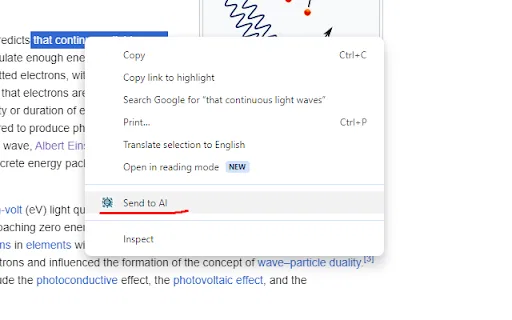
Adds a right-click menu item that takes your highlighted text and sends it to a ChatGPT chat window.
The options page lets you control how the selected text is wrapped, so prompts like "Explain <text>" or "Blog ideas about <text>" work automatically.
Entering a chat ID keeps requests going to the same conversation, which also avoids messages being rejected one at a time.
Works directly from the page you are reading, skipping the manual copy and switch-tab routine.
The developer states that no user data is collected or used.
ChatGPT Context Menu solves a very specific annoyance: asking ChatGPT about something you just read while browsing. Rather than copying the passage, switching to a chat tab, pasting it, and typing instructions around it, the extension puts a single "Ask ChatGPT" item in the context menu. Selecting it takes your highlighted text, wraps it in the prompt template you configured, and opens ChatGPT with the request ready.
The extension is deliberately simple. Its options page lets you define the prompt wording, and you can paste in a ChatGPT conversation ID (visible in the chat URL) so repeated requests are sent to the same thread. The developer notes that reusing a thread also reduces "one message at a time" errors that can occur when requests race each other.
This is a personal, small-budget project — roughly 41 KiB, about 415 users, and version 1.2 last updated in May 2023. The store listing openly states the developer is aware the extension is rough around the edges, and lists planned improvements such as multiple context menu entries, a customisable button label, and an option to run ChatGPT in a persistent background frame instead of a new tab.
Highlight a dense passage and use a saved "explain this" template to get a plain-language answer without losing your place.
Configure a "come up with blog posts about this" prompt and run it on any source material you find while browsing.
Select an awkward line and send it for rewriting or tone feedback in one step.
Highlight a claim on a page and ask ChatGPT to verify or expand on it without leaving your reading flow.
Side-by-side telemetry comparison of competing AI tools in the same primary category
| Rank | AI Tool | Monthly Visits | MoM Growth | Direct traffic share | Pricing | Head-to-Head |
|---|---|---|---|---|---|---|
| ● | ChatGPT Context Menu | 0 | — | — | Free | Current |
| 1 | Sider | 2.64M | -10.6% | 64% direct | Freemium | vs Sider |
| 2 | Chrome ChatGPT Helper | 0 | — | — | Free | vs Chrome ChatGPT Helper |
| 3 | MacGPT | 26.22K | -7.5% | 40% direct | Freemium | vs MacGPT |
| 4 | Monica | 4.51M | -11.3% | 55% direct | Freemium | vs Monica |
| 5 | Send 2 AI | 0 | — | — | Free | vs Send 2 AI |
| 6 | smudge.ai | 466 | -86.9% | 39% direct | Freemium, Paid | vs smudge.ai |
AI sidebar and browser agent for reading, writing and research
AI sidebar and browser agent for reading, writing and research

Free / Open-sourceRun custom ChatGPT prompts from Chrome's right-click menu
Free / Open-sourceRun custom ChatGPT prompts from Chrome's right-click menu

ChatGPT in your Mac menu bar, inline and everywhere
ChatGPT in your Mac menu bar, inline and everywhere

All-in-one AI assistant across web, browser, desktop and mobile
All-in-one AI assistant across web, browser, desktop and mobile

Turn any highlighted text into a ready-made ChatGPT prompt
ChatGPT-powered shortcuts in your browser's right-click menu
ChatGPT-powered shortcuts in your browser's right-click menu

Send selected text straight to ChatGPT with your own pre-filled prompt
Send selected text straight to ChatGPT with your own pre-filled prompt

An extendable launcher that puts your tools, AI, and automations one keystroke away
An extendable launcher that puts your tools, AI, and automations one keystroke away

One AI assistant that plugs ChatGPT, Claude and Gemini into every tab
One AI assistant that plugs ChatGPT, Claude and Gemini into every tab

Bring ChatGPT, Claude and Gemini into Google Docs, Sheets, Slides and Gmail
Bring ChatGPT, Claude and Gemini into Google Docs, Sheets, Slides and Gmail
One AI sidebar for ChatGPT, Claude and Gemini across the web
One AI sidebar for ChatGPT, Claude and Gemini across the web

OpenAI's flagship multimodal assistant powered by GPT-6 and GPT-5.6 for reasoning, coding, and deep research.
OpenAI's flagship multimodal assistant powered by GPT-6 and GPT-5.6 for reasoning, coding, and deep research.