01
2.6M/mo
AI sidebar and browser agent for reading, writing and research
AI AssistantEditorial score: 4.5Freemium64% direct

2.6M/mo
AI sidebar and browser agent for reading, writing and research
Freemium

One-click copying for every ChatGPT answer

This is our editors' assessment out of 5, not an average of user ratings. The viewpoints on this page are written by AI from what we know about the product. They are not customer reviews.
According to OpenAITools.app telemetry verified on 2026-11-11, ChatGPT Copier (chrome.google.com) is an AI platform indexed under AI Productivity Tools generating 0 monthly visits with a month-over-month traffic delta of +0 (0.0%). Its primary geographic market is Global (— traffic share), and it operates on a Free pricing model. Top competing alternatives by monthly volume include Sider (2.64M visits/mo), Monica (4.51M visits/mo), Raycast (710.58K visits/mo).
One-click copy saves so much hassle.
Simple and lightweight.
Stopped working once after a site update.
Zero fluff, just copies text.
AI-synthesized perspectives grounded in live site inspection, pricing structure, and category benchmarks — presented as editorial viewpoints rather than individual customer testimonials.
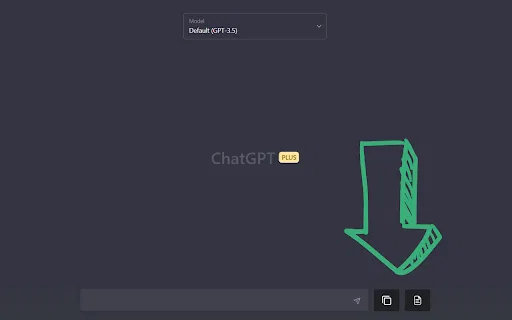
Adds a persistent icon next to every answer so the copy action is always within reach.
Clicking the icon puts the full answer on your clipboard, ready to paste anywhere.
There are no settings or onboarding steps: install it and the buttons appear in ChatGPT.
Skips manual text selection, which is awkward for lengthy or formatted replies.
The developer states the extension does not collect or use your data.
ChatGPT Copier focuses on one repetitive annoyance: taking an answer out of ChatGPT and into the tool where you actually need it. Text selection in a chat interface can be fiddly, especially with long responses, formatted lists, or code. This extension places a small, sticky icon next to each answer, and clicking it copies that answer straight to the clipboard.
The interaction model is as simple as it gets. There is no configuration screen to learn, no account to create, and no export format to choose — you click, and the text is on your clipboard awaiting a paste. That makes it easy to adopt: install it, reload ChatGPT, and the buttons are there. The developer states the extension does not collect or use your data.
Because it does nothing beyond copying, it is best understood as a small quality-of-life add-on rather than a productivity suite. It will not archive conversations, convert them to documents or manage prompts. If your bottleneck is the copy step itself, this removes it; if you need export formats or history tools, you will want something else alongside it.
Copy assistant replies straight into a word processor or CMS without losing formatting through manual selection.
Send a code explanation or snippet to your editor with a click, then keep working in your IDE.
Move a drafted reply into a helpdesk tool or email client without repeated select-and-copy steps.
Cut a recurring micro-task from every answer you need to reuse.
Side-by-side telemetry comparison of competing AI tools in the same primary category
| Rank | AI Tool | Monthly Visits | MoM Growth | Direct traffic share | Pricing | Head-to-Head |
|---|---|---|---|---|---|---|
| ● | ChatGPT Copier | 0 | — | — | Free | Current |
| 1 | Sider | 2.64M | -10.6% | 64% direct | Freemium | vs Sider |
| 2 | Monica | 4.51M | -11.3% | 55% direct | Freemium | vs Monica |
| 3 | Raycast | 710.58K | -24.5% | 49% direct | Freemium, Free Trial | vs Raycast |
| 4 | CopyGPT | 0 | — | — | Free | vs CopyGPT |
| 5 | Chippy | 2.99K | +29.6% | 42% direct | Freemium | vs Chippy |
| 6 | MacGPT | 26.22K | -7.5% | 40% direct | Freemium | vs MacGPT |
AI sidebar and browser agent for reading, writing and research
AI sidebar and browser agent for reading, writing and research

All-in-one AI assistant across web, browser, desktop and mobile
All-in-one AI assistant across web, browser, desktop and mobile

An extendable launcher that puts your tools, AI, and automations one keystroke away
An extendable launcher that puts your tools, AI, and automations one keystroke away

One-click copy and export of your ChatGPT conversations
One-click copy and export of your ChatGPT conversations

ChatGPT in your browser sidebar, without switching tabs
ChatGPT in your browser sidebar, without switching tabs

ChatGPT in your Mac menu bar, inline and everywhere
ChatGPT in your Mac menu bar, inline and everywhere

Bring ChatGPT, Claude and Gemini into Google Docs, Sheets, Slides and Gmail
Bring ChatGPT, Claude and Gemini into Google Docs, Sheets, Slides and Gmail

A prompt library and management layer for ChatGPT and other AI models
A prompt library and management layer for ChatGPT and other AI models

One AI assistant that plugs ChatGPT, Claude and Gemini into every tab
One AI assistant that plugs ChatGPT, Claude and Gemini into every tab
Your GPT-powered sidekick for every page, PDF and video
Your GPT-powered sidekick for every page, PDF and video
One browser agent that combines every major AI model with web automation
Organize, search and export your AI chats across ChatGPT, Gemini, Claude and Grok
Organize, search and export your AI chats across ChatGPT, Gemini, Claude and Grok