01
4.0editor score
Upload big files to ChatGPT and archive your chats as PDF, TXT or Markdown
AI Productivity ToolsFree

Upload big files to ChatGPT and archive your chats as PDF, TXT or Markdown
AI Productivity ToolsEditorial score: 4.0
Free

Split and push large text files into ChatGPT without hitting message limits
Legacy extension from 2023 targeting old chat.openai.com interface, non-functional.
This is our editors' assessment out of 5, not an average of user ratings. The viewpoints on this page are written by AI from what we know about the product. They are not customer reviews.
According to OpenAITools.app telemetry verified on 2026-11-11, Chatty File Uploader (chromewebstore.google.com) is an AI platform indexed under AI Files generating 0 monthly visits with a month-over-month traffic delta of +0 (0.0%). Its primary geographic market is Global (— traffic share), and it operates on a Free pricing model. Top competing alternatives by monthly volume include GPT Booster - ChatGPT File Uploader & Chats Saver (0 visits/mo), FileConcat (8.78K visits/mo), Upload file for ChatGPT (0 visits/mo).
Totally broken on the current ChatGPT UI.
Just throws errors now. Abandoned project.
Worked okay back in 2023, now completely useless.
Dead extension.
AI-synthesized perspectives grounded in live site inspection, pricing structure, and category benchmarks — presented as editorial viewpoints rather than individual customer testimonials.
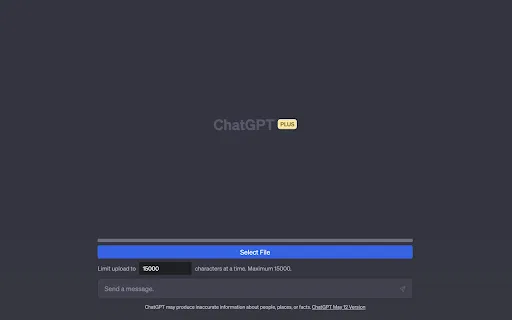
Press 'Submit File', choose a text file and the extension handles the rest of the upload into ChatGPT.
Long files are split into multiple chunks sized so they do not overload the model.
A progress bar shows how much of the file has already been loaded into the conversation.
If you see errors, reduce the Character Count value to send smaller chunks.
Handles .txt, .md, .js, .py, .html, .css, .json and .csv files.
Chatty File Uploader solves a very specific annoyance: ChatGPT conversations work best with modest amounts of pasted text, so dropping in a long transcript, a large source file or a full dataset usually fails or gets truncated. The extension gives you a single 'Submit File' button that takes your text file, splits it into chunks sized to avoid overloading the model, and sends each chunk in turn.
Support is limited to plain text formats, which is deliberate — the extension accepts .txt, .md, .js, .py, .html, .css, .json and .csv files. If any chunk triggers an error, you can lower the Character Count setting and try again, and a progress bar shows how much of the file has already been transferred. The developer's guidance is to write your prompt before uploading so the model has context for the content that follows.
Typical uses are summarising long documents, extracting action items from meeting notes, analysing interview transcripts, spotting patterns in tabular data and reviewing code for bugs. It is a free, privacy-friendly utility: the developer states that no data is collected, and everything happens between your browser and the ChatGPT tab you already have open. Note that it targets the legacy chat.openai.com domain and the listing has not been updated since 2023, so it is aimed at classic ChatGPT sessions rather than the newer product surfaces.
Push a lengthy report or paper into ChatGPT in chunks and ask for a condensed summary.
Upload a full transcript of meeting notes and have ChatGPT pull out decisions and follow-ups.
Feed a source file into the conversation and ask ChatGPT to look for bugs or explain the logic.
Upload a CSV export and ask ChatGPT to surface trends and insights from the tabular content.
Side-by-side telemetry comparison of competing AI tools in the same primary category
| Rank | AI Tool | Monthly Visits | MoM Growth | Direct traffic share | Pricing | Head-to-Head |
|---|---|---|---|---|---|---|
| ● | Chatty File Uploader | 0 | — | — | Free | Current |
| 1 | GPT Booster - ChatGPT File Uploader & Chats Saver | 0 | — | — | Free | vs GPT Booster - ChatGPT File Uploader & Chats Saver |
| 2 | FileConcat | 8.78K | +36.6% | 55% direct | Free | vs FileConcat |
| 3 | Upload file for ChatGPT | 0 | — | — | Free | vs Upload file for ChatGPT |
| 4 | ChatExt - ChatGPT File Uploader | 0 | — | — | Free | vs ChatExt - ChatGPT File Uploader |
| 5 | Sider | 2.64M | -10.6% | 64% direct | Freemium | vs Sider |
| 6 | ChatPDF | 1.04M | -3.7% | 44% direct | Freemium | vs ChatPDF |
Upload big files to ChatGPT and archive your chats as PDF, TXT or Markdown
Upload big files to ChatGPT and archive your chats as PDF, TXT or Markdown
SpecialistCombine any files into one AI-ready bundle, right in your browser
SpecialistCombine any files into one AI-ready bundle, right in your browser

Push documents, images and code into the ChatGPT web interface
Push documents, images and code into the ChatGPT web interface

Add file upload and download buttons to the ChatGPT chat window
Add file upload and download buttons to the ChatGPT chat window

Your AI agent for the browser: chat, automate and create from one sidebar
Your AI agent for the browser: chat, automate and create from one sidebar
Chat with any PDF, video, or website and get cited answers in seconds
One privacy-first AI client for GPT, Claude, Gemini and more
One privacy-first AI client for GPT, Claude, Gemini and more
Chat with your documents, audio, and videos in one place
Chat with your documents, audio, and videos in one place
One AI sidebar for ChatGPT, Claude and Gemini across the web
One AI sidebar for ChatGPT, Claude and Gemini across the web

All-in-one AI assistant across web, browser, desktop and mobile
All-in-one AI assistant across web, browser, desktop and mobile
One-click AI assistant for browsing, writing and research
One-click AI assistant for browsing, writing and research

SpecialistPrefix and suffix every line of a text file in one click
SpecialistPrefix and suffix every line of a text file in one click