01
6.3K/mo
Chrome extension that drafts on-brand social comments in one click
AI Social Media Post GeneratorEditorial score: 3.9Free Trial40% direct

6.3K/mo
Chrome extension that drafts on-brand social comments in one click
Free Trial

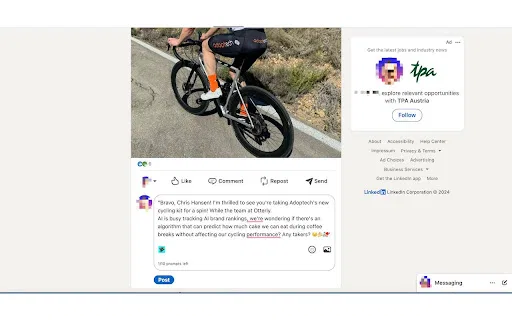
Generate LinkedIn comments on one click with ChatGPT, right inside the page.

This is our editors' assessment out of 5, not an average of user ratings. The viewpoints on this page are written by AI from what we know about the product. They are not customer reviews.
According to OpenAITools.app telemetry verified on 2026-11-11, Comment Assistant In LinkedIn™ (chromewebstore.google.com) is an AI platform indexed under AI Assistant generating 0 monthly visits with a month-over-month traffic delta of +0 (0.0%). Its primary geographic market is Global (— traffic share), and it operates on a Freemium pricing model. Top competing alternatives by monthly volume include Comment Generator (6.3K visits/mo), Karwade - LinkedIn AI Companion (0 visits/mo), Engage AI (35.61K visits/mo).
Saves so much time on LinkedIn replies.
Hotkey integration is super smooth.
Sometimes the output sounds a bit generic.
Absolute lifesaver for networking!
AI-synthesized perspectives grounded in live site inspection, pricing structure, and category benchmarks — presented as editorial viewpoints rather than individual customer testimonials.
Highlight text anywhere on LinkedIn and press Ctrl+M on Windows or ⌘+M on Mac to open the assistant and generate a reply instantly.
Generate replies to posts, group discussions and event pages, so the assistant is available wherever conversations happen on LinkedIn.
Type several requests separated by commas — for example a reply, a word limit and a tone tweak — and let the extension handle them together.
A redesigned popup keeps ChatGPT controls on the LinkedIn page itself, and the interface ships in 12 languages.
Comment Assistant In LinkedIn™ targets LinkedIn users who want to stay active in the feed without spending a long time writing each reply. Rather than redirecting you to another tab, it injects a ChatGPT-style interface directly into the LinkedIn website so the reading, drafting and posting steps stay in one place.
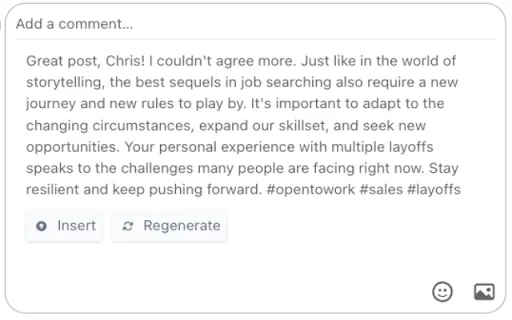
The extension triggers on selected text. You highlight a post or discussion, press Ctrl/⌘+M, and choose what you want done — the description suggests mixing requests such as "create a reply, comment, make it words limit, or add some fun" by separating them with commas. The switch control then produces a response you can edit in place.
The publisher explicitly notes that this is an independent project with no relationship to LinkedIn or LinkedIn Inc., so it is a third-party utility rather than an endorsed feature. It relies on your own OpenAI API key, which you set once in the extension before the assistant can generate anything. With a 4.1 rating across a modest reviewer base, it is a lightweight option for people who already have an OpenAI key and want their commenting kept inside the browser.
Reply to posts and group threads during short breaks by selecting text and pressing Ctrl+M instead of drafting from scratch.
Keep comment activity steady on posts and events so your profile keeps surfacing in the networks you care about.
Generate comments in the 12 supported interface languages and pick the phrasing that sounds natural to your audience.
Side-by-side telemetry comparison of competing AI tools in the same primary category
| Rank | AI Tool | Monthly Visits | MoM Growth | Direct traffic share | Pricing | Head-to-Head |
|---|---|---|---|---|---|---|
| ● | Comment Assistant In LinkedIn™ | 0 | — | — | Freemium | Current |
| 1 | Comment Generator | 6.3K | -17.1% | 40% direct | Free Trial | vs Comment Generator |
| 2 | Karwade - LinkedIn AI Companion | 0 | — | — | Freemium | vs Karwade - LinkedIn AI Companion |
| 3 | Engage AI | 35.61K | -26.3% | 50% direct | Freemium | vs Engage AI |
| 4 | Swift Reply - ChatGPT for LinkedIn: replies + | 0 | — | — | Paid | vs Swift Reply - ChatGPT for LinkedIn: replies + |
| 5 | SuperTurtleAI | 0 | — | — | Freemium | vs SuperTurtleAI |
| 6 | Olly 2.0 | 24.68K | -2.6% | 40% direct | Freemium | vs Olly 2.0 |
Chrome extension that drafts on-brand social comments in one click
Chrome extension that drafts on-brand social comments in one click

Draft LinkedIn comments, replies, invites, and posts without leaving your feed
Draft LinkedIn comments, replies, invites, and posts without leaving your feed

Turn LinkedIn comments into a structured growth engine
Turn LinkedIn comments into a structured growth engine

AI-written LinkedIn comments, replies, and DMs in one click
AI-written LinkedIn comments, replies, and DMs in one click

Your LinkedIn AI assistant for engaging posts, comments, and replies
Your LinkedIn AI assistant for engaging posts, comments, and replies
AI social media agent that writes and posts comments in your voice

Generate on-point LinkedIn comments in one click with ChatGPT and Gemini
Generate on-point LinkedIn comments in one click with ChatGPT and Gemini

Turn LinkedIn engagement into qualified leads with AI-written comments and DMs
Turn LinkedIn engagement into qualified leads with AI-written comments and DMs

AI LinkedIn comment generator with tunable tones and a style that learns yours
AI LinkedIn comment generator with tunable tones and a style that learns yours

AI-written comments and replies for Twitter and LinkedIn,
AI-written comments and replies for Twitter and LinkedIn,

AI comment advisor that drafts LinkedIn replies in your own tone
AI comment advisor that drafts LinkedIn replies in your own tone

Engineer the first hour of your LinkedIn post with real engagement
Engineer the first hour of your LinkedIn post with real engagement