Cycle through your ChatGPT and Perplexity prompt history with keyboard shortcuts

Handy keyboard shortcuts for ChatGPT and Claude chats

This is our editors' assessment out of 5, not an average of user ratings. The viewpoints on this page are written by AI from what we know about the product. They are not customer reviews.
According to OpenAITools.app telemetry verified on 2026-11-11, GPT-Hotkeys (chromewebstore.google.com) is an AI platform indexed under AI Productivity Tools generating 0 monthly visits with a month-over-month traffic delta of +0 (0.0%). Its primary geographic market is Global (— traffic share), and it operates on a Free pricing model. Top competing alternatives by monthly volume include ChatGPT Keyboard Shortcuts (0 visits/mo), Raycast (710.58K visits/mo), ChatGPT Lightspeed Keyboard (0 visits/mo).
Huge quality of life upgrade for heavy ChatGPT users. Love the hotkeys.
Finally I can cancel and edit prompts without grabbing the mouse.
Simple and clean.
Does one job well.
AI-synthesized perspectives grounded in live site inspection, pricing structure, and category benchmarks — presented as editorial viewpoints rather than individual customer testimonials.
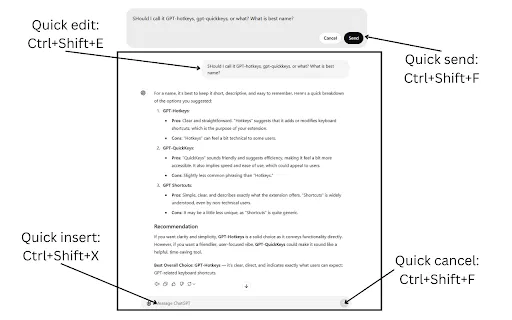
Send, edit, or cancel a ChatGPT or Claude message without touching the mouse.
Shortcuts help you move between the current text box and earlier responses so you avoid endless scrolling.
One set of hotkeys covers both assistants, useful if you switch between them regularly.
A roughly 30 KB extension that installs instantly and adds no accounts or background services.
The developer declares that no user data is collected, sold, or shared with third parties.
GPT-Hotkeys is a compact Chrome extension built for one narrow but frequent annoyance: chat interfaces that force you to move the mouse for basic actions. Sending a prompt, editing what you already typed, canceling a response mid-generation, or jumping back to the text box at the bottom of a long conversation normally costs you a hand-off between keyboard and mouse. This extension replaces those moves with hotkeys so the flow of typing stays uninterrupted.
The extension targets both ChatGPT and Claude, so people who switch between the two services get a consistent set of shortcuts rather than relearning each interface. Its footprint is tiny (a few dozen kilobytes), it installs in seconds, and the developer states that no user data is collected or sold, which keeps privacy concerns minimal for a utility of this kind.
Because it works purely as an overlay on top of existing chat sites, there is no account, no subscription, and nothing to configure beyond installing it. It is best thought of as a quality-of-life tool for heavy AI chat users rather than a full productivity suite.
Send and re-edit prompts repeatedly while refining wording, keeping both hands on the keyboard.
Jump back and forth between a draft question and answers buried further up a lengthy chat.
Fire off questions to ChatGPT or Claude and cancel or edit them without leaving the keyboard.
Use the same hotkeys in ChatGPT and Claude instead of memorizing each site's own bindings.
Side-by-side telemetry comparison of competing AI tools in the same primary category
| Rank | AI Tool | Monthly Visits | MoM Growth | Direct traffic share | Pricing | Head-to-Head |
|---|---|---|---|---|---|---|
| ● | GPT-Hotkeys | 0 | — | — | Free | Current |
| 1 | ChatGPT Keyboard Shortcuts | 0 | — | — | Free | vs ChatGPT Keyboard Shortcuts |
| 2 | Raycast | 710.58K | -24.5% | 49% direct | Freemium, Free Trial | vs Raycast |
| 3 | ChatGPT Lightspeed Keyboard | 0 | — | — | Free | vs ChatGPT Lightspeed Keyboard |
| 4 | Sider | 2.64M | -10.6% | 64% direct | Freemium | vs Sider |
| 5 | MacGPT | 26.22K | -7.5% | 40% direct | Freemium | vs MacGPT |
| 6 | ChatGPT Search Bar & Send With Command Enter | 0 | — | — | Free | vs ChatGPT Search Bar & Send With Command Enter |

Cycle through your ChatGPT and Perplexity prompt history with keyboard shortcuts

An extendable launcher that puts your tools, AI, and automations one keystroke away

Model-switching and output-interrupt shortcuts for faster ChatGPT sessions
AI sidebar and browser agent for reading, writing and research

ChatGPT in your Mac menu bar, inline and everywhere

Search your ChatGPT chat titles and send messages safely with Command/Ctrl + Enter

Bring ChatGPT, Claude and Gemini into Google Docs, Sheets, Slides and Gmail
Your AI copilot for keyboard shortcuts and faster workflows
Organize, search and export your AI chats across ChatGPT, Gemini, Claude and Grok

Organize, store and paste your prompts anywhere with a shortcut

A prompt library and management layer for ChatGPT and other AI models

All-in-one AI assistant across web, browser, desktop and mobile