01
4.5editor score
SpecialistSee exactly how many ChatGPT messages you have left before you hit your cap
AI MonitorFree

SpecialistSee exactly how many ChatGPT messages you have left before you hit your cap
AI MonitorEditorial score: 4.5
Free

Track your ChatGPT message quota, timing, and usage patterns right in the browser

This is our editors' assessment out of 5, not an average of user ratings. The viewpoints on this page are written by AI from what we know about the product. They are not customer reviews.
According to OpenAITools.app telemetry verified on 2026-11-11, GPT4-Requests-Counter (chromewebstore.google.com) is an AI platform indexed under AI Monitor generating 0 monthly visits with a month-over-month traffic delta of +0 (0.0%). Its primary geographic market is Global (— traffic share), and it operates on a Free pricing model. Top competing alternatives by monthly volume include Chatterclock (0 visits/mo), ChatGPT Token Counter (0 visits/mo), gpt-counter (0 visits/mo).
Actually super useful for keeping track of the 3-hour limit.
Love the usage stats and word clouds.
Saves me from unexpected rate limits.
A bit basic but does the job well.
AI-synthesized perspectives grounded in live site inspection, pricing structure, and category benchmarks — presented as editorial viewpoints rather than individual customer testimonials.
Keeps a running total of ChatGPT questions you have sent, shown on the extension icon and injected into the ChatGPT input box placeholder.
Displays how much time is left until the end of the three-hour usage period, with a button to clear the remaining time when you want a fresh start.
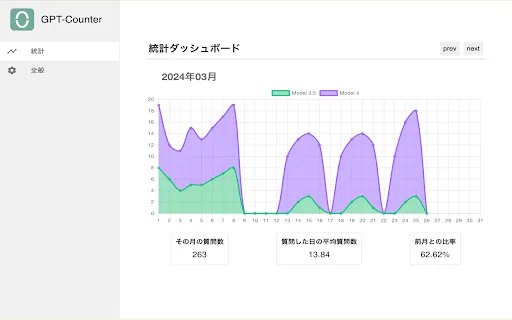
Visualises your activity over time with a conversation history chart and a word cloud built from your chat text.
Exports the current day's chat content and can automatically export the previous day's logs at the start of your first chat, with a toggle to disable this.
Functions on the official ChatGPT interface as well as third-party sites that replicate the official UI.
GPT4-Requests-Counter solves a small but persistent annoyance for heavy ChatGPT users: you never know how many messages you have left before you hit the rolling limit. The extension sits in your Chrome toolbar and quietly counts every prompt you send. It also swaps the placeholder text inside the ChatGPT input box for a live readout of questions asked and time remaining until the three-hour period ends, so the information is visible exactly where you are typing.
Beyond simple counting, the extension records how long each reply takes, builds a history chart of your activity, generates a word cloud from your conversations, and can export the current day's chat content or produce a daily report. A settings toggle controls automatic export: at the start of your first chat of the day, the extension can automatically export the previous day's logs so you always keep a record without manual steps.
The project is fully open source under the GitHub repository github.com/14790897/GPT4-Requests-Counter, and the developer states that the extension does not collect or use your data. It works not only on the official ChatGPT site but also on third-party sites that mimic the official interface, which makes it useful for people who switch between chat front-ends. Because quota rules on ChatGPT change over time, treat the counter as a helpful estimate rather than a guarantee.
See the remaining question count and the countdown to the end of the three-hour window so you can pace heavy sessions instead of being blocked unexpectedly.
Per-message timing and history charts let you compare how quickly answers arrive across models and times of day.
Automatic daily export gives you a dated copy of each day's conversations for notes, research logs, or revision history.
The generated word cloud turns recurring themes in your chats into a quick visual summary.
Side-by-side telemetry comparison of competing AI tools in the same primary category
| Rank | AI Tool | Monthly Visits | MoM Growth | Direct traffic share | Pricing | Head-to-Head |
|---|---|---|---|---|---|---|
| ● | GPT4-Requests-Counter | 0 | — | — | Free | Current |
| 1 | Chatterclock | 0 | — | — | Free | vs Chatterclock |
| 2 | ChatGPT Token Counter | 0 | — | — | Free | vs ChatGPT Token Counter |
| 3 | gpt-counter | 0 | — | — | Free | vs gpt-counter |
| 4 | ChatGPT Consumption | 0 | — | — | Free | vs ChatGPT Consumption |
| 5 | Chat4Data | 32.85K | -33.3% | 41% direct | Freemium | vs Chat4Data |
| 6 | ChatGPT Sugar: Make Your ChatGPT Sweeter | 0 | — | — | Free | vs ChatGPT Sugar: Make Your ChatGPT Sweeter |
SpecialistSee exactly how many ChatGPT messages you have left before you hit your cap
SpecialistSee exactly how many ChatGPT messages you have left before you hit your cap

See how many tokens each ChatGPT conversation is using before it forgets
See how many tokens each ChatGPT conversation is using before it forgets

SpecialistA Chrome extension that limits and visualizes how much you rely on ChatGPT
SpecialistA Chrome extension that limits and visualizes how much you rely on ChatGPT

SpecialistSee the tokens and water your ChatGPT chats burn through
SpecialistSee the tokens and water your ChatGPT chats burn through
Scrape any website by chatting with it in plain English
Scrape any website by chatting with it in plain English

Free / Open-sourceAn open-source toolkit that adds a timeline and year-in-review to ChatGPT
Free / Open-sourceAn open-source toolkit that adds a timeline and year-in-review to ChatGPT
Organize, search and export your AI chats across ChatGPT, Gemini, Claude and Grok
Organize, search and export your AI chats across ChatGPT, Gemini, Claude and Grok
See exactly how many tokens your OpenAI prompt will use
See exactly how many tokens your OpenAI prompt will use
Export, back up, and organize your AI chat history in any format
Export, back up, and organize your AI chat history in any format

SpecialistGet a sound alert the moment ChatGPT finishes writing
SpecialistGet a sound alert the moment ChatGPT finishes writing

Compare GPT, Claude, and Gemini answers side by side in one chat
Compare GPT, Claude, and Gemini answers side by side in one chat
Free / Open-sourceSummarize the exact section you select, not the whole page