01
3.9editor score
See how many tokens each ChatGPT conversation is using before it forgets
AI MonitorFree

See how many tokens each ChatGPT conversation is using before it forgets
AI MonitorEditorial score: 3.9
Free

See the tokens and water your ChatGPT chats burn through
This is our editors' assessment out of 5, not an average of user ratings. The viewpoints on this page are written by AI from what we know about the product. They are not customer reviews.
According to OpenAITools.app telemetry verified on 2026-11-11, ChatGPT Consumption (chromewebstore.google.com) is an AI platform indexed under AI Monitor generating 0 monthly visits with a month-over-month traffic delta of +0 (0.0%). Its primary geographic market is Global (— traffic share), and it operates on a Free pricing model. Top competing alternatives by monthly volume include ChatGPT Token Counter (0 visits/mo), Chatterclock (0 visits/mo), GPT4-Requests-Counter (0 visits/mo).
Wild to actually see the resource toll right there in the chat.
Numbers look like rough estimates, still neat though.
Makes you think twice about endless prompt loops.
A bit gimmicky but interesting for tracking tokens.
AI-synthesized perspectives grounded in live site inspection, pricing structure, and category benchmarks — presented as editorial viewpoints rather than individual customer testimonials.
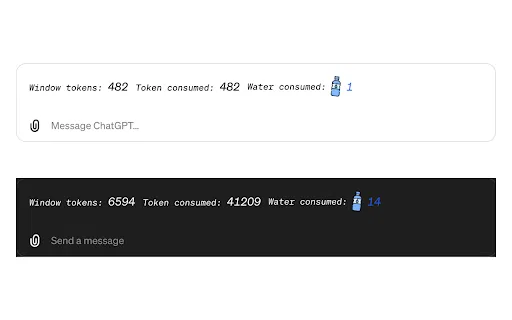
Displays the number of tokens generated in the current ChatGPT conversation, updating as the thread grows so you can see exactly how heavy a prompt has become.
Translates each exchange into an estimated volume of water used to power and cool the infrastructure serving your request, making the environmental angle concrete.
The readout sits alongside the chat interface and refreshes continuously, so no extra tab, dashboard, or manual export is needed to check your usage.
Adds to Chrome in one click with no accounts, settings, or API keys, and it stays out of the way of the normal ChatGPT workflow.
The developer declares that no user data is collected, sold, or transferred for unrelated purposes, and the extension requests no account access.
ChatGPT Consumption adds a small, always-visible panel to the ChatGPT web interface so you can watch a conversation grow in cost terms rather than just in words. As you type and the model replies, the extension tallies the tokens produced in the current thread and pairs that number with an estimated figure for the water consumed by the data-center infrastructure behind the request. The result is a running scoreboard of your session's footprint instead of an abstract statistic you read about elsewhere.
The tool was built for people who think about sustainability and about efficiency at the same time. Knowing the token count of a thread is genuinely useful even if you never look at the environmental numbers: it tells you when a prompt has become bloated, when context has spiralled, and when you would be better off starting a fresh conversation. The water estimate adds a second lens, framing each exchange as a small draw on shared physical resources.
Installation is a one-click add from the Chrome Web Store and there is nothing to configure. The extension is offered free of charge, was last updated in May 2024, and declares that it does not collect or sell user data. Treat the environmental figures as directional estimates rather than audited measurements, since real data-center consumption varies enormously by location, time of day, and hardware.
Anyone who wants a tangible sense of what an AI conversation costs in physical resources can glance at the panel and see an estimate accumulate as they chat, turning an abstract concern into something observable in the moment.
When a thread starts giving worse answers or feels sluggish, the token count reveals how much context has piled up, giving a clear signal that it is time to prune the chat or start fresh.
People writing about AI energy and water use can record token counts and estimates from their own sessions to illustrate the scale of everyday model interaction.
Teams paying per token in other tools can develop a feel for how quickly token counts escalate, which helps them write leaner prompts and keep usage predictable.
Side-by-side telemetry comparison of competing AI tools in the same primary category
| Rank | AI Tool | Monthly Visits | MoM Growth | Direct traffic share | Pricing | Head-to-Head |
|---|---|---|---|---|---|---|
| ● | ChatGPT Consumption | 0 | — | — | Free | Current |
| 1 | ChatGPT Token Counter | 0 | — | — | Free | vs ChatGPT Token Counter |
| 2 | Chatterclock | 0 | — | — | Free | vs Chatterclock |
| 3 | GPT4-Requests-Counter | 0 | — | — | Free | vs GPT4-Requests-Counter |
| 4 | ChatGPT Auto-Continue & Token Counter | 0 | — | — | Free | vs ChatGPT Auto-Continue & Token Counter |
| 5 | Monica | 4.51M | -11.3% | 55% direct | Freemium | vs Monica |
| 6 | Prompt Token Counter | 8.33K | -29.9% | 40% direct | Free | vs Prompt Token Counter |
See how many tokens each ChatGPT conversation is using before it forgets
See how many tokens each ChatGPT conversation is using before it forgets

See exactly how many ChatGPT messages you have left before you hit your cap
See exactly how many ChatGPT messages you have left before you hit your cap

Free / Open-sourceTrack your ChatGPT message quota, timing, and usage patterns right in the browser
Free / Open-sourceTrack your ChatGPT message quota, timing, and usage patterns right in the browser

Keeps ChatGPT generating on its own while a live token counter shows how much context you've used
Keeps ChatGPT generating on its own while a live token counter shows how much context you've used

All-in-one AI assistant across web, browser, desktop and mobile
All-in-one AI assistant across web, browser, desktop and mobile
See exactly how many tokens your OpenAI prompt will use
See exactly how many tokens your OpenAI prompt will use
One AI sidebar for ChatGPT, Claude and Gemini across the web
One AI sidebar for ChatGPT, Claude and Gemini across the web

A Chrome extension that limits and visualizes how much you rely on ChatGPT
A Chrome extension that limits and visualizes how much you rely on ChatGPT

Get a sound alert the moment ChatGPT finishes writing
Get a sound alert the moment ChatGPT finishes writing

Your AI agent for the browser: chat, automate and create from one sidebar
Your AI agent for the browser: chat, automate and create from one sidebar

ChatGPT in your Mac menu bar, inline and everywhere
ChatGPT in your Mac menu bar, inline and everywhere

A free Chrome extension that adds auto-continue, macros, and live token counting to ChatGPT
A free Chrome extension that adds auto-continue, macros, and live token counting to ChatGPT