A private, visual AI space to save and remember anything — no folders, no tagging

Capture and reuse your AI prompts from any website

This is our editors' assessment out of 5, not an average of user ratings. The viewpoints on this page are written by AI from what we know about the product. They are not customer reviews.
According to OpenAITools.app telemetry verified on 2026-11-11, MyPrompts (chromewebstore.google.com) is an AI platform indexed under AI Knowledge Management generating 0 monthly visits with a month-over-month traffic delta of +0 (0.0%). Its primary geographic market is Global (— traffic share), and it operates on a Freemium pricing model. Top competing alternatives by monthly volume include mymind (221.82K visits/mo), AIPRM (708.87K visits/mo), AI Toolbox (290.14K visits/mo).
Finally a clean way to hoard prompts without digging through browser history.
Right click and save is such a frictionless workflow.
Wish there was cloud sync between multiple chrome profiles.
Keeps my Midjourney and Claude snippets organized nicely.
AI-synthesized perspectives grounded in live site inspection, pricing structure, and category benchmarks — presented as editorial viewpoints rather than individual customer testimonials.
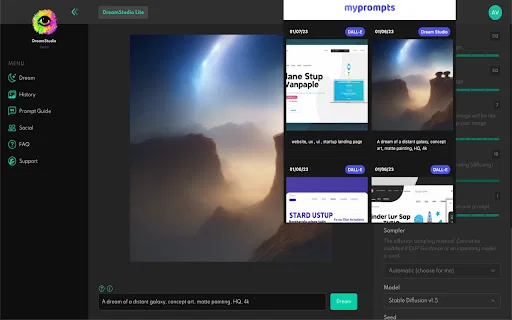
Right-click any image on a supported AI site and choose 'Save my Prompt' to capture the prompt and its generator settings in one step.
Each saved item keeps the image, the prompt text, and the settings used to create it, so results stay reproducible.
An extension popup gives you a single view of everything you have saved, making it easy to review past assets.
Capture prompts and images from wherever you are generating them, then share or revisit the collection later.
A Discord community channel is available for questions, feature ideas, and product updates.
MyPrompts is a small Chrome extension built for one problem: AI prompts are easy to lose. When you generate an image or craft a prompt on a website, the settings and wording that produced it usually disappear the moment you navigate away. MyPrompts fixes that by letting you right-click an image and choose 'Save my Prompt', storing the image, the prompt text, and the associated settings together as a single reusable asset.
All of your saved items are reachable from the extension's popup, which acts as a personal library of prompts and assets. That makes it simple to reopen a favorite style, reuse a settings combination that worked well, or share a prompt with a colleague. The workflow is intentionally minimal: capture, browse, reuse, with no complicated project structure to maintain.
The extension is published by an independent developer and has a small but real installed base. A Discord channel handles feature requests. The developer has published a roadmap that points toward 24-hour saved history, cross-device access, collections, filtering and sorting, and broader support for all types of AI-generated assets. Note that the listing was last updated in January 2023, so the shipped feature set may lag the roadmap.
Save a prompt that produced a strong image, including all its settings, so you can reproduce the same look for future content.
Build a personal library of tested prompts and settings that you can pull up instantly rather than retyping them each session.
Capture prompts and reference images from any tool and store them in one place where teammates can see what worked.
Use the right-click capture flow to log prompts while browsing AI explainers and tool pages, without switching apps.
Side-by-side telemetry comparison of competing AI tools in the same primary category
| Rank | AI Tool | Monthly Visits | MoM Growth | Direct traffic share | Pricing | Head-to-Head |
|---|---|---|---|---|---|---|
| ● | MyPrompts | 0 | — | — | Freemium | Current |
| 1 | mymind | 221.82K | -1% | 75% direct | Free Trial, Paid | vs mymind |
| 2 | AIPRM | 708.87K | -6.9% | 26% direct | Freemium, Paid | vs AIPRM |
| 3 | AI Toolbox | 290.14K | +16.9% | 32% direct | Freemium | vs AI Toolbox |
| 4 | PromptDrive | 0 | — | — | Free | vs PromptDrive |
| 5 | PromptBox | 18.54K | +30.2% | 62% direct | Free Trial, Paid | vs PromptBox |
| 6 | Pin Prompts | 0 | — | — | Free | vs Pin Prompts |

A private, visual AI space to save and remember anything — no folders, no tagging

A prompt library and management layer for ChatGPT and other AI models
Organize, search and export your AI chats across ChatGPT, Gemini, Claude and Grok

Save, organise and share AI prompts without leaving your browser

Organize, store and paste your prompts anywhere with a shortcut

Build a personal prompt library inside ChatGPT, Claude and Gemini

Organise, share, and improve your team's AI prompts in one library.
Export, back up, and organize your AI chat history in any format

Free / Open-sourceBuild, organise and reuse your own library of AI prompts in Chrome

Organize, build and discover AI prompts for ChatGPT, Midjourney and more

A prompt enhancer that restructures rough ideas into clear, effective prompts in one click

Generate, enhance and organize AI prompts in one searchable personal library