01
708.9K/mo
A prompt library and management layer for ChatGPT and other AI models
AI Prompt GeneratorEditorial score: 4.1Freemium, Paid26% direct

708.9K/mo
A prompt library and management layer for ChatGPT and other AI models
Freemium, Paid

Build a personal prompt library inside ChatGPT, Claude and Gemini

This is our editors' assessment out of 5, not an average of user ratings. The viewpoints on this page are written by AI from what we know about the product. They are not customer reviews.
According to OpenAITools.app telemetry verified on 2026-11-11, Pin Prompts (chromewebstore.google.com) is an AI platform indexed under AI Productivity Tools generating 0 monthly visits with a month-over-month traffic delta of +0 (0.0%). Its primary geographic market is Global (— traffic share), and it operates on a Free pricing model. Top competing alternatives by monthly volume include AIPRM (708.87K visits/mo), AI Toolbox (290.14K visits/mo), mymind (221.82K visits/mo).
Pinned my most used prompts and never looked back.
Alt+P shortcut makes pulling up my library instant.
Clean interface right inside Claude and Gemini.
Exported my JSON backup in two clicks.
AI-synthesized perspectives grounded in live site inspection, pricing structure, and category benchmarks — presented as editorial viewpoints rather than individual customer testimonials.
Hover over a prompt in ChatGPT, Claude or Gemini and click the Pin Prompts button to save it. You can also create prompts inside the extension popup, or press Alt+P to open your library instantly.
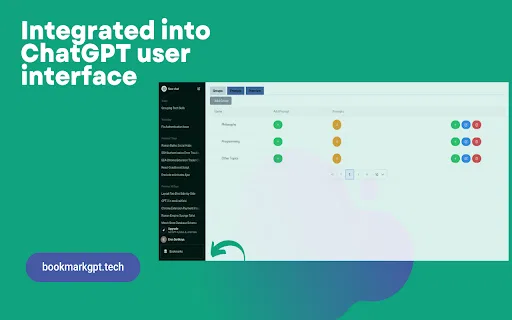
Group saved prompts into custom categories, mark frequently used ones as favorites, and edit categories as your library grows.
Search prompt text and categories instantly to find the exact prompt you need without scrolling through everything.
Export and import your saved prompts as JSON or CSV whenever you want to create or restore a backup.
Saved prompt text is stored using Chrome extension storage and is not sent to the developer or any developer-controlled server.
Pin Prompts is a small, focused Chrome extension whose job is to make prompt reuse easy. Anyone who regularly works in ChatGPT, Claude or Google Gemini tends to rewrite the same instructions again and again. Pin Prompts solves that by creating a personal prompt library directly inside those three sites. You hover over a prompt in a conversation and click the Pin Prompts button, or you can write prompts straight into the extension popup. A keyboard shortcut, Alt+P, opens the library at any time.
Organization is the core of the product. Saved prompts can be dropped into custom categories, tagged as favorites if you use them often, and searched instantly by prompt text or category name. Categories remain editable as your library grows. You can copy any saved prompt to reuse in a new conversation, or locate a saved prompt within the conversation you already have open. Starter templates are available so you can be productive right away rather than starting from an empty list. For safekeeping, the extension can export and import your whole library as JSON or CSV, which doubles as a simple backup and migration path.
On privacy, Pin Prompts is deliberately low-key: saved prompt text lives in Chrome extension storage and is not sent to the developer or any developer-controlled server, and the developer has disclosed that it does not collect or use your data. The extension is free, weighs only about 36 KB and is offered by an independent developer. It is explicitly an independent extension and is not affiliated with or endorsed by OpenAI, Anthropic or Google, even though it is built to work alongside their products.
Keep your best editing, tone and content-brief prompts one click away instead of retyping them for every draft.
Store coding instructions, debugging checklists and boilerplate prompts so you can drop them into any new session instantly.
Organize campaign, research and analysis prompts into categories so the whole workflow is easy to find and repeat.
Keep study, explanation and revision prompts organised so you can reuse them across subjects and courses.
Side-by-side telemetry comparison of competing AI tools in the same primary category
| Rank | AI Tool | Monthly Visits | MoM Growth | Direct traffic share | Pricing | Head-to-Head |
|---|---|---|---|---|---|---|
| ● | Pin Prompts | 0 | — | — | Free | Current |
| 1 | AIPRM | 708.87K | -6.9% | 26% direct | Freemium, Paid | vs AIPRM |
| 2 | AI Toolbox | 290.14K | +16.9% | 32% direct | Freemium | vs AI Toolbox |
| 3 | mymind | 221.82K | -1% | 75% direct | Free Trial, Paid | vs mymind |
| 4 | Organize ChatGPT | 1.81K | +19.5% | 39% direct | Freemium | vs Organize ChatGPT |
| 5 | PromptBox | 18.54K | +30.2% | 62% direct | Free Trial, Paid | vs PromptBox |
| 6 | BookmarkGPT - Bookmark Your ChatGPT Prompts | 0 | — | — | Free | vs BookmarkGPT - Bookmark Your ChatGPT Prompts |
A prompt library and management layer for ChatGPT and other AI models
A prompt library and management layer for ChatGPT and other AI models
Organize, search and export your AI chats across ChatGPT, Gemini, Claude and Grok
Organize, search and export your AI chats across ChatGPT, Gemini, Claude and Grok

A private, visual AI space to save and remember anything — no folders, no tagging
A private, visual AI space to save and remember anything — no folders, no tagging
Sort your ChatGPT history into colour-coded folders you can actually find again
Sort your ChatGPT history into colour-coded folders you can actually find again

Organize, store and paste your prompts anywhere with a shortcut
Organize, store and paste your prompts anywhere with a shortcut

Save, group, and reuse your best ChatGPT prompts without leaving the chat.
Save, group, and reuse your best ChatGPT prompts without leaving the chat.

A privacy-first AI bookmark manager for Chrome
A privacy-first AI bookmark manager for Chrome

Capture and reuse your AI prompts from any website
Capture and reuse your AI prompts from any website

Save and organize your favorite ChatGPT responses in one click
Save and organize your favorite ChatGPT responses in one click

Free / Open-sourceBuild, organise and reuse your own library of AI prompts in Chrome
Free / Open-sourceBuild, organise and reuse your own library of AI prompts in Chrome

Generate, enhance and organize AI prompts in one searchable personal library
Generate, enhance and organize AI prompts in one searchable personal library
Export, back up, and organize your AI chat history in any format
Export, back up, and organize your AI chat history in any format