01
GPT for Work (Autosheet)Official
160.7K/mo
SpecialistAI spreadsheet agent for Excel and Google Sheets
AI SpreadsheetEditorial score: 4.5Free Trial, Paid38% direct

Free Trial, Paid

Ask your Google Sheets anything in plain English — no formulas, no pivot tables
This is our editors' assessment out of 5, not an average of user ratings. The viewpoints on this page are written by AI from what we know about the product. They are not customer reviews.
According to OpenAITools.app telemetry verified on 2026-11-11, Octo: AI Data Analysis & Automation for Google Sheets (chromewebstore.google.com) is an AI platform indexed under AI For Data Analytics generating 0 monthly visits with a month-over-month traffic delta of +0 (0.0%). Its primary geographic market is Global (— traffic share), and it operates on a Free Trial pricing model. Top competing alternatives by monthly volume include GPT for Work (Autosheet) (160.67K visits/mo), Sourcetable — AI spreadsheet & data analyst (38.5K visits/mo), SimpleMetrics AI for Sheets (6.77K visits/mo).
Queries massive sheets like an actual database.
Saved me from writing endless VLOOKUP formulas.
Natural language queries inside Sheets are magic.
Free tier is handy, Pro is worth ten bucks.
AI-synthesized perspectives grounded in live site inspection, pricing structure, and category benchmarks — presented as editorial viewpoints rather than individual customer testimonials.
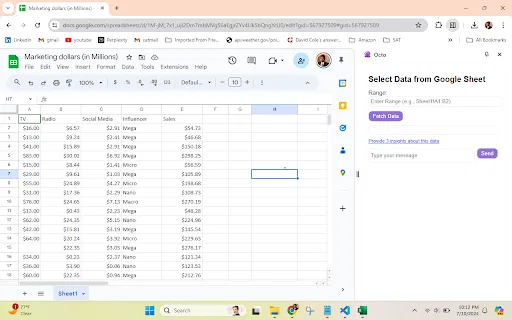
Ask questions in plain English and get answers with the numbers behind them — no VLOOKUP, QUERY, SUMIF or pivot tables required.
Octo fills gaps, fixes two-row and merged headers, skips title rows and handles broken-formula cells before analyzing, and flags cleanup suggestions you can accept in one click.
Auto-picks the right chart type for your data and lets you switch types in one click or export any analysis as a clean, shareable PDF.
Pull data from the web and public APIs into your sheet, reconcile two sheets side by side, and audit every column for nulls, duplicates and outliers.
Schedule recurring analyses and refreshes and get results emailed daily, weekly or monthly, with alerts when a value crosses a threshold.
Most AI chat tools struggle with real spreadsheets: they truncate large tables and lose the details that matter. Octo takes a different approach by living inside Google Sheets as a Chrome extension, querying the full dataset like a database and then acting on the results. It is built by data professionals with more than 15 years in the field and is aimed at people who want answers from their data without mastering spreadsheet formulas.
In practice, you add Octo to Chrome, connect a sheet in one click, and start asking questions. Octo cleans messy data automatically — filling gaps, repairing two-row and merged headers, skipping banner rows and handling broken-formula cells — then returns answers, summaries, trends and outliers, and guided follow-up suggestions. Beyond simple summaries it runs real statistics such as correlations, regressions, forecasts and distributions, and generates charts with an appropriate type chosen for your data.
Automation is where the Pro plan adds most value. You can schedule recurring analyses and data refreshes and have the results emailed on a daily, weekly or monthly cadence, or set alerts that fire when a cell crosses a threshold or the data changes. Octo works within Google's limited drive.file scope, so it only touches the spreadsheets you explicitly connect, and its data is never sold or used for advertising.
Marketers and sales teams analyse campaign performance, pipeline and sales forecasts directly in their sheets with scheduled reports delivered by email.
Researchers and students explore datasets, run statistical tests such as regression and ANOVA, and interpret results without wrestling with formulas.
Automate the recurring analyses you rebuild every week or month and have results emailed or refreshed automatically.
Reconcile two sheets side by side and audit columns for nulls, duplicates and outliers to surface mismatches fast.
Side-by-side telemetry comparison of competing AI tools in the same primary category
| Rank | AI Tool | Monthly Visits | MoM Growth | Direct traffic share | Pricing | Head-to-Head |
|---|---|---|---|---|---|---|
| ● | Octo: AI Data Analysis & Automation for Google Sheets | 0 | — | — | Free Trial | Current |
| 1 | GPT for Work (Autosheet) | 160.67K | -13.5% | 38% direct | Free Trial, Paid | vs GPT for Work (Autosheet) |
| 2 | Sourcetable — AI spreadsheet & data analyst | 38.5K | +13.2% | 34% direct | Freemium, Free Trial, Paid | vs Sourcetable — AI spreadsheet & data analyst |
| 3 | SimpleMetrics AI for Sheets | 6.77K | +40% | 40% direct | Freemium | vs SimpleMetrics AI for Sheets |
| 4 | Numerous.ai | 128.83K | -17% | 25% direct | Freemium, Free Trial, Paid | vs Numerous.ai |
| 5 | Julius AI | 665.49K | +5% | 40% direct | Free Trial, Contact for Pricing | vs Julius AI |
| 6 | Quadratic | 87.22K | -18.3% | 36% direct | Freemium | vs Quadratic |
SpecialistAI spreadsheet agent for Excel and Google Sheets

SpecialistThe AI-native spreadsheet that talks to your databases
SpecialistThe AI-native spreadsheet that talks to your databases

SpecialistAI formulas and agents that run inside Google Sheets
SpecialistAI formulas and agents that run inside Google Sheets

SpecialistChatGPT inside Google Sheets and Excel, with no API keys required
SpecialistChatGPT inside Google Sheets and Excel, with no API keys required
SpecialistChat with your data to get analysis, charts, reports, and slides
SpecialistChat with your data to get analysis, charts, reports, and slides

The AI spreadsheet that connects to your data and explains its answers
The AI spreadsheet that connects to your data and explains its answers
SpecialistRun text, image, video, and music AI inside Google Sheets
SpecialistRun text, image, video, and music AI inside Google Sheets

SpecialistAsk questions about your spreadsheets in plain language
SpecialistAsk questions about your spreadsheets in plain language

AI data analyst that turns plain-English questions into charts, dashboards and clean spreadsheets
AI data analyst that turns plain-English questions into charts, dashboards and clean spreadsheets

SpecialistChat your way through spreadsheets, reports, and slides
SpecialistChat your way through spreadsheets, reports, and slides

SpecialistAI prompts and analysis inside your Google Sheets
SpecialistAI prompts and analysis inside your Google Sheets

SpecialistAn agentic analytics platform that turns questions into governed, trusted answers
SpecialistAn agentic analytics platform that turns questions into governed, trusted answers