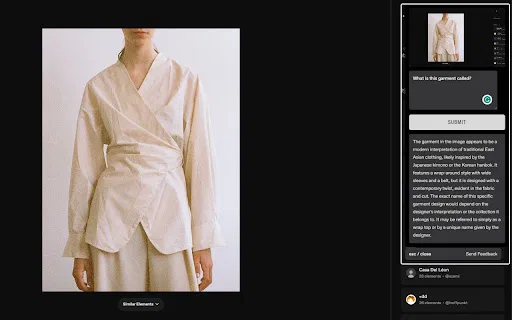
Turn any screenshot into an instant AI answer

This is our editors' assessment out of 5, not an average of user ratings. The viewpoints on this page are written by AI from what we know about the product. They are not customer reviews.
According to OpenAITools.app telemetry verified on 2026-11-11, Vision AI (chromewebstore.google.com) is an AI platform indexed under AI Search Engine generating 0 monthly visits with a month-over-month traffic delta of +0 (0.0%). Its primary geographic market is Global (— traffic share), and it operates on a Free pricing model. Top competing alternatives by monthly volume include AnswersAi (61.7K visits/mo), Merlin AI (1.38M visits/mo), Sider (2.64M visits/mo).
Ctrl + Shift + Y shortcut makes explaining webpage errors to AI instant.
Completely free, no hidden paywalls yet.
Needs history log.
Basic.
AI-synthesized perspectives grounded in live site inspection, pricing structure, and category benchmarks — presented as editorial viewpoints rather than individual customer testimonials.
Grab images, text, charts, or any region of a page instantly with the CTRL + SHIFT + Y shortcut.
Attach a question to your screenshot and the AI interprets it in the context of the captured image.
Works inside the normal browser flow, so AI help is a click away on any site.
Built for studying, market and chart analysis, design inspiration, and general research.
Vision AI is a lightweight Chrome extension that changes how you search the web by combining screenshots with AI-generated answers. Instead of copying text into a chatbot or manually describing an image, you capture the exact region you care about and attach your question directly to it.
Once captured, the integrated AI interprets your prompt in the context of the image and returns a richer, more accurate response than a text-only query would. This makes it useful for students working through dense diagrams, professionals reading market charts, and anyone who wants quick context on visuals they encounter online.
The extension is small and designed to disappear into the browsing experience: you press CTRL + SHIFT + Y, select an area, type your question, and read the answer. It has a modest but positive footprint on the Chrome Web Store, with a five-star rating from early users. The developer states that captured website content is used only to deliver the core feature and is not sold to third parties.

A student screenshots a complex diagram from a lecture page and asks the AI to explain it step by step.
An analyst captures a market chart and asks for an interpretation or forecast to speed up reporting.
A designer grabs artwork or UI they like and asks for style insights or similar references.
Side-by-side telemetry comparison of competing AI tools in the same primary category
| Rank | AI Tool | Monthly Visits | MoM Growth | Direct traffic share | Pricing | Head-to-Head |
|---|---|---|---|---|---|---|
| ● | Vision AI | 0 | — | — | Free | Current |
| 1 | AnswersAi | 61.7K | +22.6% | 35% direct | Paid | vs AnswersAi |
| 2 | Merlin AI | 1.38M | +13.1% | 50% direct | Freemium | vs Merlin AI |
| 3 | Sider | 2.64M | -10.6% | 64% direct | Freemium | vs Sider |
| 4 | Monica | 4.51M | -11.3% | 55% direct | Freemium | vs Monica |
| 5 | Quiz Solver AI | 35.18K | +28.6% | 66% direct | Freemium, Paid | vs Quiz Solver AI |
| 6 | Perplexity | 88.31M | -3.7% | 72% direct | Freemium | vs Perplexity |
One-click AI assistant for browsing, writing and research
AI sidebar and browser agent for reading, writing and research

All-in-one AI assistant across web, browser, desktop and mobile
AI browser extension that reads quiz questions and answers them with explanations
Real-time AI answer engine and research workspace combining live web citations with frontier reasoning models.

A private, visual AI space to save and remember anything — no folders, no tagging

Screenshot or select text, then let ChatGPT analyse and rewrite it

Describe any image with AI — detailed descriptions, captions, prompts, and text extraction in one place
Screenshot any question, get instant AI answers

Capture any page and ask Gemini about it instantly