01
4.1editor score
Screenshot any page and get an instant ChatGPT answer
AI Productivity ToolsFreemium

Screenshot any page and get an instant ChatGPT answer
AI Productivity ToolsEditorial score: 4.1
Freemium

Capture any page and ask Gemini about it instantly

This is our editors' assessment out of 5, not an average of user ratings. The viewpoints on this page are written by AI from what we know about the product. They are not customer reviews.
According to OpenAITools.app telemetry verified on 2026-11-11, Ask Screenshot for Gemini (chromewebstore.google.com) is an AI platform indexed under AI Assistant generating 0 monthly visits with a month-over-month traffic delta of +0 (0.0%). Its primary geographic market is Global (— traffic share), and it operates on a Free pricing model. Top competing alternatives by monthly volume include Ask Screenshot for ChatGPT (0 visits/mo), Google Gemini (2.64B visits/mo), Sider (2.64M visits/mo).
Great shortcut to feed Gemini screenshots.
Saves so much time!
Clean and fast.
UI could be smoother.
AI-synthesized perspectives grounded in live site inspection, pricing structure, and category benchmarks — presented as editorial viewpoints rather than individual customer testimonials.
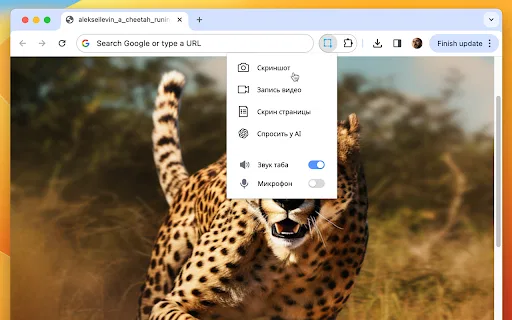
Capture the visible page area and have it open in Gemini automatically, with no saving, downloading, or clipboard steps.
Highlight text on any page and right-click to send it to Gemini for explanation, translation, or a direct answer.
Built-in presets handle the frequent jobs, and each one can be rewritten to match your own phrasing and requirements.
Build your own template library so recurring analyses become a single right-click instead of a typed prompt.
The developer states no trackers and no data collection, with the policy published openly on GitHub.
Ask Screenshot for Gemini attaches itself to the browser context menu. Right-click anywhere on a page and hover over "Ask Gemini" to see the available actions. Screenshots are captured and handed to Gemini automatically, while selected text is passed along for explanation, translation, or answering. Predefined templates such as Summarize, Transcribe, Explain, Translate, and Answer cover the most common requests, and an interactive mode lets you ask anything you like about the captured content.
Crucially, every template is fully customizable. You can adjust the wording, chain in extra instructions, or create presets around your own recurring tasks — turning a screenshot of a receipt into structured data, for instance, or having Gemini rewrite a paragraph in a different register. The extension is part of the same family as Ask Screenshot for ChatGPT, uses the identical privacy posture, and runs on Chrome and other Chromium-based browsers.
The developer, POLYWOCK, declares no data collection and no trackers; the privacy policy lives in a public GitHub repository. The interface is localized into 11 languages, including both Simplified and Traditional Chinese, Japanese, and Korean. It is distributed free through the Chrome Web Store, and the listing has been updated regularly, with the most recent version shipping in 2026.
Scanned PDFs, image-based slides, and protected articles resist text selection; a screenshot gets Gemini to extract the meaning, summarize it, or answer questions about it.
When a site disables text highlighting, capture the block and use the Translate template to get a readable version in the target language.
Capture an error screen, invoice, or ticket and ask Gemini to transcribe the details or pull out the fields you need.
Grab a slide, chart, or infographic and ask Gemini to draft a caption, description, or social post based on what it shows.
Side-by-side telemetry comparison of competing AI tools in the same primary category
| Rank | AI Tool | Monthly Visits | MoM Growth | Direct traffic share | Pricing | Head-to-Head |
|---|---|---|---|---|---|---|
| ● | Ask Screenshot for Gemini | 0 | — | — | Free | Current |
| 1 | Ask Screenshot for ChatGPT | 0 | — | — | Freemium | vs Ask Screenshot for ChatGPT |
| 2 | Google Gemini | 2.64B | -0.1% | 62% direct | Freemium | vs Google Gemini |
| 3 | Sider | 2.64M | -10.6% | 64% direct | Freemium | vs Sider |
| 4 | Merlin AI | 1.38M | +13.1% | 50% direct | Freemium | vs Merlin AI |
| 5 | Monica | 4.51M | -11.3% | 55% direct | Freemium | vs Monica |
| 6 | AnswersAi | 61.7K | +22.6% | 35% direct | Paid | vs AnswersAi |
Screenshot any page and get an instant ChatGPT answer
Screenshot any page and get an instant ChatGPT answer

Google's multimodal AI assistant powered by Gemini 4 Carbon (Gemini Carbon 4), Gemini 4 Argon, and Gemini 3.8 Flash with a 1M-token context window and Workspace integration.
Google's multimodal AI assistant powered by Gemini 4 Carbon (Gemini Carbon 4), Gemini 4 Argon, and Gemini 3.8 Flash with a 1M-token context window and Workspace integration.
AI sidebar and browser agent for reading, writing and research
AI sidebar and browser agent for reading, writing and research
One-click AI assistant for browsing, writing and research
One-click AI assistant for browsing, writing and research

All-in-one AI assistant across web, browser, desktop and mobile
All-in-one AI assistant across web, browser, desktop and mobile
Summarize, bookmark and write with AI right in your browser
Summarize, bookmark and write with AI right in your browser

A low-cost AI assistant that lives in your browser tab
A low-cost AI assistant that lives in your browser tab

SpecialistTurn any screenshot into an instant AI answer

ChatGPT in your browser sidebar, without switching tabs
ChatGPT in your browser sidebar, without switching tabs

Capture an area, record your screen, then ask ChatGPT to solve, explain or translate what you selected
Capture an area, record your screen, then ask ChatGPT to solve, explain or translate what you selected
AI browser extension that reads quiz questions and answers them with explanations
AI browser extension that reads quiz questions and answers them with explanations