01
4.5M/mo
All-in-one AI assistant across web, browser, desktop and mobile
AI AssistantEditorial score: 4.3Freemium55% direct

4.5M/mo
All-in-one AI assistant across web, browser, desktop and mobile
Freemium
ChatClip records 0 monthly visits with — month-over-month growth and Free pricing. ChatGPTables records 0 monthly visits with — growth and Free pricing.

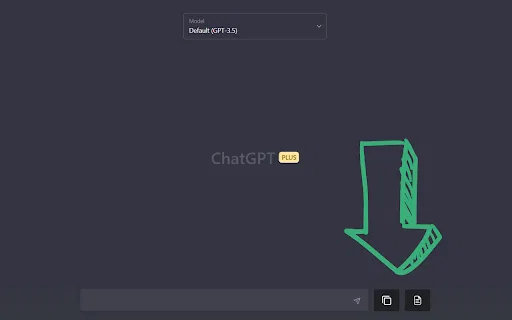
Copy ChatGPT conversations as plain text, Markdown, JSON, or code

Copy ChatGPT tables straight into clean Markdown
| Dimension / Metric | | |
|---|---|---|
| Official Domain | chromewebstore.google.com | chrome.google.com |
| Pricing Model | Free | Free |
| Monthly Visits | 0 (0) | 0 (0) |
| MoM Traffic Delta | 0 (—) | 0 (—) |
| Primary Market & Share | 🌐 Global (—) | 🌐 Global (—) |
| Direct Visits / mo | 0 | 0 |
| User Rating | 3.8 | 1.8 |
| Supported Platforms | Browser Extension | Browser Extension |
Copy ChatGPT conversations as plain text, Markdown, JSON, or code
Grab a selected portion or the whole conversation with a single click instead of dragging to select text.
Export the same content as plain text, JSON, Markdown, or raw code depending on what your next step needs.
Pull just the code block out of an assistant reply so you can drop it into your IDE without stray prose.
Install from the Chrome Web Store and start using it immediately — no sign-up, no server-side chat storage.
Copy ChatGPT tables straight into clean Markdown
Adds a table copy button inside ChatGPT responses so you can grab the table without manually selecting rows and cells.
Rewrites the styled HTML table from ChatGPT into standard Markdown table syntax that renders on GitHub, Notion, Obsidian and most docs platforms.
The copy action also brings along images associated with the table content, so you do not have to re-fetch them separately.
Install from the Chrome Web Store, reload ChatGPT, and the button appears. No sign-in, API key or configuration required.
All-in-one AI assistant across web, browser, desktop and mobile
All-in-one AI assistant across web, browser, desktop and mobile
AI sidebar and browser agent for reading, writing and research
AI sidebar and browser agent for reading, writing and research
An extendable launcher that puts your tools, AI, and automations one keystroke away
An extendable launcher that puts your tools, AI, and automations one keystroke away
One browser agent that combines every major AI model with web automation

Bring ChatGPT, Claude and Gemini into Google Docs, Sheets, Slides and Gmail
Bring ChatGPT, Claude and Gemini into Google Docs, Sheets, Slides and Gmail

All-in-one collaborative workspace blending docs, tables, and AI
All-in-one collaborative workspace blending docs, tables, and AI
Organize, search and export your AI chats across ChatGPT, Gemini, Claude and Grok
Organize, search and export your AI chats across ChatGPT, Gemini, Claude and Grok
Scrape any website by chatting with it in plain English
Scrape any website by chatting with it in plain English
Export, back up, and organize your AI chat history in any format
Export, back up, and organize your AI chat history in any format

Copy and export ChatGPT conversations in TXT, CSV, JSON, HTML, XML or Excel
Copy and export ChatGPT conversations in TXT, CSV, JSON, HTML, XML or Excel

One-click copy and export of your ChatGPT conversations
One-click copy and export of your ChatGPT conversations

Export ChatGPT conversations to PDF, Markdown, TXT or JSON in one click
Export ChatGPT conversations to PDF, Markdown, TXT or JSON in one click