01
17.4K/mo
Export, back up, and organize your AI chat history in any format
AI Knowledge ManagementEditorial score: 4.4Freemium, Free Trial+165.1%

17.4K/mo+165.1%
Export, back up, and organize your AI chat history in any format
Freemium, Free Trial

Export ChatGPT conversations to PDF, Markdown, TXT or JSON in one click

This is our editors' assessment out of 5, not an average of user ratings. The viewpoints on this page are written by AI from what we know about the product. They are not customer reviews.
According to OpenAITools.app telemetry verified on 2026-11-11, ChatGPT Exporter - Save & Download Chats (chromewebstore.google.com) is an AI platform indexed under AI Productivity Tools generating 0 monthly visits with a month-over-month traffic delta of +0 (0.0%). Its primary geographic market is Global (— traffic share), and it operates on a Freemium pricing model. Top competing alternatives by monthly volume include YourAIScroll (17.4K visits/mo), ClaudePDF - Turn Claude Chats into PDFs (0 visits/mo), SAVE ChatGPT (0 visits/mo).
Saves hours of manual copy-pasting every single week.
Code blocks and tables export cleanly without breaking formatting.
Clean interface, does exactly what the description promises.
Would love a direct cloud sync feature in future updates.
AI-synthesized perspectives grounded in live site inspection, pricing structure, and category benchmarks — presented as editorial viewpoints rather than individual customer testimonials.
Open any ChatGPT conversation and download it immediately — no manual text selection, no copy-paste formatting cleanup.
Save chats as PDF for sharing and printing, Markdown for Notion or Obsidian, plain TXT for archiving, or JSON for developer workflows.
Code blocks, tables, bullet lists, headings and long AI answers keep their original formatting in the exported file.
Conversion runs entirely inside your browser; chat content is never uploaded to or stored on external servers.
Roughly 121 KiB, handles very long threads without lag, and ships with 13 interface languages including Chinese, Japanese, Korean and Vietnamese.
ChatGPT Exporter is a free-to-install Chrome extension built for one job: getting your ChatGPT conversations out of the browser and into a file you can keep, share or reuse. Instead of selecting text by hand or screenshotting a thread, you hit one button on an open chat and choose a format. The page's structure is preserved, so code blocks stay monospaced and copyable, tables keep their rows and columns, and lists remain lists.
The four export formats cover most workflows. PDF is the obvious choice for reports, meeting notes and anything you need to hand to someone else. Markdown drops cleanly into Notion, Obsidian, Logseq and other note tools. TXT is the lightest option for plain archiving. JSON is aimed at developers who want to pipe conversation data into scripts, datasets or their own AI pipelines.
Privacy is handled the simple way: all conversion happens locally inside your browser, so conversation text is never uploaded to the developer's servers. The extension stays small (about 121 KiB) and reports 13 interface languages, a 4.6-star rating from roughly 114 reviews and around 9,000 users. Core export features are free; an optional premium plan unlocks extras such as unlimited exports. It is an independent third-party tool and is not made or endorsed by OpenAI.
Export a research or planning conversation as PDF and attach it to a client deck, meeting note or internal doc.
Save Q&A sessions as Markdown so they live alongside your other notes in Obsidian, Notion or a plain folder.
Pull conversations out as JSON to parse prompts and answers programmatically for evaluation or dataset building.
Archive ideation threads locally as TXT or PDF so good ideas survive chat deletions and account changes.
Side-by-side telemetry comparison of competing AI tools in the same primary category
| Rank | AI Tool | Monthly Visits | MoM Growth | Direct traffic share | Pricing | Head-to-Head |
|---|---|---|---|---|---|---|
| ● | ChatGPT Exporter - Save & Download Chats | 0 | — | — | Freemium | Current |
| 1 | YourAIScroll | 17.4K | +165.1% | 40% direct | Freemium, Free Trial | vs YourAIScroll |
| 2 | ClaudePDF - Turn Claude Chats into PDFs | 0 | — | — | Free | vs ClaudePDF - Turn Claude Chats into PDFs |
| 3 | SAVE ChatGPT | 0 | — | — | Free | vs SAVE ChatGPT |
| 4 | ChatGPT Plus - Batch Export GPT Conversations | 0 | — | — | Free | vs ChatGPT Plus - Batch Export GPT Conversations |
| 5 | AI Toolbox | 290.14K | +16.9% | 32% direct | Freemium | vs AI Toolbox |
| 6 | ChatGPT Session Exporter | 0 | — | — | Free | vs ChatGPT Session Exporter |
Export, back up, and organize your AI chat history in any format
Export, back up, and organize your AI chat history in any format

One-click PDF, Markdown and text export for your Claude.ai conversations
One-click PDF, Markdown and text export for your Claude.ai conversations

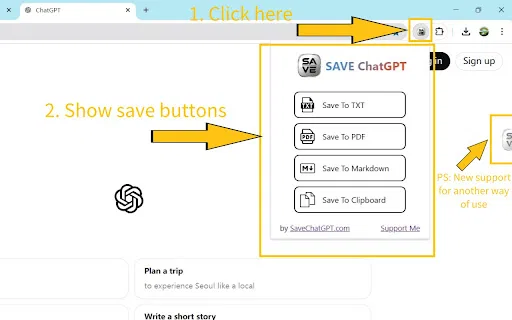
SpecialistSave any ChatGPT conversation as TXT, PDF, Markdown, or straight to your clipboard
SpecialistSave any ChatGPT conversation as TXT, PDF, Markdown, or straight to your clipboard

Export and share your ChatGPT chats as PDF, DOCX, TXT, MD, or PNG
Export and share your ChatGPT chats as PDF, DOCX, TXT, MD, or PNG
Organize, search and export your AI chats across ChatGPT, Gemini, Claude and Grok
Organize, search and export your AI chats across ChatGPT, Gemini, Claude and Grok

One-click export of ChatGPT chats to HTML or TXT
One-click export of ChatGPT chats to HTML or TXT

SpecialistSave, export and share your ChatGPT conversations in a few clicks
SpecialistSave, export and share your ChatGPT conversations in a few clicks

Save any ChatGPT conversation as a clean, shareable PDF in one click
Save any ChatGPT conversation as a clean, shareable PDF in one click
Sort your ChatGPT history into colour-coded folders you can actually find again
Sort your ChatGPT history into colour-coded folders you can actually find again

Save any ChatGPT conversation as TXT, PNG, Markdown or PDF with one click from the chat page.
Save any ChatGPT conversation as TXT, PNG, Markdown or PDF with one click from the chat page.
AI sidebar and browser agent for reading, writing and research
AI sidebar and browser agent for reading, writing and research

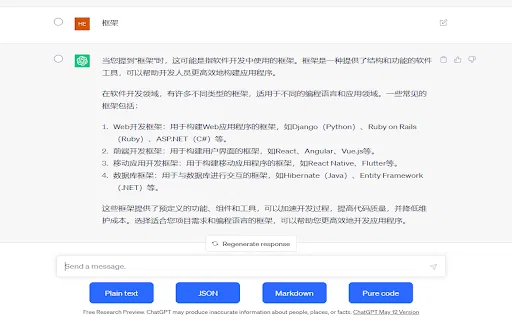
SpecialistCopy ChatGPT conversations as plain text, Markdown, JSON, or code
SpecialistCopy ChatGPT conversations as plain text, Markdown, JSON, or code