01
4.2editor score
Capture any page and ask Gemini about it instantly
AI AssistantFree

Capture any page and ask Gemini about it instantly
AI AssistantEditorial score: 4.2
Free

Screenshot any page and get an instant ChatGPT answer

This is our editors' assessment out of 5, not an average of user ratings. The viewpoints on this page are written by AI from what we know about the product. They are not customer reviews.
According to OpenAITools.app telemetry verified on 2026-11-11, Ask Screenshot for ChatGPT (chromewebstore.google.com) is an AI platform indexed under AI Productivity Tools generating 0 monthly visits with a month-over-month traffic delta of +0 (0.0%). Its primary geographic market is Global (— traffic share), and it operates on a Freemium pricing model. Top competing alternatives by monthly volume include Ask Screenshot for Gemini (0 visits/mo), Sider (2.64M visits/mo), Monica (4.51M visits/mo).
Saves me from endless screenshotting and saving to disk.
Super slick workflow!
Right-click and done.
Sometimes fails on heavy JS pages.
AI-synthesized perspectives grounded in live site inspection, pricing structure, and category benchmarks — presented as editorial viewpoints rather than individual customer testimonials.
Grab the visible page area in one click and hand it straight to ChatGPT, no image saving or clipboard juggling required.
Highlight any passage on a page, right-click, and send it to ChatGPT for explanation, translation, or rewriting.
Summarize, Transcribe, Transform Style, Explain, Translate, and Solve come built in, and every one can be rewritten or duplicated into your own presets.
Type gg in the browser address bar to launch a ChatGPT session from any tab, including pages where context menus are blocked.
The developer declares no data collection and no trackers, with a public privacy policy on GitHub.
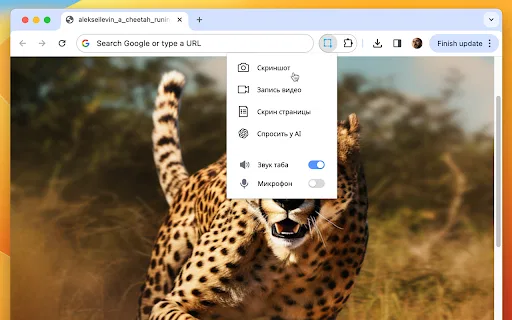
Ask Screenshot for ChatGPT lives in your browser's context menu. Right-click anywhere on a page and hover over the "Ask GPT" entry to reveal a list of actions; the extension captures the visible area (or your current text selection), opens ChatGPT, and drops the content into the prompt box for you. From there you either ask a free-form question or pick a predefined template such as Summarize, Transcribe, Transform Style, Explain, Translate, or Solve.
Every template is editable. You can rewrite the wording, add your own instructions, or build entirely new presets so the extension matches the exact prompts your job needs — from turning a screenshot of a chart into a written description to translating a foreign-language paragraph you can't select cleanly. An "Omni Search" shortcut lets you type gg in the address bar to summon ChatGPT from anywhere, even on tabs where right-click is disabled.
The developer, POLYWOCK, ships the extension with a privacy-first posture: no analytics, no trackers, and no collection of browsing data. It is free to install, with the optional ChatGPT Plus benefit of an integrated sidebar experience. The listing supports 11 interface languages, and the source and privacy policy are hosted publicly on GitHub.
PDF viewers, protected articles, and image-based documents can't be selected normally — screenshot them and ask ChatGPT for a summary or key points in seconds.
Capture a graph or KPI panel and ask ChatGPT to describe the trend, flag anomalies, or draft a written commentary for your report.
When a page blocks text selection, screenshot the paragraph and use the Translate template to get a clean rendering in your language.
Select a block of copy, then use Transform Style to shift tone or reading level without retyping the source material.
Side-by-side telemetry comparison of competing AI tools in the same primary category
| Rank | AI Tool | Monthly Visits | MoM Growth | Direct traffic share | Pricing | Head-to-Head |
|---|---|---|---|---|---|---|
| ● | Ask Screenshot for ChatGPT | 0 | — | — | Freemium | Current |
| 1 | Ask Screenshot for Gemini | 0 | — | — | Free | vs Ask Screenshot for Gemini |
| 2 | Sider | 2.64M | -10.6% | 64% direct | Freemium | vs Sider |
| 3 | Monica | 4.51M | -11.3% | 55% direct | Freemium | vs Monica |
| 4 | Merlin AI | 1.38M | +13.1% | 50% direct | Freemium | vs Merlin AI |
| 5 | AnswersAi | 61.7K | +22.6% | 35% direct | Paid | vs AnswersAi |
| 6 | ChatGPT Vision for ALL | 0 | — | — | Freemium, Free Trial | vs ChatGPT Vision for ALL |
Capture any page and ask Gemini about it instantly
Capture any page and ask Gemini about it instantly
AI sidebar and browser agent for reading, writing and research
AI sidebar and browser agent for reading, writing and research

All-in-one AI assistant across web, browser, desktop and mobile
All-in-one AI assistant across web, browser, desktop and mobile
One-click AI assistant for browsing, writing and research
One-click AI assistant for browsing, writing and research

Screenshot or select text, then let ChatGPT analyse and rewrite it
Screenshot or select text, then let ChatGPT analyse and rewrite it

ChatGPT in your browser sidebar, without switching tabs
ChatGPT in your browser sidebar, without switching tabs
Summarize, bookmark and write with AI right in your browser
Summarize, bookmark and write with AI right in your browser
Your GPT-powered sidekick for every page, PDF and video
Your GPT-powered sidekick for every page, PDF and video

Capture an area, record your screen, then ask ChatGPT to solve, explain or translate what you selected
Capture an area, record your screen, then ask ChatGPT to solve, explain or translate what you selected

A low-cost AI assistant that lives in your browser tab
A low-cost AI assistant that lives in your browser tab

Summarize any YouTube video into key ideas and timestamped notes in seconds.
Summarize any YouTube video into key ideas and timestamped notes in seconds.