01
2.6M/mo
AI sidebar and browser agent for reading, writing and research
AI AssistantEditorial score: 4.5Freemium64% direct

2.6M/mo
AI sidebar and browser agent for reading, writing and research
Freemium

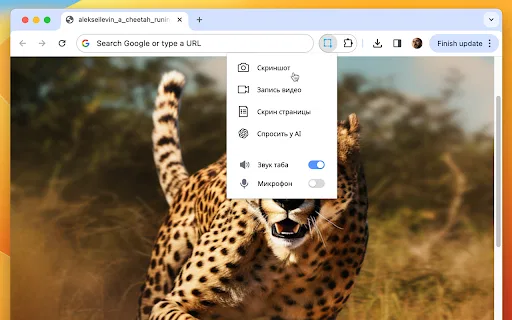
Capture an area, record your screen, then ask ChatGPT to solve, explain or translate what you selected
This is our editors' assessment out of 5, not an average of user ratings. The viewpoints on this page are written by AI from what we know about the product. They are not customer reviews.
According to OpenAITools.app telemetry verified on 2026-11-11, Skrinshoter: Screenshot, Screen Recording, ChatGPT (chromewebstore.google.com) is an AI platform indexed under AI Assistant generating 0 monthly visits with a month-over-month traffic delta of +0 (0.0%). Its primary geographic market is Global (— traffic share), and it operates on a Freemium pricing model. Top competing alternatives by monthly volume include Sider (2.64M visits/mo), Monica (4.51M visits/mo), Merlin AI (1.38M visits/mo).
Awesome combo of screen capture and ChatGPT help.
Saves so many steps when debugging errors.
Interface is a bit cluttered sometimes.
Very solid screen recording tool.
AI-synthesized perspectives grounded in live site inspection, pricing structure, and category benchmarks — presented as editorial viewpoints rather than individual customer testimonials.
Highlight a region or capture an entire page, then get an instant shareable link to the image.
Record your screen quickly and share a link to the video without manual file handling.
Select any region and ask the AI to solve a task, recognise the image content, translate text or explain it.
Captures are delivered as links, which makes passing them to teammates or chat threads fast.
New users receive a bundle of complimentary AI tokens to test the assistant before purchasing more.
Skrinshoter started as a straightforward capture tool: highlight an area or grab an entire page, record a clip of your screen, and instantly get a shareable link to the result. That core loop is designed for speed, so you can send a screenshot or recording to a colleague without saving files locally first.
The headline feature is "Ask AI", built on ChatGPT 4.0. Select a region with a question, a math problem, a foreign-language paragraph or an unfamiliar interface, and the assistant answers it in seconds. It handles problem solving, image recognition, text translation and general explanations, which makes the extension useful far beyond simple archiving.
Skrinshoter is an independent third-party extension published by SAAS GROVE COM LTD, the owner of skrinshoter.ru. It is not affiliated with OpenAI. AI requests consume tokens, and new users receive a welcome bundle of free tokens to try the feature, with additional usage offered through in-app purchases.
Screenshot a tricky question and let the AI walk through the solution or explain the underlying concept.
Capture a bug area, record a short reproduction clip, and send the link straight into the ticket.
Select a region containing foreign text and have it recognised and translated in place.
Highlight a dashboard or settings screen you do not understand and ask the AI what it means.
Side-by-side telemetry comparison of competing AI tools in the same primary category
| Rank | AI Tool | Monthly Visits | MoM Growth | Direct traffic share | Pricing | Head-to-Head |
|---|---|---|---|---|---|---|
| ● | Skrinshoter: Screenshot, Screen Recording, ChatGPT | 0 | — | — | Freemium | Current |
| 1 | Sider | 2.64M | -10.6% | 64% direct | Freemium | vs Sider |
| 2 | Monica | 4.51M | -11.3% | 55% direct | Freemium | vs Monica |
| 3 | Merlin AI | 1.38M | +13.1% | 50% direct | Freemium | vs Merlin AI |
| 4 | ChatGPT Visioner for Screenshot Reading and Analysis | 0 | — | — | Freemium, Free Trial | vs ChatGPT Visioner for Screenshot Reading and Analysis |
| 5 | Walles.ai - Your AI Browser Sidekick | 8.31K | -39.2% | 67% direct | Freemium | vs Walles.ai - Your AI Browser Sidekick |
| 6 | Ask Screenshot for ChatGPT | 0 | — | — | Freemium | vs Ask Screenshot for ChatGPT |
AI sidebar and browser agent for reading, writing and research
AI sidebar and browser agent for reading, writing and research

All-in-one AI assistant across web, browser, desktop and mobile
All-in-one AI assistant across web, browser, desktop and mobile
One-click AI assistant for browsing, writing and research
One-click AI assistant for browsing, writing and research

Turn any screenshot into a ChatGPT question
Turn any screenshot into a ChatGPT question
Your GPT-powered sidekick for every page, PDF and video
Your GPT-powered sidekick for every page, PDF and video

Screenshot any page and get an instant ChatGPT answer
Screenshot any page and get an instant ChatGPT answer

Capture any page and ask Gemini about it instantly
Capture any page and ask Gemini about it instantly

One AI super app for chat, images, video and everyday document tasks
One AI super app for chat, images, video and everyday document tasks

Screenshot or select text, then let ChatGPT analyse and rewrite it
Screenshot or select text, then let ChatGPT analyse and rewrite it

OpenAI's flagship multimodal assistant powered by GPT-6 and GPT-5.6 for reasoning, coding, and deep research.
OpenAI's flagship multimodal assistant powered by GPT-6 and GPT-5.6 for reasoning, coding, and deep research.

Bilingual AI translation for websites, documents, video and images
Bilingual AI translation for websites, documents, video and images


