01
1.8K/mo
Sort your ChatGPT history into colour-coded folders you can actually find again
AI Productivity ToolsEditorial score: 4.2Freemium+19.5%

1.8K/mo+19.5%
Sort your ChatGPT history into colour-coded folders you can actually find again
Freemium

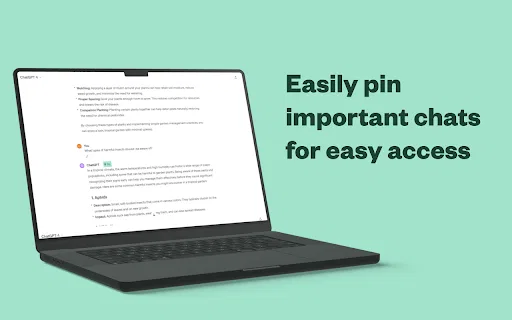
Bookmark key ChatGPT messages and jump straight back to them
This is our editors' assessment out of 5, not an average of user ratings. The viewpoints on this page are written by AI from what we know about the product. They are not customer reviews.
According to OpenAITools.app telemetry verified on 2026-11-11, ChatGPT Bookmark (chromewebstore.google.com) is an AI platform indexed under AI Chatbot generating 0 monthly visits with a month-over-month traffic delta of +0 (0.0%). Its primary geographic market is Global (— traffic share), and it operates on a Free pricing model. Top competing alternatives by monthly volume include Organize ChatGPT (1.81K visits/mo), AI Toolbox (290.14K visits/mo), AIPRM (708.87K visits/mo).
Finally a way to bookmark specific messages in huge threads.
Extension sometimes loses bookmarks after updates.
Saves so much scrolling time.
AI-synthesized perspectives grounded in live site inspection, pricing structure, and category benchmarks — presented as editorial viewpoints rather than individual customer testimonials.
Mark the exact ChatGPT message you want to keep instead of bookmarking the whole conversation.
Group saved messages into folders and tag them so a growing collection stays searchable and tidy.
Clicking a bookmark opens the original conversation and scrolls to the saved message.
A compact extension popup that manages bookmarks without getting in the way of your chat workflow.
The developer declares that no user data is sold or used for unrelated purposes.
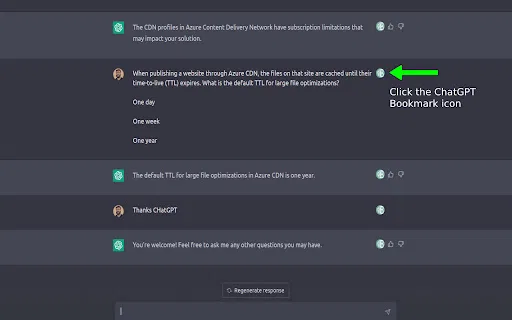
ChatGPT Bookmark solves a very practical annoyance: long ChatGPT threads are hard to navigate. When you find a prompt or answer worth keeping, ChatGPT itself gives you limited ways to mark it within the flow of the conversation. This extension adds a simple bookmark action so the message is saved with a reference that points back to its original position in the thread.
Later, you open the extension popup and click the saved entry. The extension opens the ChatGPT conversation and scrolls directly to the message you bookmarked, so you do not have to re-read the whole thread to find the part you cared about. The developer describes the experience as being similar to starred messages in a messaging app.
Version 1.0.5 refreshed the interface and added support for folders and tags, which makes it practical to build a personal library of favourite prompts, useful answers and reference material across many chats. It stays free, small (around 244 KiB) and focused on doing one thing well rather than replacing ChatGPT's interface.
Save the answer that finally made a concept click, so you can revisit it during revision instead of scrolling through a long study thread.
Bookmark strong prompts and responses from different chats, tag them by task, and reuse the structure in new conversations.
Mark the paragraphs, outlines and phrasing you liked across many brainstorming sessions and pull them up again in seconds.
Tag code snippets, error explanations and fixes so the solution is one click away the next time the same problem appears.
Side-by-side telemetry comparison of competing AI tools in the same primary category
| Rank | AI Tool | Monthly Visits | MoM Growth | Direct traffic share | Pricing | Head-to-Head |
|---|---|---|---|---|---|---|
| ● | ChatGPT Bookmark | 0 | — | — | Free | Current |
| 1 | Organize ChatGPT | 1.81K | +19.5% | 39% direct | Freemium | vs Organize ChatGPT |
| 2 | AI Toolbox | 290.14K | +16.9% | 32% direct | Freemium | vs AI Toolbox |
| 3 | AIPRM | 708.87K | -6.9% | 26% direct | Freemium, Paid | vs AIPRM |
| 4 | Monica | 4.51M | -11.3% | 55% direct | Freemium | vs Monica |
| 5 | Sider | 2.64M | -10.6% | 64% direct | Freemium | vs Sider |
| 6 | mymind | 221.82K | -1% | 75% direct | Free Trial, Paid | vs mymind |
Sort your ChatGPT history into colour-coded folders you can actually find again
Sort your ChatGPT history into colour-coded folders you can actually find again
Organize, search and export your AI chats across ChatGPT, Gemini, Claude and Grok
Organize, search and export your AI chats across ChatGPT, Gemini, Claude and Grok

A prompt library and management layer for ChatGPT and other AI models
A prompt library and management layer for ChatGPT and other AI models

All-in-one AI assistant across web, browser, desktop and mobile
All-in-one AI assistant across web, browser, desktop and mobile
AI sidebar and browser agent for reading, writing and research
AI sidebar and browser agent for reading, writing and research

A private, visual AI space to save and remember anything — no folders, no tagging
A private, visual AI space to save and remember anything — no folders, no tagging

SpecialistFind any past ChatGPT conversation in seconds with a lightweight sidebar filter
SpecialistFind any past ChatGPT conversation in seconds with a lightweight sidebar filter
Pin key ChatGPT messages and jump back to them instantly

SpecialistSave, search and revisit your best ChatGPT conversations in one click
SpecialistSave, search and revisit your best ChatGPT conversations in one click
One privacy-first AI client for GPT, Claude, Gemini and more
One privacy-first AI client for GPT, Claude, Gemini and more

SpecialistFile your ChatGPT conversations into folders with a simple drag and drop
SpecialistFile your ChatGPT conversations into folders with a simple drag and drop

SpecialistSave and share your ChatGPT conversations as links
SpecialistSave and share your ChatGPT conversations as links