Organize, search and export your AI chats across ChatGPT, Gemini, Claude and Grok
Sort your ChatGPT history into colour-coded folders you can actually find again
Estimated monthly website visits
Similarweb estimates for this domain, not active users. Only available observation months are shown; collection date is separate from the traffic period.
Collected Nov 11, 2026

This is our editors' assessment out of 5, not an average of user ratings. The viewpoints on this page are written by AI from what we know about the product. They are not customer reviews.
According to OpenAITools.app telemetry verified on 2026-11-11, Organize ChatGPT (organizechatgpt.com) is an AI platform indexed under AI Productivity Tools generating 1.81K monthly visits with a month-over-month traffic delta of +295 (+19.5%). Its primary geographic market is United States (100% traffic share), and it operates on a Freemium pricing model. Top competing alternatives by monthly volume include AI Toolbox (290.14K visits/mo), GPT Power Manager (0 visits/mo), ChatGPT Bookmark (0 visits/mo).
Folders finally save my sanity. Endless scrolling is gone.
Sync feature is pricey, but local organization is top-notch.
Pinned chats and colors make research workflows actually manageable.
UI integration is seamless.
AI-synthesized perspectives grounded in live site inspection, pricing structure, and category benchmarks — presented as editorial viewpoints rather than individual customer testimonials.
Create unlimited named folders with their own colour and icon so projects, topics or clients stay visually separated.
Pin a conversation via right-click to keep it anchored at the top of its folder for quick recall.
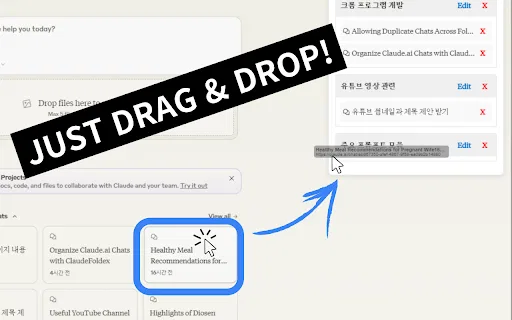
Select several chats at once and drop them into a folder instead of moving them one by one.
Assign visual tags to folders so you can recognise a category at a glance in a crowded sidebar.
With the paid licence your folder structure follows you to any computer you sign into.
ChatGPT's own sidebar keeps every conversation in one long, chronological list, which becomes genuinely unusable once you pass a few hundred chats. Organize ChatGPT fixes exactly that pain point by injecting a folder layer into the chat.openai.com interface. You create a folder, give it a name, assign a colour and pick an icon, then drag or right-click conversations into it. Important threads can be pinned so they float to the top of their folder, and the whole structure stays searchable and filterable.
The extension runs entirely in the browser and, according to its own privacy note, does not store personal data on its servers — only folder names, colours and chat links are synced, which is what makes cross-device use possible. The developer publishes bug-fix notes regularly, including fixes prompted by OpenAI's own UI redesigns, so it tends to be patched quickly when the ChatGPT front end changes.
The core extension is free. A single one-off payment of €29.95 unlocks multi-computer sync through a customer portal, which is aimed at people who hop between a desktop, a laptop and a work machine. There is no subscription.
Keep every client's research, drafts and revisions in a colour-coded folder rather than hunting through months of history.
Split essay research, exam revision and lecture notes into distinct folders so study sessions start instantly.
Group prompt chains, outlines and ad copy per campaign and pin the ones you return to daily.
Turn a thousand-chat backlog into a browsable archive with search and filters instead of endless scrolling.
Side-by-side telemetry comparison of competing AI tools in the same primary category
| Rank | AI Tool | Monthly Visits | MoM Growth | Direct traffic share | Pricing | Head-to-Head |
|---|---|---|---|---|---|---|
| ● | Organize ChatGPT | 1.81K | +19.5% | 39% direct | Freemium | Current |
| 1 | AI Toolbox | 290.14K | +16.9% | 32% direct | Freemium | vs AI Toolbox |
| 2 | GPT Power Manager | 0 | — | — | Freemium | vs GPT Power Manager |
| 3 | ChatGPT Bookmark | 0 | — | — | Free | vs ChatGPT Bookmark |
| 4 | StackMind.AI - Intelligent ChatGPT History Organizer & Search | 0 | — | — | Free | vs StackMind.AI - Intelligent ChatGPT History Organizer & Search |
| 5 | AIPRM | 708.87K | -6.9% | 26% direct | Freemium, Paid | vs AIPRM |
| 6 | Sortbase (ChatGPT Easy Folders) | 0 | — | — | Freemium | vs Sortbase (ChatGPT Easy Folders) |
Organize, search and export your AI chats across ChatGPT, Gemini, Claude and Grok

Organize ChatGPT with tags, pins, colors, and folders

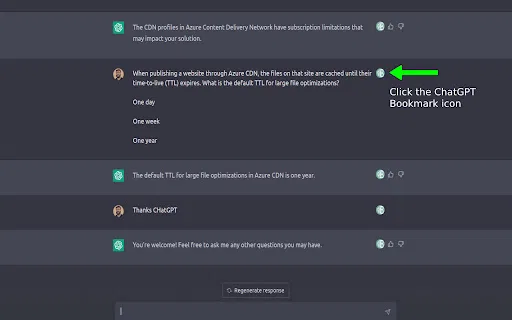
Bookmark key ChatGPT messages and jump straight back to them

SpecialistAuto-organize and search your entire ChatGPT history

A prompt library and management layer for ChatGPT and other AI models

One folder tree for your ChatGPT, Claude, Gemini and Grok conversations

Organize ChatGPT chats and LinkedIn posts into tidy folders

SpecialistFile your ChatGPT conversations into folders with a simple drag and drop

A private, visual AI space to save and remember anything — no folders, no tagging
Export, back up, and organize your AI chat history in any format

Sort your Claude.ai conversations into folders instead of endless scrolling
The best frontend for AI.