01
3.9editor score
See how many tokens each ChatGPT conversation is using before it forgets
AI MonitorFree

See how many tokens each ChatGPT conversation is using before it forgets
AI MonitorEditorial score: 3.9
Free

Real-time token counter that keeps your ChatGPT messages under the limit
This is our editors' assessment out of 5, not an average of user ratings. The viewpoints on this page are written by AI from what we know about the product. They are not customer reviews.
According to OpenAITools.app telemetry verified on 2026-11-11, ChatGPT-Pro (chromewebstore.google.com) is an AI platform indexed under AI Chatbot generating 0 monthly visits with a month-over-month traffic delta of +0 (0.0%). Its primary geographic market is Global (— traffic share), and it operates on a Free pricing model. Top competing alternatives by monthly volume include ChatGPT Token Counter (0 visits/mo), Prompt Token Counter (8.33K visits/mo), Chatterclock (0 visits/mo).
prevents those annoying prompt length errors perfectly
token count is a bit off sometimes
absolute life saver when writing massive prompts
UI bugs out on some custom gpt pages
AI-synthesized perspectives grounded in live site inspection, pricing structure, and category benchmarks — presented as editorial viewpoints rather than individual customer testimonials.
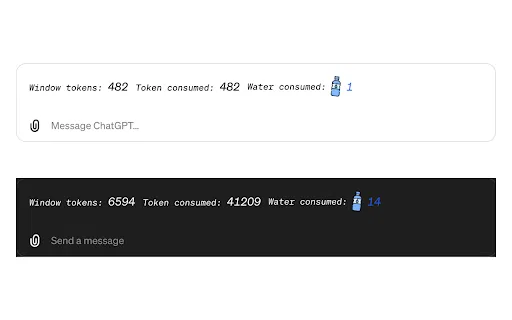
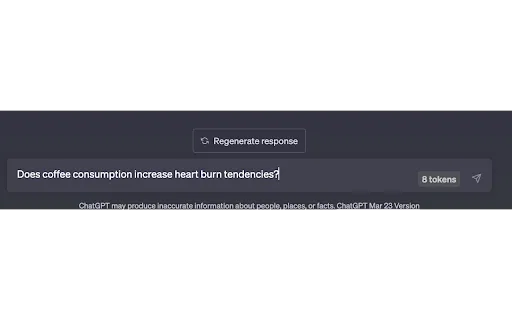
A running token tally updates as you type, so you always know how close you are to the limit.
Avoid the failed-submit, refresh, and retype cycle caused by overlong messages.
Overlays directly on the existing chat interface with no separate window or app.
Install from the Chrome Web Store and start using it immediately — no account or login.
The developer states that user data is not collected, sold, or used for unrelated purposes.
ChatGPT-Pro exists to solve one very specific friction point: long prompts that exceed the model's token budget fail on submit, forcing a page refresh and a rewrite. The extension overlays a running token count on the ChatGPT interface so you can see exactly how much room you have left as the message grows.
Because the count updates in real time, you can edit, shorten, or split a prompt before committing to it. That makes the tool useful for anyone pasting documents, code blocks, or long research excerpts into ChatGPT, where it is easy to blow past the limit without noticing.
The extension is deliberately minimal. There is no account, no dashboard, and no data collection per the developer's disclosure; it is a small workflow utility published by foil.dev. It was last updated in 2023, so treat it as a simple helper rather than a feature that tracks every later ChatGPT change.
Check the token cost of a pasted article or transcript before sending it into the chat.
Keep code blocks within the message budget so debugging questions submit on the first try.
See when a draft is getting too heavy and break it into a cleaner multi-message sequence.
Side-by-side telemetry comparison of competing AI tools in the same primary category
| Rank | AI Tool | Monthly Visits | MoM Growth | Direct traffic share | Pricing | Head-to-Head |
|---|---|---|---|---|---|---|
| ● | ChatGPT-Pro | 0 | — | — | Free | Current |
| 1 | ChatGPT Token Counter | 0 | — | — | Free | vs ChatGPT Token Counter |
| 2 | Prompt Token Counter | 8.33K | -29.9% | 40% direct | Free | vs Prompt Token Counter |
| 3 | Chatterclock | 0 | — | — | Free | vs Chatterclock |
| 4 | Sider | 2.64M | -10.6% | 64% direct | Freemium | vs Sider |
| 5 | ChatHub | 322.62K | -13.9% | 59% direct | Freemium | vs ChatHub |
| 6 | ChatGPT | 6.05B | +2.2% | 73% direct | Freemium | vs ChatGPT |
See how many tokens each ChatGPT conversation is using before it forgets
See how many tokens each ChatGPT conversation is using before it forgets
See exactly how many tokens your OpenAI prompt will use
See exactly how many tokens your OpenAI prompt will use

See exactly how many ChatGPT messages you have left before you hit your cap
See exactly how many ChatGPT messages you have left before you hit your cap

Your AI agent for the browser: chat, automate and create from one sidebar
Your AI agent for the browser: chat, automate and create from one sidebar

Compare GPT, Claude, and Gemini answers side by side in one chat
Compare GPT, Claude, and Gemini answers side by side in one chat

OpenAI's flagship multimodal assistant powered by GPT-6 and GPT-5.6 for reasoning, coding, and deep research.
OpenAI's flagship multimodal assistant powered by GPT-6 and GPT-5.6 for reasoning, coding, and deep research.

See the tokens and water your ChatGPT chats burn through
See the tokens and water your ChatGPT chats burn through

Keeps ChatGPT generating on its own while a live token counter shows how much context you've used
Keeps ChatGPT generating on its own while a live token counter shows how much context you've used
One AI sidebar for ChatGPT, Claude and Gemini across the web
One AI sidebar for ChatGPT, Claude and Gemini across the web

ChatGPT in your Mac menu bar, inline and everywhere
ChatGPT in your Mac menu bar, inline and everywhere

All-in-one AI assistant across web, browser, desktop and mobile
All-in-one AI assistant across web, browser, desktop and mobile
The best frontend for AI.