01
708.9K/mo
A prompt library and management layer for ChatGPT and other AI models
AI Prompt GeneratorEditorial score: 4.1Freemium, Paid26% direct

708.9K/mo
A prompt library and management layer for ChatGPT and other AI models
Freemium, Paid

Never lose a long ChatGPT prompt to a dropped connection
This is our editors' assessment out of 5, not an average of user ratings. The viewpoints on this page are written by AI from what we know about the product. They are not customer reviews.
According to OpenAITools.app telemetry verified on 2026-11-11, Save ChatGPT Input (chromewebstore.google.com) is an AI platform indexed under AI Productivity Tools generating 0 monthly visits with a month-over-month traffic delta of +0 (0.0%). Its primary geographic market is Global (— traffic share), and it operates on a Free pricing model. Top competing alternatives by monthly volume include AIPRM (708.87K visits/mo), Sider (2.64M visits/mo), Typing Mind (533.1K visits/mo).
Saved my long prompt three times today alone.
Total lifesaver when the server drops out.
Invisible until you need it, which is great.
Needs a tiny popup history log though.
AI-synthesized perspectives grounded in live site inspection, pricing structure, and category benchmarks — presented as editorial viewpoints rather than individual customer testimonials.
The last piece of content you attempted to send to ChatGPT is saved automatically, without you having to remember to do anything first.
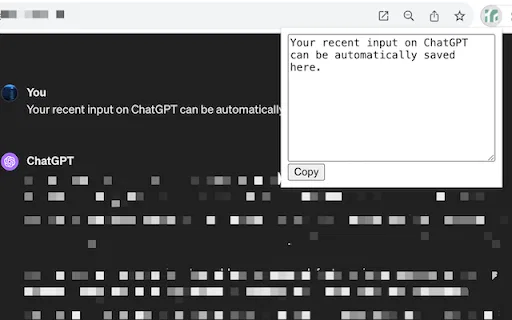
Click the extension icon to pop up a dialog containing your most recent sent content and copy it back in a single click.
No extra interface elements appear on the page; the extension only shows itself when you invoke it.
Saved content stays on your own computer with no upload to external servers, per the developer's stated policy.
Save ChatGPT Input addresses a narrow but genuinely annoying problem: you write a long, carefully worded prompt, hit send, the network hiccups, and the input field is emptied. The extension quietly records the most recent content you tried to send so it can be recovered rather than retyped.
Recovery is deliberately minimal. There is no permanent toolbar, no popup clutter and no configuration to work through — you click the extension icon only when something went wrong, and a dialog shows your last attempted message with a one-click copy so you can paste it straight back into the chat box and resend. Outside of those moments it stays invisible, which keeps the ChatGPT interface as clean as it was before.
Everything is stored locally in your browser. The developer states that no saved content is uploaded anywhere, which matters for people who paste sensitive drafts, code or work material into ChatGPT. It is a single-purpose utility rather than an archiving or export tool: it does not build a searchable history of conversations.
Recover a detailed multi-paragraph instruction after a failed send instead of reconstructing it from memory.
Retrieve a code snippet or error log that was lost when the request failed, and resend it without editing again.
Continue a session on mobile hotspots, hotel Wi-Fi or a VPN that intermittently drops requests to chat.openai.com.
Side-by-side telemetry comparison of competing AI tools in the same primary category
| Rank | AI Tool | Monthly Visits | MoM Growth | Direct traffic share | Pricing | Head-to-Head |
|---|---|---|---|---|---|---|
| ● | Save ChatGPT Input | 0 | — | — | Free | Current |
| 1 | AIPRM | 708.87K | -6.9% | 26% direct | Freemium, Paid | vs AIPRM |
| 2 | Sider | 2.64M | -10.6% | 64% direct | Freemium | vs Sider |
| 3 | Typing Mind | 533.1K | +12.9% | 68% direct | Paid | vs Typing Mind |
| 4 | Raycast | 710.58K | -24.5% | 49% direct | Freemium, Free Trial | vs Raycast |
| 5 | Auto Save ChatGPT | 0 | — | — | Freemium | vs Auto Save ChatGPT |
| 6 | AI Toolbox | 290.14K | +16.9% | 32% direct | Freemium | vs AI Toolbox |
A prompt library and management layer for ChatGPT and other AI models
A prompt library and management layer for ChatGPT and other AI models
AI sidebar and browser agent for reading, writing and research
AI sidebar and browser agent for reading, writing and research
The best frontend for AI.

An extendable launcher that puts your tools, AI, and automations one keystroke away
An extendable launcher that puts your tools, AI, and automations one keystroke away

Never lose a ChatGPT conversation again — automatic local backups with search and templates
Never lose a ChatGPT conversation again — automatic local backups with search and templates
Organize, search and export your AI chats across ChatGPT, Gemini, Claude and Grok
Organize, search and export your AI chats across ChatGPT, Gemini, Claude and Grok

All-in-one AI assistant across web, browser, desktop and mobile
All-in-one AI assistant across web, browser, desktop and mobile

ChatGPT in your Mac menu bar, inline and everywhere
ChatGPT in your Mac menu bar, inline and everywhere

Organize, store and paste your prompts anywhere with a shortcut
Organize, store and paste your prompts anywhere with a shortcut

Stop ChatGPT from dropping your session with automatic keep-alive pings
Stop ChatGPT from dropping your session with automatic keep-alive pings

Save, reuse and organize your AI prompts right inside the browser
Save, reuse and organize your AI prompts right inside the browser

Store multiple ChatGPT Custom Instructions and switch between them instantly
Store multiple ChatGPT Custom Instructions and switch between them instantly