01
30K/mo
Free ChatGPT-style text-to-speech and speech-to-text in your browser
AI Text-to-SpeechEditorial score: 4.0Free76% direct

30K/mo
Free ChatGPT-style text-to-speech and speech-to-text in your browser
Free

Voice chat with GPT: speak your prompts and hear the answers
This is our editors' assessment out of 5, not an average of user ratings. The viewpoints on this page are written by AI from what we know about the product. They are not customer reviews.
According to OpenAITools.app telemetry verified on 2026-11-11, Talk GPT (chromewebstore.google.com) is an AI platform indexed under AI Voice Assistants generating 0 monthly visits with a month-over-month traffic delta of +0 (0.0%). Its primary geographic market is Global (— traffic share), and it operates on a Free pricing model. Top competing alternatives by monthly volume include GPT Reader & Transcriber (30K visits/mo), Talking ChatGPT (0 visits/mo), ChatGPT - Lets talk (0 visits/mo).
Really handy for hands-free chatting while doing chores around the house.
Decent voice layer, but the speech-to-text occasionally cuts off mid-sentence.
Makes talking to the AI feel way more natural than typing everything out.
Free version is limited and settings reset randomly after updates.
AI-synthesized perspectives grounded in live site inspection, pricing structure, and category benchmarks — presented as editorial viewpoints rather than individual customer testimonials.
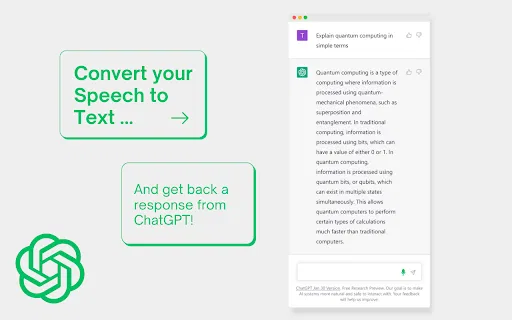
Dictate your questions and instructions instead of typing them, and have the transcript placed into the GPT prompt box.
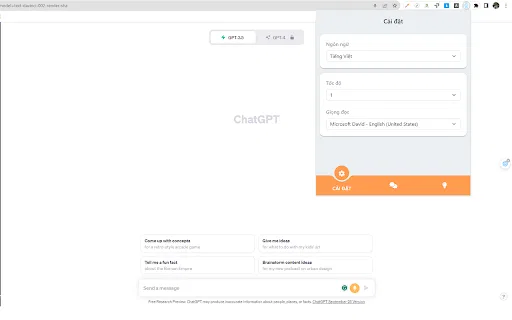
Listen to GPT's responses read aloud, with adjustable speaking speed and selectable voices for different proficiency levels.
Get better-phrased alternatives for what you said, so rough spoken input becomes a cleaner prompt.
Use GPT to build scripts and dialogue flows for practice sessions, interviews, or presentations.
Keeps exchanges on topic and conversational rather than drifting into long, hard-to-follow answers.
Ships as a small Chrome extension (about 200 KB) with a straightforward add-to-Chrome installation.
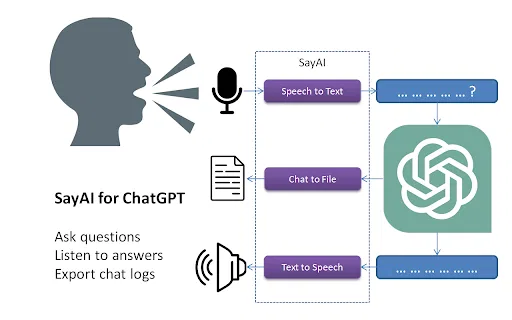
Talk GPT is a lightweight browser extension that changes how you interact with a GPT chat interface: instead of typing every message, you can talk. Your speech is converted into text and dropped into the prompt box, and the assistant's answers can be converted back into speech so you can listen rather than read. For long sessions this makes the tool feel closer to a spoken conversation than a text form.
The extension also goes beyond plain transcription. It suggests better-phrased versions of what you said, can draft conversational scripts with GPT, and is designed to keep dialogue focused and natural. Both the speaking rate and the voice used for playback are adjustable, which is useful for learners at different proficiency levels, for people who process audio better than text, and for anyone who wants to practise speaking in a target language.
Talk GPT is a free extension published by an individual developer on the Chrome Web Store. It is a third-party product, not an official OpenAI tool, and it works alongside the GPT web interface rather than replacing it. Because it has a small user base and infrequent release cadence, treat it as a handy convenience layer rather than a mission-critical workflow component.
Speak prompts aloud, hear natural replies at a comfortable speed, and use phrasing suggestions to correct awkward sentences in real time.
Dictate instead of typing and listen instead of reading, which helps when typing is slow, painful, or simply inconvenient.
Talk through an idea and let the extension shape it into a focused conversational script you can refine for video, podcast, or training material.
Enter questions by voice between other tasks and have answers read back, so you do not have to stop and stare at a chat window.
Side-by-side telemetry comparison of competing AI tools in the same primary category
| Rank | AI Tool | Monthly Visits | MoM Growth | Direct traffic share | Pricing | Head-to-Head |
|---|---|---|---|---|---|---|
| ● | Talk GPT | 0 | — | — | Free | Current |
| 1 | GPT Reader & Transcriber | 30K | -16% | 76% direct | Free | vs GPT Reader & Transcriber |
| 2 | Talking ChatGPT | 0 | — | — | Free | vs Talking ChatGPT |
| 3 | ChatGPT - Lets talk | 0 | — | — | Free | vs ChatGPT - Lets talk |
| 4 | Voice Master for ChatGPT (ChatGPT Voice Master) | 0 | — | — | Freemium | vs Voice Master for ChatGPT (ChatGPT Voice Master) |
| 5 | ChatGPT Voice Plus Game and Translation | 0 | — | — | Free | vs ChatGPT Voice Plus Game and Translation |
| 6 | SayAI | 0 | — | — | Free | vs SayAI |
Free ChatGPT-style text-to-speech and speech-to-text in your browser
Free ChatGPT-style text-to-speech and speech-to-text in your browser

Free / Open-sourceTalk to ChatGPT — speech in, spoken answers out

SpecialistVoice chat with ChatGPT using keyboard shortcuts and text-to-speech
SpecialistVoice chat with ChatGPT using keyboard shortcuts and text-to-speech

Natural speech input and read-aloud for ChatGPT, plus a handy sidebar
Natural speech input and read-aloud for ChatGPT, plus a handy sidebar

Talk to ChatGPT out loud, play voice games and translate on the fly
Talk to ChatGPT out loud, play voice games and translate on the fly
Talk to ChatGPT and hear its answers read aloud.

ChatGPT in your Mac menu bar, inline and everywhere
ChatGPT in your Mac menu bar, inline and everywhere

Talk to Claude.ai instead of typing — hands-free voice input in your browser
Talk to Claude.ai instead of typing — hands-free voice input in your browser

SpecialistTalk to ChatGPT, DeepSeek and other AI chatbots with your voice
SpecialistTalk to ChatGPT, DeepSeek and other AI chatbots with your voice

Talk to ChatGPT out loud with voice input and spoken replies
Talk to ChatGPT out loud with voice input and spoken replies

Speak naturally, get polished and structured text anywhere on your desktop
Speak naturally, get polished and structured text anywhere on your desktop

Read aloud webpages, PDFs, Kindle books and AI answers with synced highlighting
Read aloud webpages, PDFs, Kindle books and AI answers with synced highlighting