01
4.1K/mo
Voice control the web — dictate and navigate Chrome hands-free
AI Voice AssistantsEditorial score: 4.1Freemium+23.6%
4.1K/mo+23.6%
Voice control the web — dictate and navigate Chrome hands-free
Freemium

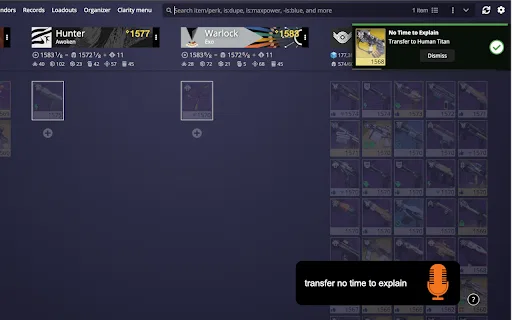
Transfer weapons and swap loadouts in Destiny 2 just by speaking
This is our editors' assessment out of 5, not an average of user ratings. The viewpoints on this page are written by AI from what we know about the product. They are not customer reviews.
According to OpenAITools.app telemetry verified on 2026-11-11, Voice DIM (chromewebstore.google.com) is an AI platform indexed under AI Voice Assistants generating 0 monthly visits with a month-over-month traffic delta of +0 (0.0%). Its primary geographic market is Global (— traffic share), and it operates on a Free pricing model. Top competing alternatives by monthly volume include LipSurf (4.07K visits/mo), OutSkill Ai (879 visits/mo), NetEase Bagoshuo (29.6K visits/mo).
Absolute game changer for Destiny raids when you need a heavy weapon swap instantly.
Occasionally drops a command if comms on Discord get too loud.
Works like absolute magic with DIM.
Setup took a minute to get used to.
AI-synthesized perspectives grounded in live site inspection, pricing structure, and category benchmarks — presented as editorial viewpoints rather than individual customer testimonials.
Listen on a hotkey or in Always Listening mode with a wake phrase so commands fire mid-encounter.
Move weapons and armor by name, by type and energy, or by required perks.
Equip a saved loadout, store items in the vault, or pull the character's max-power gear instantly.
Toggle farming mode to stop drops flooding the postmaster, and collect the postmaster by command.
Open the options page to remap every command to phrasing that works for your setup.
Voice DIM solves a specific Destiny 2 problem: you realise you need a different weapon in the middle of a raid encounter or a heated Crucible match, but alt-tabbing to Destiny Item Manager takes too long. The extension lets you simply say what you want and have DIM execute it within seconds while you stay in the action.
Activation is flexible. A global shortcut, Ctrl+Shift+0 by default, opens a listening window on demand; alternatively an Always Listening mode responds to a wake phrase, which ships as "okay ghost" and can be changed. Once listening, the extension parses commands such as transferring or equipping a weapon by name, by weapon type plus energy type, or with required perks; storing an item in the vault; equipping a loadout by name; starting or stopping Farming Mode to keep items out of the postmaster; equipping max-power gear; and collecting everything from the current character's postmaster.
All commands are configurable through the options page. The developer is transparent about current limitations, noting that loadouts whose names contain numbers tend to match poorly and that a few weapon names, such as the auto rifle Krait, are frequently misheard by the underlying speech recognition. The extension has a 5.0 rating from 13 reviews and around 777 users, and declares that it does not collect or sell user data.
Switch weapons or equip a loadout mid-encounter without alt-tabbing out of Destiny 2.
Equip specific perk rolls and max-power gear between Crucible matches using quick voice commands.
Toggle farming mode and collect the postmaster by voice while running repeated activities.
Side-by-side telemetry comparison of competing AI tools in the same primary category
| Rank | AI Tool | Monthly Visits | MoM Growth | Direct traffic share | Pricing | Head-to-Head |
|---|---|---|---|---|---|---|
| ● | Voice DIM | 0 | — | — | Free | Current |
| 1 | LipSurf | 4.07K | +23.6% | 39% direct | Freemium | vs LipSurf |
| 2 | OutSkill Ai | 879 | -44.1% | 40% direct | Free Trial, Paid | vs OutSkill Ai |
| 3 | NetEase Bagoshuo | 29.6K | -60.8% | 31% direct | Free | vs NetEase Bagoshuo |
| 4 | ChatGPT Voice Plus Game and Translation | 0 | — | — | Free | vs ChatGPT Voice Plus Game and Translation |
| 5 | Voice Control for Disney+ | 0 | — | — | Free | vs Voice Control for Disney+ |
| 6 | Voice Control for Netflix | 0 | — | — | Free | vs Voice Control for Netflix |
Voice control the web — dictate and navigate Chrome hands-free
Voice control the web — dictate and navigate Chrome hands-free

Control your desktop by voice, for work and for play
Control your desktop by voice, for work and for play

Speak naturally, get polished and structured text anywhere on your desktop
Speak naturally, get polished and structured text anywhere on your desktop

Talk to ChatGPT out loud, play voice games and translate on the fly
Talk to ChatGPT out loud, play voice games and translate on the fly

Control Disney+ playback with your voice instead of a keyboard or remote
Control Disney+ playback with your voice instead of a keyboard or remote

Watch Netflix hands-free with simple spoken playback commands
Watch Netflix hands-free with simple spoken playback commands
Voice-based AI English tutor and learning games for young children
Voice-based AI English tutor and learning games for young children

Talk to ChatGPT, DeepSeek and other AI chatbots with your voice
Talk to ChatGPT, DeepSeek and other AI chatbots with your voice

Talk to your coding agents and hear them talk back
Talk to your coding agents and hear them talk back

Natural speech input and read-aloud for ChatGPT, plus a handy sidebar
Natural speech input and read-aloud for ChatGPT, plus a handy sidebar

Browse the web with your voice - dictate, click, scroll and control Chrome hands-free
Browse the web with your voice - dictate, click, scroll and control Chrome hands-free

Speak your math out loud and get the answer instantly — free in your browser, with AI problem-solving on iPhone.
Speak your math out loud and get the answer instantly — free in your browser, with AI problem-solving on iPhone.