01
4.1editor score
Natural speech input and read-aloud for ChatGPT, plus a handy sidebar
AI Voice AssistantsFreemium

Natural speech input and read-aloud for ChatGPT, plus a handy sidebar
AI Voice AssistantsEditorial score: 4.1
Freemium

Hold to talk, release to send, and listen to ChatGPT reply

Marked as legacy wrapper due to 2023 last update and broken chrome APIs.
This is our editors' assessment out of 5, not an average of user ratings. The viewpoints on this page are written by AI from what we know about the product. They are not customer reviews.
According to OpenAITools.app telemetry verified on 2026-11-11, Voice-to-ChatGPT (chromewebstore.google.com) is an AI platform indexed under AI Voice Assistants generating 0 monthly visits with a month-over-month traffic delta of +0 (0.0%). Its primary geographic market is Global (— traffic share), and it operates on a Free pricing model. Top competing alternatives by monthly volume include Voice Master for ChatGPT (ChatGPT Voice Master) (0 visits/mo), GPT Reader & Transcriber (30K visits/mo), ChatGPT Voice Plus Game and Translation (0 visits/mo).
Utter wrapper junk abandoned in 2023.
Completely outdated interface that barely works now.
Just a flimsy wrapper over old Chrome APIs.
Stopped functioning properly months ago.
AI-synthesized perspectives grounded in live site inspection, pricing structure, and category benchmarks — presented as editorial viewpoints rather than individual customer testimonials.
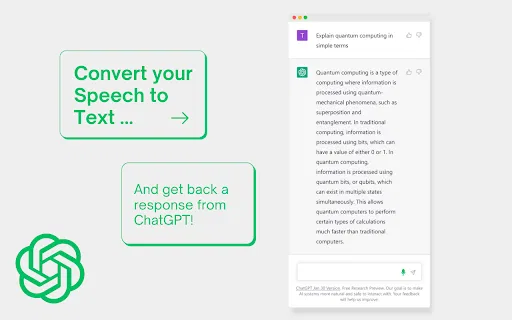
Press and hold the button to dictate your message, release it to send, and cancel or edit before submitting.
Both your prompt and ChatGPT's reply can be read aloud so you can use the chat hands-free.
A dedicated control halts the current voice output whenever you want it to stop.
Uses Chrome's own speech recognition and text-to-speech, so it covers the major languages those engines support.
A tiny extension with a minimal interface and no account or configuration required.
Voice-to-ChatGPT is a lightweight, free Chrome extension that adds a voice layer to the ChatGPT website. Its interaction model is deliberately simple: press and hold the 'Hold to Talk' button, speak your question, then release the button to send it. You can cancel or edit the transcribed text before it goes through if the recognition is not quite right.
The extension is built on Google Chrome's own speech recognition and text-to-speech engines, so it supports the major languages those engines cover rather than shipping its own voice models. Every question and answer can be spoken aloud, and there is also a stop control so the current voice output can be cut off.
Because it is very small and has no accounts, dashboards or server component, it behaves more like a bare-bones utility than a full voice assistant suite. The listing shows version 2.0.0, last updated in March 2023, and the developer credits earlier work from similar open-source projects as its inspiration.
Skip typing short prompts by holding the button, speaking, and letting the transcript be sent automatically.
Have answers read aloud so you can follow the conversation without reading long blocks of text on screen.
Speak your prompts while doing something else, using the hold-and-release gesture to control when messages are sent.
Side-by-side telemetry comparison of competing AI tools in the same primary category
| Rank | AI Tool | Monthly Visits | MoM Growth | Direct traffic share | Pricing | Head-to-Head |
|---|---|---|---|---|---|---|
| ● | Voice-to-ChatGPT | 0 | — | — | Free | Current |
| 1 | Voice Master for ChatGPT (ChatGPT Voice Master) | 0 | — | — | Freemium | vs Voice Master for ChatGPT (ChatGPT Voice Master) |
| 2 | GPT Reader & Transcriber | 30K | -16% | 76% direct | Free | vs GPT Reader & Transcriber |
| 3 | ChatGPT Voice Plus Game and Translation | 0 | — | — | Free | vs ChatGPT Voice Plus Game and Translation |
| 4 | Voice Control for ChatGPT (Voice Mode for AI Chatbots) | 0 | — | — | Free | vs Voice Control for ChatGPT (Voice Mode for AI Chatbots) |
| 5 | Talk GPT | 0 | — | — | Free | vs Talk GPT |
| 6 | ChatGPT - Lets talk | 0 | — | — | Free | vs ChatGPT - Lets talk |
Natural speech input and read-aloud for ChatGPT, plus a handy sidebar
Natural speech input and read-aloud for ChatGPT, plus a handy sidebar

Free ChatGPT-style text-to-speech and speech-to-text in your browser
Free ChatGPT-style text-to-speech and speech-to-text in your browser

Talk to ChatGPT out loud, play voice games and translate on the fly
Talk to ChatGPT out loud, play voice games and translate on the fly

Talk to ChatGPT, DeepSeek and other AI chatbots with your voice
Talk to ChatGPT, DeepSeek and other AI chatbots with your voice

Voice chat with GPT: speak your prompts and hear the answers
Voice chat with GPT: speak your prompts and hear the answers

Voice chat with ChatGPT using keyboard shortcuts and text-to-speech
Voice chat with ChatGPT using keyboard shortcuts and text-to-speech
Talk to ChatGPT out loud with voice input and spoken replies
Talk to ChatGPT out loud with voice input and spoken replies

ChatGPT in your Mac menu bar, inline and everywhere
ChatGPT in your Mac menu bar, inline and everywhere
Talk to ChatGPT and hear its answers read aloud.

Free / Open-sourceTalk to ChatGPT — speech in, spoken answers out

Speak naturally, get polished and structured text anywhere on your desktop
Speak naturally, get polished and structured text anywhere on your desktop

Voice-first ChatGPT assistant for Android phones and WearOS watches
Voice-first ChatGPT assistant for Android phones and WearOS watches