01
The AI-native spreadsheet that talks to your databases
AI SpreadsheetEditorial score: 4.4Freemium, Free Trial, Paid+13.2%

38.5K/mo+13.2%
The AI-native spreadsheet that talks to your databases
Freemium, Free Trial, Paid
Analyze spreadsheets and get answers with plain-language AI questions
This is our editors' assessment out of 5, not an average of user ratings. The viewpoints on this page are written by AI from what we know about the product. They are not customer reviews.
According to OpenAITools.app telemetry verified on 2026-11-11, AskExcel (askexcel.cc) is an AI platform indexed under Excel AI generating 0 monthly visits with a month-over-month traffic delta of +0 (0%). Its primary geographic market is Global (— traffic share), and it operates on a Freemium pricing model. Top competing alternatives by monthly volume include Sourcetable — AI spreadsheet & data analyst (38.5K visits/mo), Formula Bot (Better Analyst) (73.19K visits/mo), Cool Table ChatExcel (189.97K visits/mo).
Saved me hours on messy quarterly CSVs.
Hallucinated numbers on a custom pivot request.
Literally typed what I wanted and got the chart.
Free tier limits hit way too fast.
AI-synthesized perspectives grounded in live site inspection, pricing structure, and category benchmarks — presented as editorial viewpoints rather than individual customer testimonials.
Ask questions about your uploaded Excel or CSV data in plain language and receive direct written answers instead of writing formulas yourself.
Run correlation analysis, exploratory analysis, and KPI tracking to uncover patterns, trends, and anomalies across your datasets.
Pull specific details out of text-based fields and detect whether text is positive, negative, or neutral for faster qualitative review.
Generate visual summaries and downloadable charts alongside your results so findings are easy to share with others.
Start by uploading spreadsheets up to 10MB on the free tier, with larger 50MB processing available on paid plans.
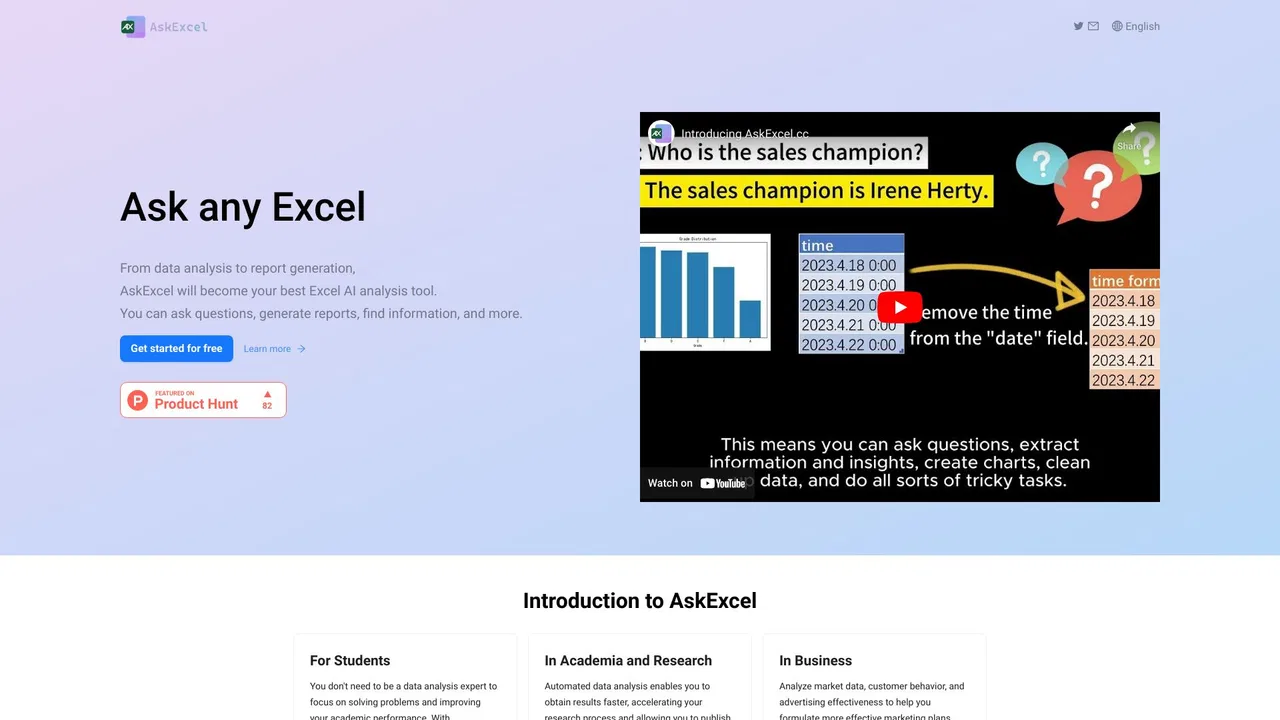
AskExcel positions itself as a low-effort way to work with spreadsheets. Instead of memorizing formulas or building pivot tables, you describe your goal in plain text — for example, asking which salesperson performed best — and AskExcel reads your uploaded file, performs the analysis, and returns a written answer alongside a chart. The product highlights natural-language processing, automated data analysis, and AI-powered text extraction as its core capabilities.
The feature set covers common analytics tasks: correlation analysis to surface relationships between variables, exploratory analysis to uncover trends and anomalies, KPI tracking over time, web and media trend analysis, sentiment analysis on text fields, and text extraction to pull specific details out of unstructured content. This makes it useful for analysts, marketers, and operations staff who want fast answers without deep spreadsheet expertise.
Pricing is freemium. A free tier provides core spreadsheet AI with CSV/XLSX uploads on a shared compute server and a 10MB file-size limit. Paid Plus plans (monthly and annual) add unlimited messages, advanced analysis, priority and dedicated compute, premium AI models, larger 50MB files, downloadable charts/files, and VIP support. Note that at the time of review, the site displayed a notice that all plans are sold out and that subscriptions and upgrades are temporarily unavailable, so the free tier is currently the practical entry point.
Upload a sales records file and ask which representative closed the most revenue; AskExcel returns the ranking and a chart instantly.
Feed in campaign or review data to measure web/media impact and gauge whether audience text skews positive, negative, or neutral.
Monitor key metrics across periods to spot performance shifts without building manual dashboards.
Ask questions in plain language to pull specific values or facts out of a spreadsheet or text column, no advanced Excel skills required.
Side-by-side telemetry comparison of competing AI tools in the same primary category
| Rank | AI Tool | Monthly Visits | MoM Growth | Direct traffic share | Pricing | Head-to-Head |
|---|---|---|---|---|---|---|
| ● | AskExcel | 0 | 0% | — | Freemium | Current |
| 1 | Sourcetable — AI spreadsheet & data analyst | 38.5K | +13.2% | 34% direct | Freemium, Free Trial, Paid | vs Sourcetable — AI spreadsheet & data analyst |
| 2 | Formula Bot (Better Analyst) | 73.19K | -35.3% | 41% direct | Freemium | vs Formula Bot (Better Analyst) |
| 3 | Cool Table ChatExcel | 189.97K | -22.1% | 60% direct | Freemium | vs Cool Table ChatExcel |
| 4 | Ajelix | 107.75K | -9.3% | 21% direct | Freemium | vs Ajelix |
| 5 | RowSpeak (Excelmatic) | 80.08K | +8.8% | 41% direct | Freemium, Free Trial | vs RowSpeak (Excelmatic) |
| 6 | GPTExcel | 120.86K | -14.8% | 31% direct | Freemium | vs GPTExcel |
The AI-native spreadsheet that talks to your databases
The AI-native spreadsheet that talks to your databases

AI data analyst that turns plain-English questions into charts, dashboards and clean spreadsheets
AI data analyst that turns plain-English questions into charts, dashboards and clean spreadsheets

Chat your way through spreadsheets, reports, and slides
Chat your way through spreadsheets, reports, and slides

Agentic AI workspace for spreadsheets, docs and business data

AI data analytics for the spreadsheets you already have
AI data analytics for the spreadsheets you already have
AI spreadsheet assistant for formulas, pivots and analysis
AI spreadsheet assistant for formulas, pivots and analysis

AI spreadsheet agent for Excel and Google Sheets

Turn plain-English instructions into Excel and Google Sheets formulas in seconds
Turn plain-English instructions into Excel and Google Sheets formulas in seconds

Excel and Google Sheets tutorials, free templates and an AI add-on in one place
Excel and Google Sheets tutorials, free templates and an AI add-on in one place

Describe it in plain English, get working Excel formulas and VBA instantly
Describe it in plain English, get working Excel formulas and VBA instantly

Describe it in plain English, get the working spreadsheet formula
Describe it in plain English, get the working spreadsheet formula