01
4.0editor score
Automatically clicks 'Continue Generating' so ChatGPT keeps writing
AI Productivity ToolsFree
Automatically clicks 'Continue Generating' so ChatGPT keeps writing
AI Productivity ToolsEditorial score: 4.0
Free

Stop babysitting ChatGPT — auto-click "Continue generating" for uninterrupted long answers

This is our editors' assessment out of 5, not an average of user ratings. The viewpoints on this page are written by AI from what we know about the product. They are not customer reviews.
According to OpenAITools.app telemetry verified on 2026-11-11, Auto Generate Clicker (chromewebstore.google.com) is an AI platform indexed under AI Chatbot generating 0 monthly visits with a month-over-month traffic delta of +0 (0.0%). Its primary geographic market is Global (— traffic share), and it operates on a Free pricing model. Top competing alternatives by monthly volume include Auto Continue ChatGPT (0 visits/mo), Sider (2.64M visits/mo), ChatGPT Auto Continue (0 visits/mo).
Absolute lifesaver for massive code generation runs.
Zero bloat, just clicks continue and regenerate.
Never have to babysit long prompts again.
Gets the job done without fuss.
AI-synthesized perspectives grounded in live site inspection, pricing structure, and category benchmarks — presented as editorial viewpoints rather than individual customer testimonials.
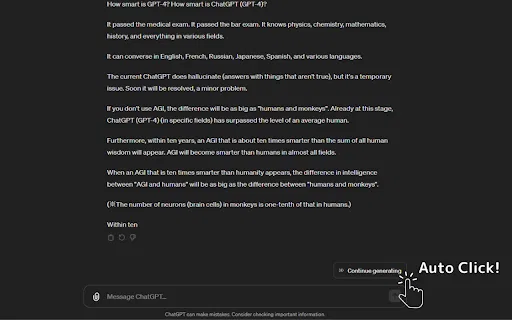
Detects when ChatGPT stops mid-answer and presses the continue button for you, letting long responses finish without supervision.
Also handles the "Regenerate" button, useful when you want a fresh attempt at a response without switching back to the tab.
Runs only on chat.openai.com and chatgpt.com using activeTab, scripting and host permissions — nothing outside those pages.
The developer declares that the extension does not collect, store or transmit personal data, and that data is never sold to third parties.
Under 40 KB installed, so it adds no meaningful load to the browser or to your ChatGPT sessions.
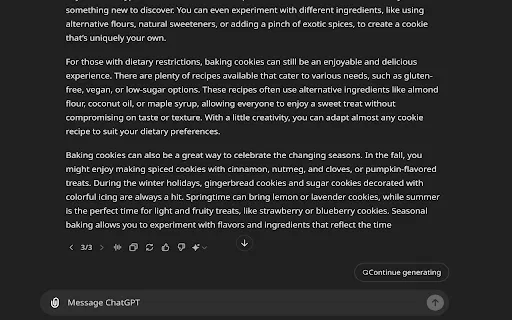
ChatGPT cuts long responses short and asks you to press "Continue generating" again and again. If you walk away, the answer simply stops. Auto Generate Clicker removes that manual step by watching the page and clicking the button for you, so extended outputs — long code blocks, detailed reports, step-by-step guides — keep flowing until they are finished.
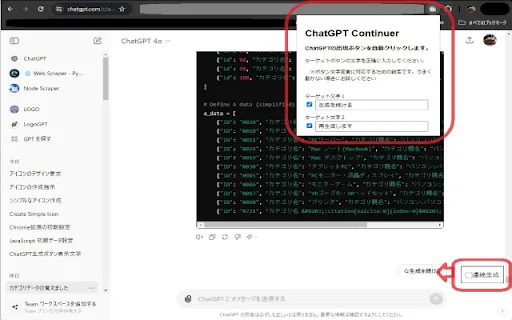
The extension is deliberately minimal. It requests the activeTab, scripting and host permissions needed to inject a click script into ChatGPT pages only, and the developer declares that the tool does not sell data to third parties or use it outside its core function. There is no account, no dashboard and no configuration to learn.
Auto Generate Clicker is a third-party utility and is not affiliated with or endorsed by OpenAI. Because ChatGPT's interface markup changes over time, functionality can break after major UI updates; the last published version (1.1) dates from July 2024, so check recent reviews before relying on it.
Kick off a request for a large code block or refactor and step away; the extension keeps clicking continue so the full listing is there when you return.
Generate extended outlines, summaries or translations in one go instead of re-prompting every time the response is truncated.
Let detailed explanations finish while you take notes on paper or read along, rather than clicking continue every few seconds.
Anyone who runs many long ChatGPT sessions a day can cut out hundreds of identical button presses with a single install.
Side-by-side telemetry comparison of competing AI tools in the same primary category
| Rank | AI Tool | Monthly Visits | MoM Growth | Direct traffic share | Pricing | Head-to-Head |
|---|---|---|---|---|---|---|
| ● | Auto Generate Clicker | 0 | — | — | Free | Current |
| 1 | Auto Continue ChatGPT | 0 | — | — | Free | vs Auto Continue ChatGPT |
| 2 | Sider | 2.64M | -10.6% | 64% direct | Freemium | vs Sider |
| 3 | ChatGPT Auto Continue | 0 | — | — | Free | vs ChatGPT Auto Continue |
| 4 | Auto "Continue Generating" | 0 | — | — | Free | vs Auto "Continue Generating" |
| 5 | ChatGPT Continuer | 0 | — | — | Free | vs ChatGPT Continuer |
| 6 | ChatGPT Auto-Continue & Token Counter | 0 | — | — | Free | vs ChatGPT Auto-Continue & Token Counter |
Automatically clicks 'Continue Generating' so ChatGPT keeps writing
Automatically clicks 'Continue Generating' so ChatGPT keeps writing

Your AI agent for the browser: chat, automate and create from one sidebar
Your AI agent for the browser: chat, automate and create from one sidebar

Automatically clicks ChatGPT's “Continue generating” button so long answers finish on their own
Automatically clicks ChatGPT's “Continue generating” button so long answers finish on their own

Automatically clicks ChatGPT's "Continue generating" button
Automatically clicks ChatGPT's "Continue generating" button

Automatically clicks "Continue generating" so ChatGPT never stops mid-answer
Automatically clicks "Continue generating" so ChatGPT never stops mid-answer

Keeps ChatGPT generating on its own while a live token counter shows how much context you've used
Keeps ChatGPT generating on its own while a live token counter shows how much context you've used

All-in-one AI assistant across web, browser, desktop and mobile
All-in-one AI assistant across web, browser, desktop and mobile
One browser agent that combines every major AI model with web automation

ChatGPT in your Mac menu bar, inline and everywhere
ChatGPT in your Mac menu bar, inline and everywhere

OpenAI's flagship multimodal assistant powered by GPT-6 and GPT-5.6 for reasoning, coding, and deep research.
OpenAI's flagship multimodal assistant powered by GPT-6 and GPT-5.6 for reasoning, coding, and deep research.

Auto-send 'continue' to ChatGPT so long answers finish hands-free
Auto-send 'continue' to ChatGPT so long answers finish hands-free

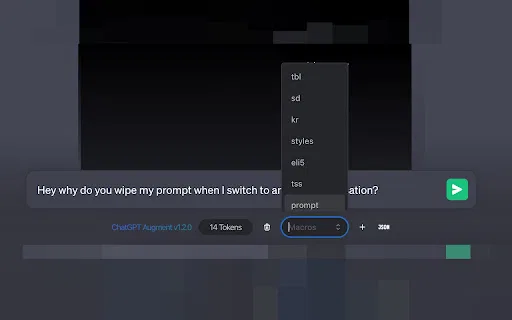
A free Chrome extension that adds auto-continue, macros, and live token counting to ChatGPT
A free Chrome extension that adds auto-continue, macros, and live token counting to ChatGPT