01
4.0editor score
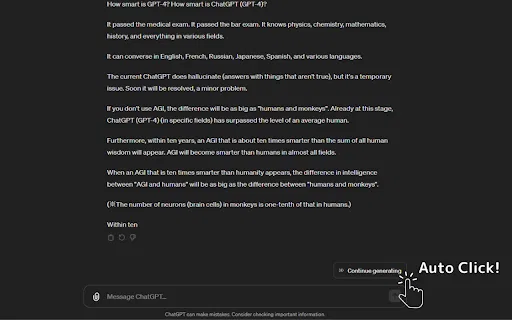
Automatically clicks 'Continue Generating' so ChatGPT keeps writing
AI Productivity ToolsFree
Automatically clicks 'Continue Generating' so ChatGPT keeps writing
AI Productivity ToolsEditorial score: 4.0
Free

Automatically clicks "Continue generating" so ChatGPT never stops mid-answer
This is our editors' assessment out of 5, not an average of user ratings. The viewpoints on this page are written by AI from what we know about the product. They are not customer reviews.
According to OpenAITools.app telemetry verified on 2026-11-11, ChatGPT Continuer (chromewebstore.google.com) is an AI platform indexed under AI Productivity Tools generating 0 monthly visits with a month-over-month traffic delta of +0 (0.0%). Its primary geographic market is Global (— traffic share), and it operates on a Free pricing model. Top competing alternatives by monthly volume include Auto Continue ChatGPT (0 visits/mo), Auto "Continue Generating" (0 visits/mo), ChatGPT Auto Continue (0 visits/mo).
Saves a few clicks on long answers.
Does exactly what it promises without bloat.
Wish it had a settings panel, but it works.
Handy for long prompts.
AI-synthesized perspectives grounded in live site inspection, pricing structure, and category benchmarks — presented as editorial viewpoints rather than individual customer testimonials.
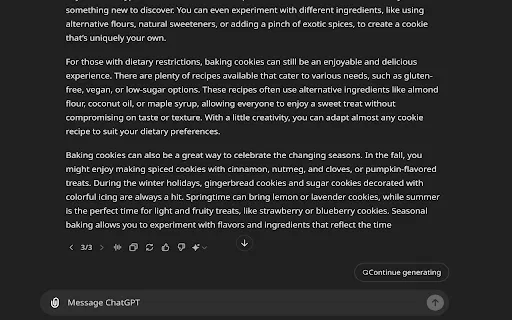
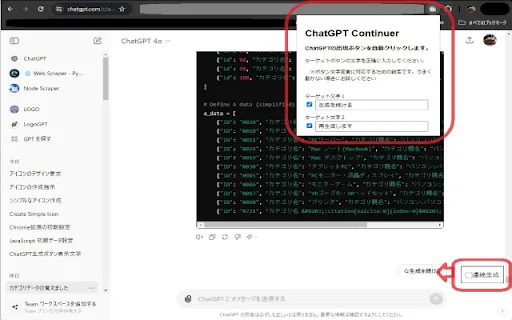
Detects the "Continue generating" button in the ChatGPT interface and clicks it without user input, so answers keep flowing.
Lets you look away or step away while a lengthy answer is generated, instead of watching for the next prompt to click.
Ships with localization for English, German, Spanish, French, Italian, Portuguese, Russian, Arabic, Persian, Hindi, Bengali, Thai, Vietnamese, Turkish, Filipino, Indonesian, Chinese (Simplified and Traditional), Japanese and Korean.
The developer states that no user data is collected or used, and declares nothing sold to third parties.
Does one thing only, with no added panels, accounts, or configuration to learn.
ChatGPT Continuer addresses one specific frustration with the ChatGPT web app: long answers frequently stop mid-sentence, and continuing them requires spotting the "Continue generating" button and clicking it — repeatedly, if the answer is very long. The extension automates that loop. When the button appears, it is clicked on your behalf, and ChatGPT keeps writing.
The extension is intentionally minimal rather than a general-purpose AI toolkit. It does not change how you prompt, add model choices, or store conversations; it simply removes a repetitive interaction from long generation sessions. That makes it most valuable in the exact situations where ChatGPT is most annoying — drafting multi-section documents, producing long code files, or working through extended reasoning where the reply would otherwise stall partway.
The publisher is listed as the owner of 2tom.jp with a clean record, and the extension ships with interface translations for 19 languages including English, German, Spanish, French, Portuguese, Japanese, Korean, Chinese (Simplified and Traditional), Arabic, Hindi, Russian and Vietnamese. It is free, roughly 57 KiB in size, small in user base (around 20 users), and version 1.0 was published in July 2024.
Generate multi-section articles, outlines or reports without clicking continue every few paragraphs.
Let long code snippets and refactors finish generating instead of getting a truncated function you have to re-prompt for.
Receive complete step-by-step explanations for study material without babysitting the Continue button.
Keep longer analytical answers flowing while you read along or take notes.
Side-by-side telemetry comparison of competing AI tools in the same primary category
| Rank | AI Tool | Monthly Visits | MoM Growth | Direct traffic share | Pricing | Head-to-Head |
|---|---|---|---|---|---|---|
| ● | ChatGPT Continuer | 0 | — | — | Free | Current |
| 1 | Auto Continue ChatGPT | 0 | — | — | Free | vs Auto Continue ChatGPT |
| 2 | Auto "Continue Generating" | 0 | — | — | Free | vs Auto "Continue Generating" |
| 3 | ChatGPT Auto Continue | 0 | — | — | Free | vs ChatGPT Auto Continue |
| 4 | ChatGPT Auto-Continue & Token Counter | 0 | — | — | Free | vs ChatGPT Auto-Continue & Token Counter |
| 5 | Sider | 2.64M | -10.6% | 64% direct | Freemium | vs Sider |
| 6 | Auto Generate Clicker | 0 | — | — | Free | vs Auto Generate Clicker |
Automatically clicks 'Continue Generating' so ChatGPT keeps writing
Automatically clicks 'Continue Generating' so ChatGPT keeps writing

Automatically clicks ChatGPT's "Continue generating" button
Automatically clicks ChatGPT's "Continue generating" button

Automatically clicks ChatGPT's “Continue generating” button so long answers finish on their own
Automatically clicks ChatGPT's “Continue generating” button so long answers finish on their own

Keeps ChatGPT generating on its own while a live token counter shows how much context you've used
Keeps ChatGPT generating on its own while a live token counter shows how much context you've used
AI sidebar and browser agent for reading, writing and research
AI sidebar and browser agent for reading, writing and research

Stop babysitting ChatGPT — auto-click "Continue generating" for uninterrupted long answers
Stop babysitting ChatGPT — auto-click "Continue generating" for uninterrupted long answers

Auto-send 'continue' to ChatGPT so long answers finish hands-free
Auto-send 'continue' to ChatGPT so long answers finish hands-free

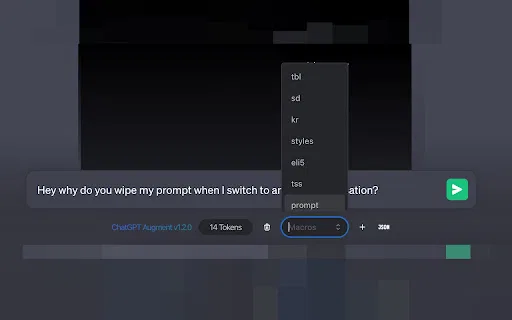
A free Chrome extension that adds auto-continue, macros, and live token counting to ChatGPT
A free Chrome extension that adds auto-continue, macros, and live token counting to ChatGPT
One-click copying for every ChatGPT answer

Stop ChatGPT from dropping your session with automatic keep-alive pings
Stop ChatGPT from dropping your session with automatic keep-alive pings

Model-switching and output-interrupt shortcuts for faster ChatGPT sessions
Model-switching and output-interrupt shortcuts for faster ChatGPT sessions

ChatGPT in your Mac menu bar, inline and everywhere
ChatGPT in your Mac menu bar, inline and everywhere