01
3.9editor score
See how many tokens each ChatGPT conversation is using before it forgets
AI MonitorFree

See how many tokens each ChatGPT conversation is using before it forgets
AI MonitorEditorial score: 3.9
Free

Count your ChatGPT prompts and nudge yourself to use AI more

This is our editors' assessment out of 5, not an average of user ratings. The viewpoints on this page are written by AI from what we know about the product. They are not customer reviews.
ChatGPT PromptCounter is an unmaintained legacy Chrome extension from late 2023 that tracks prompt counts and adds web page context buttons.
According to OpenAITools.app telemetry verified on 2026-11-11, ChatGPT PromptCounter (chromewebstore.google.com) is an AI platform indexed under AI Monitor generating 0 monthly visits with a month-over-month traffic delta of +0 (0.0%). Its primary geographic market is Global (— traffic share), and it operates on a Free pricing model. Top competing alternatives by monthly volume include ChatGPT Token Counter (0 visits/mo), AIPRM (708.87K visits/mo), Chatterclock (0 visits/mo).
Abandoned extension. Doesn't even track correctly on the latest ChatGPT UI.
Useless gimmick from 2023 that broke ages ago.
Total dead project with 17 users.
Doesn't work anymore. Don't bother installing.
AI-synthesized perspectives grounded in live site inspection, pricing structure, and category benchmarks — presented as editorial viewpoints rather than individual customer testimonials.
Runs silently in the background and tallies each prompt you submit to ChatGPT without any manual logging.
Lets you check how many prompts you sent on a given day so you can spot habits and set your own targets.
Places a smart button in the bottom-right corner that opens ChatGPT with the current page's context already attached.
Install it and it starts counting; there is no account to create and nothing to configure.
The extension is roughly 16 KB, so it adds no noticeable weight to the browser.
ChatGPT PromptCounter is a small, free Chrome extension built around a simple idea: most people under-use ChatGPT because they never notice how rarely they actually open it. The extension runs in the background and increments a counter each time you send a prompt, so you can look back at the day and see your real AI usage rather than guessing.
Alongside the counter, it adds a floating smart button to the bottom-right of the browser. Clicking it opens ChatGPT with the context of the page you are currently on, which makes it easy to summarise an article, ask about a concept or draft a reply without switching tabs and re-explaining yourself.
The extension weighs only around 16 KB, runs in English and is published by an individual developer. There is no account, no server-side dashboard and no paid plan on the listing. Because it reads your prompt activity, the store listing does note that it handles personally identifiable information, in line with its own privacy policy.
Watch your daily prompt count and deliberately raise it over time so asking AI becomes a routine part of how you learn.
Get an honest picture of how much you actually lean on ChatGPT versus assuming you use it all the time.
Use the corner button to send an article or report straight into ChatGPT with its context, instead of copy-pasting blocks of text.
Side-by-side telemetry comparison of competing AI tools in the same primary category
| Rank | AI Tool | Monthly Visits | MoM Growth | Direct traffic share | Pricing | Head-to-Head |
|---|---|---|---|---|---|---|
| ● | ChatGPT PromptCounter | 0 | — | — | Free | Current |
| 1 | ChatGPT Token Counter | 0 | — | — | Free | vs ChatGPT Token Counter |
| 2 | AIPRM | 708.87K | -6.9% | 26% direct | Freemium, Paid | vs AIPRM |
| 3 | Chatterclock | 0 | — | — | Free | vs Chatterclock |
| 4 | GPT4-Requests-Counter | 0 | — | — | Free | vs GPT4-Requests-Counter |
| 5 | gpt-counter | 0 | — | — | Free | vs gpt-counter |
| 6 | Prompt Token Counter | 8.33K | -29.9% | 40% direct | Free | vs Prompt Token Counter |
See how many tokens each ChatGPT conversation is using before it forgets
See how many tokens each ChatGPT conversation is using before it forgets

A prompt library and management layer for ChatGPT and other AI models
A prompt library and management layer for ChatGPT and other AI models

SpecialistSee exactly how many ChatGPT messages you have left before you hit your cap
SpecialistSee exactly how many ChatGPT messages you have left before you hit your cap

Free / Open-sourceTrack your ChatGPT message quota, timing, and usage patterns right in the browser
Free / Open-sourceTrack your ChatGPT message quota, timing, and usage patterns right in the browser

SpecialistA Chrome extension that limits and visualizes how much you rely on ChatGPT
SpecialistA Chrome extension that limits and visualizes how much you rely on ChatGPT
See exactly how many tokens your OpenAI prompt will use
See exactly how many tokens your OpenAI prompt will use

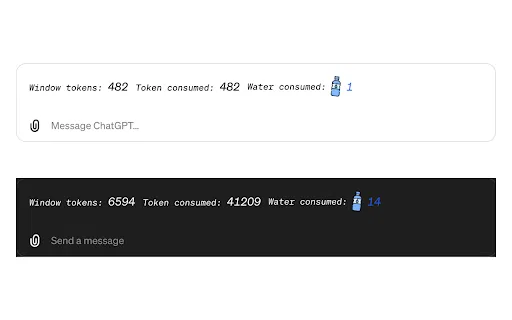
SpecialistSee the tokens and water your ChatGPT chats burn through
SpecialistSee the tokens and water your ChatGPT chats burn through

ChatGPT in your browser sidebar, without switching tabs
ChatGPT in your browser sidebar, without switching tabs

SpecialistKeeps ChatGPT generating on its own while a live token counter shows how much context you've used
SpecialistKeeps ChatGPT generating on its own while a live token counter shows how much context you've used

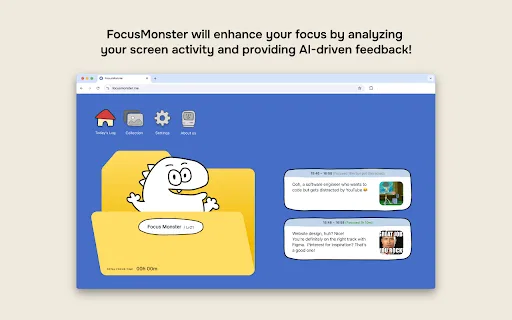
An AI-powered productivity tracker that turns your screen activity into personalized focus feedback
An AI-powered productivity tracker that turns your screen activity into personalized focus feedback
Your GPT-powered sidekick for every page, PDF and video
Your GPT-powered sidekick for every page, PDF and video
Organize, search and export your AI chats across ChatGPT, Gemini, Claude and Grok
Organize, search and export your AI chats across ChatGPT, Gemini, Claude and Grok