01
2.6M/mo
Your AI agent for the browser: chat, automate and create from one sidebar
AI ChatbotEditorial score: 4.5Freemium64% direct

2.6M/mo
Your AI agent for the browser: chat, automate and create from one sidebar
Freemium

Export your ChatGPT conversations as plain text files
This is our editors' assessment out of 5, not an average of user ratings. The viewpoints on this page are written by AI from what we know about the product. They are not customer reviews.
According to OpenAITools.app telemetry verified on 2026-11-11, ChatGPT Saver (chromewebstore.google.com) is an AI platform indexed under AI Chatbot generating 0 monthly visits with a month-over-month traffic delta of +0 (0.0%). Its primary geographic market is Global (— traffic share), and it operates on a Free pricing model. Top competing alternatives by monthly volume include Sider (2.64M visits/mo), Monica (4.51M visits/mo), Scribe GPT (0 visits/mo).
Gets the job done for backing up chats, but UI is barebones.
Great for saving long Q&As locally as txt.
Basic export, nothing fancy.
Missed half my messages on a huge thread.
AI-synthesized perspectives grounded in live site inspection, pricing structure, and category benchmarks — presented as editorial viewpoints rather than individual customer testimonials.
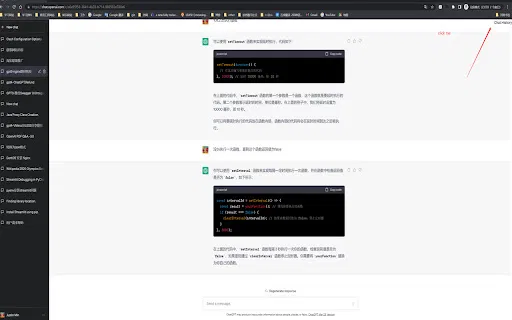
Export the entire OpenAI chat window history in one action.
Pick only the messages or records you want to keep before exporting.
Files are written as .txt so they open in any editor and stay readable.
The current conversation is not interrupted while the save runs.
Descriptions are provided in several languages including Chinese, English, Japanese, Italian and German.
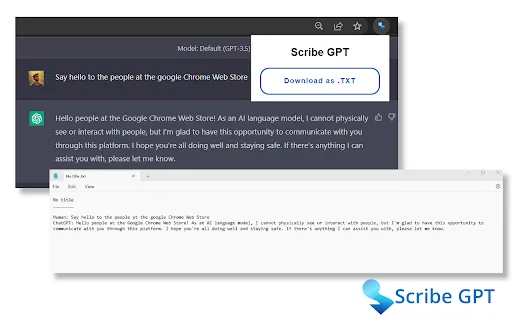
ChatGPT Saver is a small utility for anyone who wants a local copy of their AI conversations. While you are using the OpenAI chat window, the extension offers to save all of the window history or only the records you select, writing them out as a plain .txt file. It is built to do this without breaking the session you are in, so the conversation keeps flowing while the export happens.
The appeal is simplicity: no account, no cloud service, and no proprietary format — just text you can open, search, or paste anywhere. That makes it handy for archiving research threads, keeping a record of troubleshooting sessions with an AI assistant, or preserving useful drafts before clearing a conversation. The listing is multilingual, with descriptions in Chinese, English, Japanese, Italian and German, reflecting an international audience.
The extension is published by an individual developer, was last updated in May 2023, and has a modest user base. Note that the store listing flags that it offers in-app purchases, so certain capabilities may sit behind an optional paid item. It is a focused archiving helper rather than a full conversation manager.
Save a lengthy Q&A session as a text file you can search and cite later.
Store the exact steps and answers from a debugging conversation for future reference.
Export selected AI-generated paragraphs before clearing the chat window.
Side-by-side telemetry comparison of competing AI tools in the same primary category
| Rank | AI Tool | Monthly Visits | MoM Growth | Direct traffic share | Pricing | Head-to-Head |
|---|---|---|---|---|---|---|
| ● | ChatGPT Saver | 0 | — | — | Free | Current |
| 1 | Sider | 2.64M | -10.6% | 64% direct | Freemium | vs Sider |
| 2 | Monica | 4.51M | -11.3% | 55% direct | Freemium | vs Monica |
| 3 | Scribe GPT | 0 | — | — | Free | vs Scribe GPT |
| 4 | GPTSaver | 0 | — | — | Free | vs GPTSaver |
| 5 | ChatGPT Exporter - ChatGPT to PDF, MD, and more | 0 | — | — | Free | vs ChatGPT Exporter - ChatGPT to PDF, MD, and more |
| 6 | Chat4Data | 32.85K | -33.3% | 41% direct | Freemium | vs Chat4Data |
Your AI agent for the browser: chat, automate and create from one sidebar
Your AI agent for the browser: chat, automate and create from one sidebar

All-in-one AI assistant across web, browser, desktop and mobile
All-in-one AI assistant across web, browser, desktop and mobile

SpecialistOne-click export of your ChatGPT conversations to plain text files
SpecialistOne-click export of your ChatGPT conversations to plain text files

SpecialistExport complete ChatGPT conversations to a local archive in one click
SpecialistExport complete ChatGPT conversations to a local archive in one click

ChatGPT Exporter is a Chrome extension that turns your ChatGPT conversations into clean, shareable files, exporting them as PDF, Markdown, Text, CSV, or JSON with fine-grained control over what gets saved.
ChatGPT Exporter is a Chrome extension that turns your ChatGPT conversations into clean, shareable files, exporting them as PDF, Markdown, Text, CSV, or JSON with fine-grained control over what gets saved.
Scrape any website by chatting with it in plain English
Scrape any website by chatting with it in plain English

Upload big files to ChatGPT and archive your chats as PDF, TXT or Markdown
Upload big files to ChatGPT and archive your chats as PDF, TXT or Markdown

One-click export of ChatGPT chats to HTML or TXT
One-click export of ChatGPT chats to HTML or TXT
One-click AI assistant for browsing, writing and research
One-click AI assistant for browsing, writing and research
Organize, search and export your AI chats across ChatGPT, Gemini, Claude and Grok
Organize, search and export your AI chats across ChatGPT, Gemini, Claude and Grok

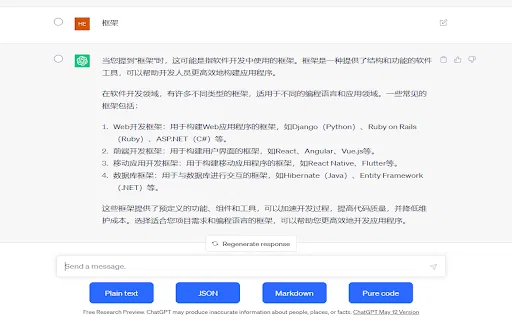
SpecialistCopy ChatGPT conversations as plain text, Markdown, JSON, or code
SpecialistCopy ChatGPT conversations as plain text, Markdown, JSON, or code

Chat with 30+ leading AI models in one clean, fast workspace
Chat with 30+ leading AI models in one clean, fast workspace