01
32.9K/mo
Scrape any website by chatting with it in plain English
AI Web ScrapingEditorial score: 3.9Freemium41% direct

32.9K/mo
Scrape any website by chatting with it in plain English
Freemium

One-click export of ChatGPT chats to HTML or TXT
This is our editors' assessment out of 5, not an average of user ratings. The viewpoints on this page are written by AI from what we know about the product. They are not customer reviews.
According to OpenAITools.app telemetry verified on 2026-11-11, ChatGPT Session Exporter (chromewebstore.google.com) is an AI platform indexed under AI Chatbot generating 0 monthly visits with a month-over-month traffic delta of +0 (0.0%). Its primary geographic market is Global (— traffic share), and it operates on a Free pricing model. Top competing alternatives by monthly volume include Chat4Data (32.85K visits/mo), Sider (2.64M visits/mo), ChatGPT Exporter - Save & Download Chats (0 visits/mo).
Finally a clean way to back up long research threads.
Saves HTML cleanly with all formatting intact.
Basic UI, but export works every time without fail.
Essential for keeping offline logs of coding sessions.
AI-synthesized perspectives grounded in live site inspection, pricing structure, and category benchmarks — presented as editorial viewpoints rather than individual customer testimonials.
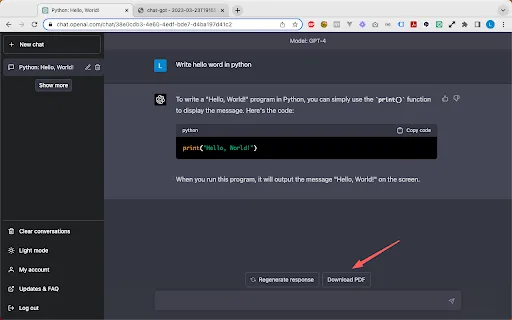
Save any open ChatGPT conversation to a formatted HTML file that opens in any browser.
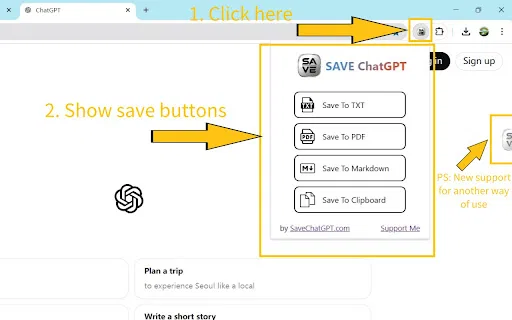
Generate a plain .txt version when you just want raw text without markup.
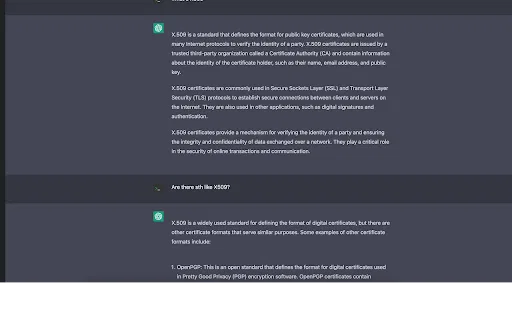
Code blocks, highlights and other style elements from the original conversation are kept in the exported file.
The extension focuses solely on exporting the current session, with no extra features or background processes.
Useful for keeping a personal record of long AI conversations or for sharing answers with colleagues.
ChatGPT Session Exporter addresses a routine annoyance: ChatGPT is great at producing long, useful conversations, but keeping a tidy copy of them outside the web app takes effort. This extension adds a one-click path from an open chat to a saved file. Depending on what you need, you get an HTML document that looks like the conversation did on screen, or a plain TXT file with the raw text.
The appeal is that the HTML export stays structured. Headings, code blocks and emphasis survive the transfer, so a saved session still reads like a conversation rather than a wall of unformatted text. That makes the output suitable for documentation, study notes or simply a personal archive you control.
The extension is deliberately narrow in scope. It has a very small install size, no analytics, and the developer declares no data collection. It was published in 2023 and has a modest but well-rated user base. Think of it as a simple utility that does one job and does not ask for anything beyond access to the page you are exporting.
Save a well-formatted HTML copy of the conversation for reading later without internet access.
Export a session as HTML and attach it to a ticket or email so teammates see the exact exchange.
Turn study sessions with ChatGPT into readable HTML notes you can organise and revisit.
Side-by-side telemetry comparison of competing AI tools in the same primary category
| Rank | AI Tool | Monthly Visits | MoM Growth | Direct traffic share | Pricing | Head-to-Head |
|---|---|---|---|---|---|---|
| ● | ChatGPT Session Exporter | 0 | — | — | Free | Current |
| 1 | Chat4Data | 32.85K | -33.3% | 41% direct | Freemium | vs Chat4Data |
| 2 | Sider | 2.64M | -10.6% | 64% direct | Freemium | vs Sider |
| 3 | ChatGPT Exporter - Save & Download Chats | 0 | — | — | Freemium | vs ChatGPT Exporter - Save & Download Chats |
| 4 | AI Toolbox | 290.14K | +16.9% | 32% direct | Freemium | vs AI Toolbox |
| 5 | Monica | 4.51M | -11.3% | 55% direct | Freemium | vs Monica |
| 6 | Merlin AI | 1.38M | +13.1% | 50% direct | Freemium | vs Merlin AI |
Scrape any website by chatting with it in plain English
Scrape any website by chatting with it in plain English

Your AI agent for the browser: chat, automate and create from one sidebar
Your AI agent for the browser: chat, automate and create from one sidebar

Export ChatGPT conversations to PDF, Markdown, TXT or JSON in one click
Export ChatGPT conversations to PDF, Markdown, TXT or JSON in one click
Organize, search and export your AI chats across ChatGPT, Gemini, Claude and Grok
Organize, search and export your AI chats across ChatGPT, Gemini, Claude and Grok

All-in-one AI assistant across web, browser, desktop and mobile
All-in-one AI assistant across web, browser, desktop and mobile
One-click AI assistant for browsing, writing and research
One-click AI assistant for browsing, writing and research

SpecialistSave any ChatGPT conversation as a clean, shareable PDF in one click
SpecialistSave any ChatGPT conversation as a clean, shareable PDF in one click

Export and share your ChatGPT chats as PDF, DOCX, TXT, MD, or PNG
Export and share your ChatGPT chats as PDF, DOCX, TXT, MD, or PNG

Save any ChatGPT conversation as a clean, shareable PDF in one click
Save any ChatGPT conversation as a clean, shareable PDF in one click

OpenAI's flagship multimodal assistant powered by GPT-6 and GPT-5.6 for reasoning, coding, and deep research.
OpenAI's flagship multimodal assistant powered by GPT-6 and GPT-5.6 for reasoning, coding, and deep research.

SpecialistSave any ChatGPT conversation as TXT, PDF, Markdown, or straight to your clipboard
SpecialistSave any ChatGPT conversation as TXT, PDF, Markdown, or straight to your clipboard

ChatGPT Exporter is a Chrome extension that turns your ChatGPT conversations into clean, shareable files, exporting them as PDF, Markdown, Text, CSV, or JSON with fine-grained control over what gets saved.
ChatGPT Exporter is a Chrome extension that turns your ChatGPT conversations into clean, shareable files, exporting them as PDF, Markdown, Text, CSV, or JSON with fine-grained control over what gets saved.