Organize, search and export your AI chats across ChatGPT, Gemini, Claude and Grok

ChatGPT Exporter is a Chrome extension that turns your ChatGPT conversations into clean, shareable files, exporting them as PDF, Markdown, Text, CSV, or JSON with fine-grained control over what gets saved.

This is our editors' assessment out of 5, not an average of user ratings. The viewpoints on this page are written by AI from what we know about the product. They are not customer reviews.
According to OpenAITools.app telemetry verified on 2026-11-11, ChatGPT Exporter - ChatGPT to PDF, MD, and more (chromewebstore.google.com) is an AI platform indexed under AI Document Extraction generating 0 monthly visits with a month-over-month traffic delta of +0 (0.0%). Its primary geographic market is Global (— traffic share), and it operates on a Free pricing model. Top competing alternatives by monthly volume include AI Toolbox (290.14K visits/mo), YourAIScroll (17.4K visits/mo), Chat4Data (32.85K visits/mo).
Absolute lifesaver for archiving long research threads.
PDF limits are annoying, but Markdown export is perfection.
Cleanest JSON export tool out there.
Crashed once on a massive 50k word chat.
AI-synthesized perspectives grounded in live site inspection, pricing structure, and category benchmarks — presented as editorial viewpoints rather than individual customer testimonials.
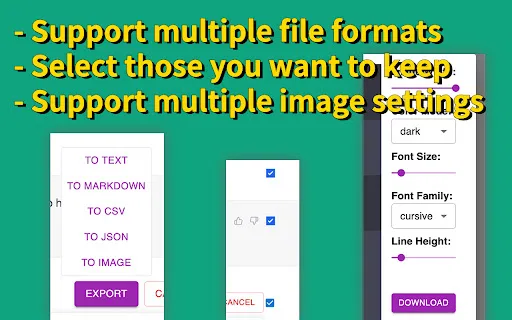
Save conversations as PDF, Markdown, Text, CSV, or JSON for different workflows.
Control filename, title, page size, orientation, margins, fonts, table of contents, timestamps, and page breaks.
Export only the responses you need, with Shift+click to select a range of messages.
Keeps code with syntax highlighting, tables, canvas, formulas, Deep Research citations, and reasoning steps.
Skip downloading entirely and copy formatted output straight to the clipboard.
ChatGPT Exporter is a browser extension built for one job: getting your ChatGPT conversations out of the chat window and into a file you can keep, share, or process. It exports chats as PDF, Markdown, Text, CSV, or JSON, and is one of the more established tools in this niche with a large user base and strong ratings.
Its PDF output is unusually configurable: you can set filenames, titles, page size, orientation, margins, font size and family, include a table of contents, toggle page numbers and timestamps, add user info, and enable per-prompt page breaks. It automatically handles CJK fonts for Chinese, Japanese, and Korean content. Beyond PDF, the extension preserves code blocks with syntax highlighting, tables, canvas content, and mathematical formulas, and it can extract Deep Research citations, Web Search sources, and reasoning steps from models like o1.
A standout feature is selective download: instead of forcing the whole chat, you can tick specific responses, using Shift+click to grab a range. Markdown, Text, JSON, and CSV exports are free and stay in your browser, while PDF export is processed temporarily on the developer's server and deleted immediately. The interface is available in 34 languages, and the extension also detects and exports group conversations with proper speaker roles.
Save customer logs, brainstorming, or project notes and share polished PDFs with colleagues.
Archive Q&A sessions and Deep Research reports with citations for later review.
Pull JSON or CSV for analysis and keep code snippets formatted with syntax highlighting.
Copy output directly into blogs, social posts, or writing apps, or use Markdown in a CMS.
Side-by-side telemetry comparison of competing AI tools in the same primary category
| Rank | AI Tool | Monthly Visits | MoM Growth | Direct traffic share | Pricing | Head-to-Head |
|---|---|---|---|---|---|---|
| ● | ChatGPT Exporter - ChatGPT to PDF, MD, and more | 0 | — | — | Free | Current |
| 1 | AI Toolbox | 290.14K | +16.9% | 32% direct | Freemium | vs AI Toolbox |
| 2 | YourAIScroll | 17.4K | +165.1% | 40% direct | Freemium, Free Trial | vs YourAIScroll |
| 3 | Chat4Data | 32.85K | -33.3% | 41% direct | Freemium | vs Chat4Data |
| 4 | ChatGPT PDF Saver | 0 | — | — | Free | vs ChatGPT PDF Saver |
| 5 | SAVE ChatGPT | 0 | — | — | Free | vs SAVE ChatGPT |
| 6 | ChatGPT Consolidator | 0 | — | — | Free | vs ChatGPT Consolidator |
Organize, search and export your AI chats across ChatGPT, Gemini, Claude and Grok
Export, back up, and organize your AI chat history in any format
Scrape any website by chatting with it in plain English

Save any ChatGPT conversation as a clean, shareable PDF in one click

SpecialistSave any ChatGPT conversation as TXT, PDF, Markdown, or straight to your clipboard

Merge, summarize and export your ChatGPT conversations

Upload big files to ChatGPT and archive your chats as PDF, TXT or Markdown

One-click PDF, Markdown and text export for your Claude.ai conversations

One-click export of ChatGPT chats to HTML or TXT

SpecialistSave any ChatGPT conversation as a clean, shareable PDF in one click

Export ChatGPT conversations to PDF, Markdown, TXT or JSON in one click

SpecialistOne-click export of your ChatGPT conversations to plain text files