01
4.2editor score
One-click PDF, Markdown and text export for your Claude.ai conversations
AI Documents GeneratorFree

One-click PDF, Markdown and text export for your Claude.ai conversations
AI Documents GeneratorEditorial score: 4.2
Free

Save any ChatGPT conversation as TXT, PDF, Markdown, or straight to your clipboard
This is our editors' assessment out of 5, not an average of user ratings. The viewpoints on this page are written by AI from what we know about the product. They are not customer reviews.
According to OpenAITools.app telemetry verified on 2026-11-11, SAVE ChatGPT (chromewebstore.google.com) is an AI platform indexed under AI Documents Generator generating 0 monthly visits with a month-over-month traffic delta of +0 (0.0%). Its primary geographic market is Global (— traffic share), and it operates on a Free pricing model. Top competing alternatives by monthly volume include ClaudePDF - Turn Claude Chats into PDFs (0 visits/mo), ChatGPT PDF Saver (0 visits/mo), ChagtGPT Exporter (0 visits/mo).
Saves me from endless copy-pasting when archiving code snippets.
Markdown export is super clean. Exactly what I needed.
Works well on long threads, though PDF formatting can sometimes break slightly.
Lifesaver.
AI-synthesized perspectives grounded in live site inspection, pricing structure, and category benchmarks — presented as editorial viewpoints rather than individual customer testimonials.
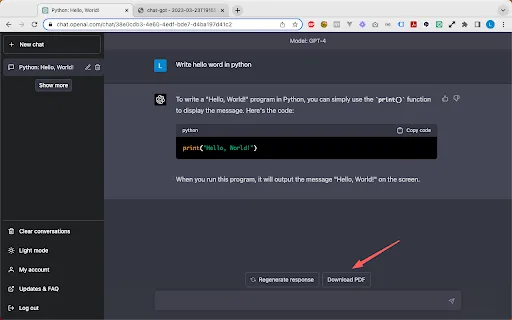
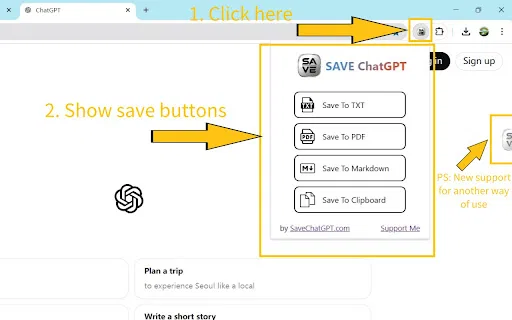
Choose between TXT, PDF, and Markdown files so the export matches how you plan to store or share the conversation.
Click the toolbar icon and the current conversation is captured, without selecting text or reformatting anything by hand.
A semi-hidden floating icon on the ChatGPT page keeps the save button within reach while you keep chatting.
Copy the whole conversation straight to your clipboard when you want to paste it into an email, doc, or notes app right away.
SAVE ChatGPT is a lightweight Chrome extension that solves a very practical problem: ChatGPT conversations live inside a browser tab, and getting them out in a usable file normally means a lot of manual selecting and copying. The extension adds a save control to the ChatGPT page so the current conversation can be captured as a TXT, PDF, or Markdown file, or copied to the clipboard, in a single action.,Its design is deliberately simple. There is a toolbar icon you can click at any time, plus a semi-hidden floating icon positioned to the right of the chat interface so the save action stays accessible while you work. Because the extension does not take over the page or interrupt the thread, you can export mid-conversation and keep typing afterwards. The listing notes that the author has continued to patch it as ChatGPT's interface has changed, with the most recent updates fixing incomplete Markdown exports and tab click behaviour.,The product is aimed at people who treat ChatGPT output as material worth keeping: students filing Q&A notes, writers storing drafts, or anyone who wants a shareable PDF of a discussion. The listing reports a sizeable user base, support for seventeen interface languages, and a developer declaration that no user data is collected or used, which keeps the focus on local file export rather than cloud storage of your chats.
Turn a finished Q&A session into a clean PDF or Markdown file so it can be filed, cited, or reviewed later.
Grab an entire thread in one click and paste it into a document or message, avoiding manual selection of long replies.
Export a discussion into a file you control on your own computer rather than relying on the chat history inside the browser.
Side-by-side telemetry comparison of competing AI tools in the same primary category
| Rank | AI Tool | Monthly Visits | MoM Growth | Direct traffic share | Pricing | Head-to-Head |
|---|---|---|---|---|---|---|
| ● | SAVE ChatGPT | 0 | — | — | Free | Current |
| 1 | ClaudePDF - Turn Claude Chats into PDFs | 0 | — | — | Free | vs ClaudePDF - Turn Claude Chats into PDFs |
| 2 | ChatGPT PDF Saver | 0 | — | — | Free | vs ChatGPT PDF Saver |
| 3 | ChagtGPT Exporter | 0 | — | — | Free | vs ChagtGPT Exporter |
| 4 | Export GPT & Gemini | 0 | — | — | Free | vs Export GPT & Gemini |
| 5 | ChatGPT Exporter - Save & Download Chats | 0 | — | — | Freemium | vs ChatGPT Exporter - Save & Download Chats |
| 6 | Chat-GPT PDF | 0 | — | — | Free | vs Chat-GPT PDF |
One-click PDF, Markdown and text export for your Claude.ai conversations
One-click PDF, Markdown and text export for your Claude.ai conversations

Save any ChatGPT conversation as a clean, shareable PDF in one click
Save any ChatGPT conversation as a clean, shareable PDF in one click

Save any ChatGPT conversation as TXT, PNG, Markdown or PDF with one click from the chat page.
Save any ChatGPT conversation as TXT, PNG, Markdown or PDF with one click from the chat page.

Save ChatGPT and Gemini chats as clean PDFs or interactive HTML
Save ChatGPT and Gemini chats as clean PDFs or interactive HTML

Export ChatGPT conversations to PDF, Markdown, TXT or JSON in one click
Export ChatGPT conversations to PDF, Markdown, TXT or JSON in one click

Save any ChatGPT conversation as a clean, shareable PDF in one click
Save any ChatGPT conversation as a clean, shareable PDF in one click

Export and share your ChatGPT chats as PDF, DOCX, TXT, MD, or PNG
Export and share your ChatGPT chats as PDF, DOCX, TXT, MD, or PNG
Chat with any PDF and get cited answers instantly

One-click export of ChatGPT chats to HTML or TXT
One-click export of ChatGPT chats to HTML or TXT

ChatGPT Exporter is a Chrome extension that turns your ChatGPT conversations into clean, shareable files, exporting them as PDF, Markdown, Text, CSV, or JSON with fine-grained control over what gets saved.
ChatGPT Exporter is a Chrome extension that turns your ChatGPT conversations into clean, shareable files, exporting them as PDF, Markdown, Text, CSV, or JSON with fine-grained control over what gets saved.
Chat with any PDF, video, or website and get cited answers in seconds
Organize, search and export your AI chats across ChatGPT, Gemini, Claude and Grok
Organize, search and export your AI chats across ChatGPT, Gemini, Claude and Grok