Free / Open-sourceExport ChatGPT, Grok and Gemini chats to clean Markdown, Typora-ready

Export ChatGPT conversations to clean Markdown with tables, code and LaTeX intact

This is our editors' assessment out of 5, not an average of user ratings. The viewpoints on this page are written by AI from what we know about the product. They are not customer reviews.
According to OpenAITools.app telemetry verified on 2026-11-11, ChatGPT to Markdown Pro - Code/LaTeX/Table (chromewebstore.google.com) is an AI platform indexed under AI Documents Generator generating 0 monthly visits with a month-over-month traffic delta of +0 (0.0%). Its primary geographic market is Global (— traffic share), and it operates on a Free pricing model. Top competing alternatives by monthly volume include ChatGPT to MarkDown plus (0 visits/mo), ClaudePDF - Turn Claude Chats into PDFs (0 visits/mo), AI Toolbox (290.14K visits/mo).
Absolute lifesaver for dumping chat threads straight into Obsidian without mangling LaTeX or code blocks.
Saves so much copy pasting time.
Clean Markdown export.
Works reliably on large threads.
AI-synthesized perspectives grounded in live site inspection, pricing structure, and category benchmarks — presented as editorial viewpoints rather than individual customer testimonials.
Click the extension icon on an open ChatGPT conversation and the entire dialogue is converted to Markdown without any manual selection or copy-paste.
Fenced code blocks keep their language tags, math notation is preserved as LaTeX, and tables are rebuilt as proper Markdown tables rather than flattened text.
Output is tuned for Obsidian, Notion, Typora and similar tools, with speaker turns mapped to H1 headings so documents stay navigable.
A popup lets you control whether the export button appears directly on the ChatGPT page, so the interface stays clean if you prefer the toolbar icon.
The plugin ships localized UI strings including English, Chinese (Simplified and Traditional), Japanese, Korean, Spanish, French, German, Portuguese, Russian, Turkish, Italian, Vietnamese and Indonesian.
ChatGPT to Markdown Pro targets a very specific annoyance: ChatGPT has no native "save as Markdown" button, so people who keep notes in Obsidian, Notion or a Git repository end up copying answers block by block. The extension adds one-click export on chat.openai.com, then formats the result as standard Markdown so it drops straight into whatever tooling you already use.
Its main selling point is fidelity on the messy parts of a conversation. Tables become real Markdown tables, math expressions survive as LaTeX, and fenced code blocks keep their language hints so syntax highlighting still works downstream. Speaker labels are mapped to headings — user turns and ChatGPT turns each get their own H1-style structure. The developer also ships a popup that shows the export button on the page and a feedback loop for blank-output bugs.
The extension is distributed through the Chrome Web Store, lists 15 interface languages, and declares that it does not collect or sell user data. It is free, has no account system and no paid tier, and requires you to already be signed in to ChatGPT for the export to work.
Save long research or brainstorming threads as Markdown files that link cleanly into an Obsidian vault, keeping headings, lists and code intact.
Export conversations full of code blocks with syntax hints preserved so the answer stays readable when committed alongside a repo.
Convert math-heavy explanations into Markdown where LaTeX survives, then revise them in any editor that renders formulas.
Pull a long ChatGPT draft into Notion or a CMS as structured Markdown instead of retyping paragraphs and tables.
Side-by-side telemetry comparison of competing AI tools in the same primary category
| Rank | AI Tool | Monthly Visits | MoM Growth | Direct traffic share | Pricing | Head-to-Head |
|---|---|---|---|---|---|---|
| ● | ChatGPT to Markdown Pro - Code/LaTeX/Table | 0 | — | — | Free | Current |
| 1 | ChatGPT to MarkDown plus | 0 | — | — | Free | vs ChatGPT to MarkDown plus |
| 2 | ClaudePDF - Turn Claude Chats into PDFs | 0 | — | — | Free | vs ClaudePDF - Turn Claude Chats into PDFs |
| 3 | AI Toolbox | 290.14K | +16.9% | 32% direct | Freemium | vs AI Toolbox |
| 4 | ChatGPT PDF Saver | 0 | — | — | Free | vs ChatGPT PDF Saver |
| 5 | Sider | 2.64M | -10.6% | 64% direct | Freemium | vs Sider |
| 6 | Chat4Data | 32.85K | -33.3% | 41% direct | Freemium | vs Chat4Data |

Free / Open-sourceExport ChatGPT, Grok and Gemini chats to clean Markdown, Typora-ready

One-click PDF, Markdown and text export for your Claude.ai conversations
Organize, search and export your AI chats across ChatGPT, Gemini, Claude and Grok

Save any ChatGPT conversation as a clean, shareable PDF in one click
AI sidebar and browser agent for reading, writing and research
Scrape any website by chatting with it in plain English

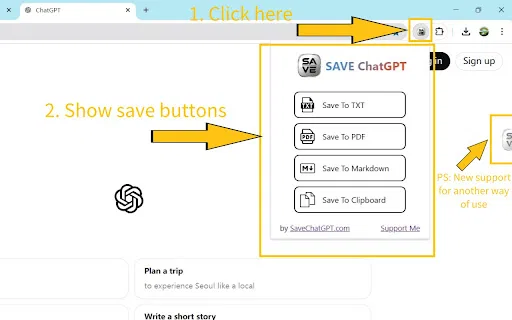
SpecialistSave any ChatGPT conversation as TXT, PDF, Markdown, or straight to your clipboard

ChatGPT/文心一言 To 语雀 is a Chrome extension that turns your AI conversations into durable, shareable documents. It exports ChatGPT chats to PDF, PNG, JSON or Markdown, copies content straight to the clipboard, and pushes both ChatGPT and Baidu Yiyan (文心一言) sessions into Yuque (语雀) knowledge base with a single click.

Export and share your ChatGPT chats as PDF, DOCX, TXT, MD, or PNG
One privacy-first AI client for GPT, Claude, Gemini and more

Export ChatGPT conversations into your Obsidian vault as Markdown notes

Export ChatGPT conversations to PDF, Markdown, TXT or JSON in one click