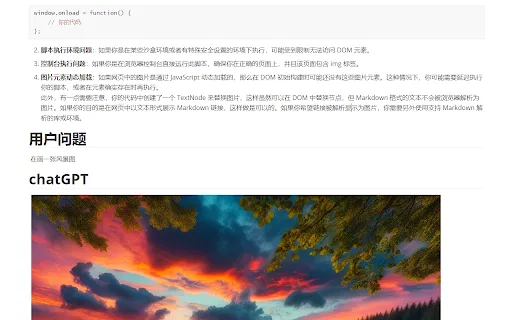
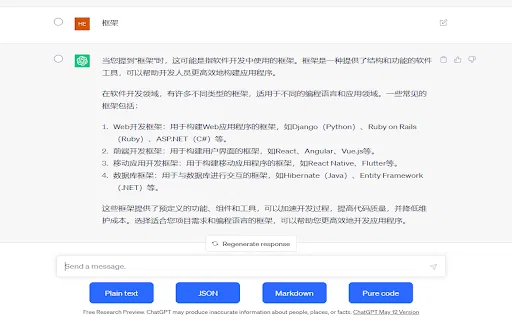
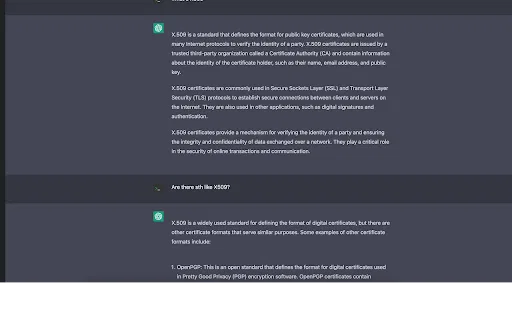
Export ChatGPT conversations to clean Markdown with tables, code and LaTeX intact

Export ChatGPT, Grok and Gemini chats to clean Markdown, Typora-ready

This is our editors' assessment out of 5, not an average of user ratings. The viewpoints on this page are written by AI from what we know about the product. They are not customer reviews.
According to OpenAITools.app telemetry verified on 2026-11-11, ChatGPT to MarkDown plus (chromewebstore.google.com) is an AI platform indexed under AI Chatbot generating 0 monthly visits with a month-over-month traffic delta of +0 (0.0%). Its primary geographic market is Global (— traffic share), and it operates on a Free pricing model. Top competing alternatives by monthly volume include ChatGPT to Markdown Pro - Code/LaTeX/Table (0 visits/mo), Monica (4.51M visits/mo), ChatGPT (6.05B visits/mo).
Lifesaver for dumping research straight into Typora without formatting headaches.
Clean markdown output every single time.
Fast!
Had one glitch with code blocks once.
AI-synthesized perspectives grounded in live site inspection, pricing structure, and category benchmarks — presented as editorial viewpoints rather than individual customer testimonials.
Works across ChatGPT, Grok and Gemini, so you can standardize exports from several assistants in one format.
Code blocks, mathematical formulas, links and formatted text are preserved rather than flattened into plain text.
Save a .md file directly to disk, or copy the Markdown to your clipboard with a single click from the popup.
The generated file is tuned so it opens correctly and renders cleanly in Typora and other Markdown editors.
The project is MIT-licensed on GitHub, and you can switch the on-page export button on or off from the extension popup.
ChatGPT to MarkDown plus exists for people who want their AI conversations as portable text files rather than trapped inside a chat window. It adds an export button to supported assistant websites and writes the conversation out as standard Markdown, which is what most note-taking, documentation and code tools expect.
The extension is deliberately narrow in scope: multi-platform capture, faithful content preservation and a clean file. It preserves code blocks, math formulas, links and formatted text, and the output is specifically checked against Typora so tables, headings and lists don't break when the file opens. A popup lets you hide or show the in-page button, and you can either download the .md file or copy the Markdown straight to the clipboard.
ChatGPT to MarkDown plus is an independent developer project released under the MIT license, with its source on GitHub and distribution through the Chrome Web Store. It is free to install, has no account system, and is not an official product of OpenAI, xAI or Google.
Pull a Gemini or Grok thread into a shared format so notes from all your assistants live in the same Markdown-based system.
Save a conversation full of code snippets and formulas as a .md file that keeps its fenced blocks and inline math intact.
Grab a long explanation as Markdown, download it, and open it in Typora for a clean reading and editing experience.
Copy exported Markdown straight to the clipboard and paste it into a wiki, issue tracker or CMS without retyping.
Side-by-side telemetry comparison of competing AI tools in the same primary category
| Rank | AI Tool | Monthly Visits | MoM Growth | Direct traffic share | Pricing | Head-to-Head |
|---|---|---|---|---|---|---|
| ● | ChatGPT to MarkDown plus | 0 | — | — | Free | Current |
| 1 | ChatGPT to Markdown Pro - Code/LaTeX/Table | 0 | — | — | Free | vs ChatGPT to Markdown Pro - Code/LaTeX/Table |
| 2 | Monica | 4.51M | -11.3% | 55% direct | Freemium | vs Monica |
| 3 | ChatGPT | 6.05B | +2.2% | 73% direct | Freemium | vs ChatGPT |
| 4 | Sider | 2.64M | -10.6% | 64% direct | Freemium | vs Sider |
| 5 | Chatbox | 567.17K | -16.1% | 58% direct | Freemium | vs Chatbox |
| 6 | ChatClip | 0 | — | — | Free | vs ChatClip |

Export ChatGPT conversations to clean Markdown with tables, code and LaTeX intact

All-in-one AI assistant across web, browser, desktop and mobile

OpenAI's flagship multimodal assistant powered by GPT-6 and GPT-5.6 for reasoning, coding, and deep research.
AI sidebar and browser agent for reading, writing and research
One privacy-first AI client for GPT, Claude, Gemini and more

SpecialistCopy ChatGPT conversations as plain text, Markdown, JSON, or code
The best frontend for AI.
Organize, search and export your AI chats across ChatGPT, Gemini, Claude and Grok

Export ChatGPT conversations to PDF, Markdown, TXT or JSON in one click
One-click AI assistant for browsing, writing and research

Compare GPT, Claude, and Gemini answers side by side in one chat

One-click export of ChatGPT chats to HTML or TXT